
What to put on an invoice
In the US there’s no single required invoice format, but these are the details customers, banks and tax preparers expect to see. This generator has a box for each one.
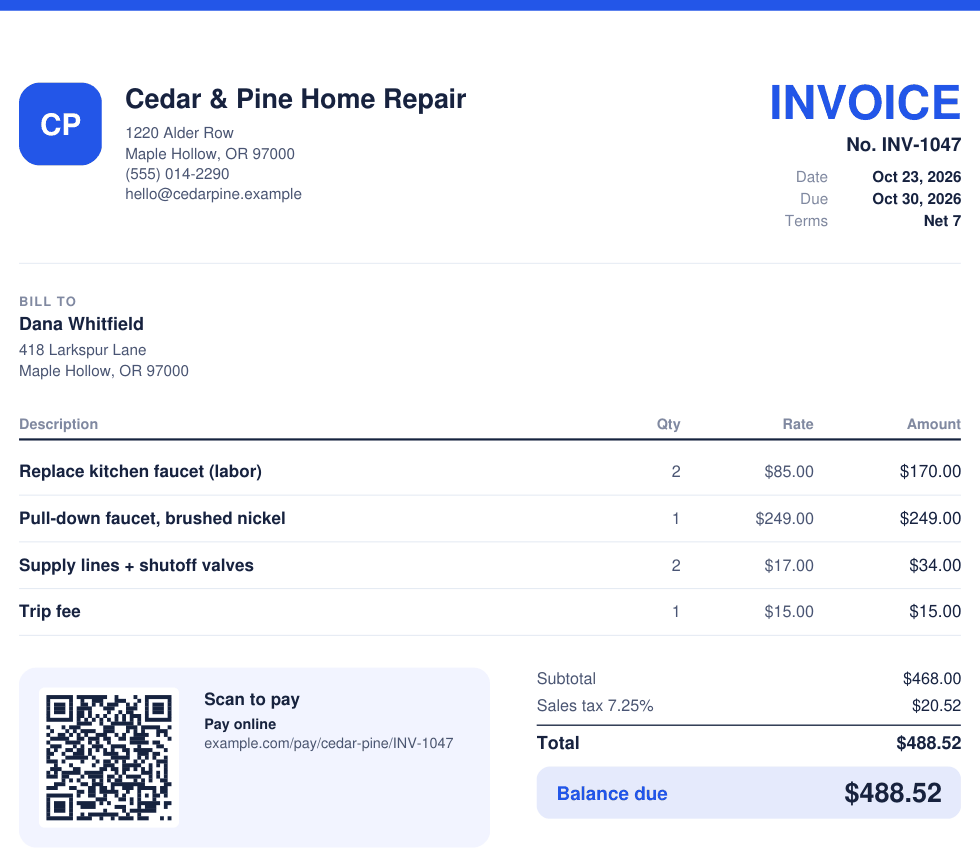
- The word “Invoice” and a unique invoice number. Number them in order (INV-1001, INV-1002 and so on) so you and your customer can find each one later. Never reuse a number.
- Your business details. Your business name, phone and email, plus your address if you have one. Add your logo so it looks like it came from a real business, because it did.
- Your customer’s details. Their name, their company if they have one, and an address or email.
- The invoice date and the due date. The day you send it and the day you want to be paid by, or payment terms like Net 15.
- What you did or sold. One line per job, part or product, each with a quantity, a rate and an amount. Be specific: “Replace kitchen faucet, 2 hours” gets fewer questions than “Labor.”
- The subtotal, any discount, sales tax and the total due. Show the math so nobody has to guess.
- How to pay you. A PayPal, Venmo, Cash App, Square or Stripe link with a QR code, or how to pay by check or bank transfer.
- A short note. A thank-you, your warranty, or your late fee policy.
Good to know: sales tax rules differ from state to state, and many services aren’t taxed at all. Check your state’s revenue department or ask a tax pro which of your work is taxable and what rate to charge. Keep a copy of every invoice you send, too: the IRS generally asks you to keep records that back up your income for at least three years after you file. This page is a how-to, not tax or legal advice.
Invoice vs. quote vs. receipt
They look alike, but each one does a different job at a different time.
Quote (or estimate)
What the job will cost, so the customer can say yes. It isn’t a bill. A quote is usually a set price, while an estimate is your best guess that can change.
Invoice
The bill. It lists what you did and asks to be paid a set amount by a due date. Send it the day you finish, or at each milestone on a big job.
Receipt
Proof the money arrived: what was paid, how and when. Your customer keeps it for their records, and so do you.
This free tool makes invoices. Quotehound makes all three and turns an approved quote into an invoice with one tap.
Payment terms: Net 7, Net 15 and Net 30
“Net 30” means the full amount is due 30 days after the invoice date. Pick your terms before the job starts, say them on the quote, and print them on the invoice.
| Terms | Means | Good for |
|---|---|---|
| Due on receipt | Pay when you get the invoice | One-time jobs, new customers, small jobs |
| Net 7 | Pay within 7 days | Most home service and trade jobs |
| Net 15 | Pay within 15 days | Repeat customers and small businesses |
| Net 30 | Pay within 30 days | Companies and property managers that pay bills once a month |
You may also see “2/10 Net 30”: the customer takes 2% off if they pay within 10 days, otherwise the full amount is due in 30.
How to get paid faster
- Send the invoice the same day you finish. The job is fresh in your customer’s mind, and in yours.
- Make paying one tap. Add your pay link so the invoice carries a QR code. A customer who can pay from their phone right now usually does.
- Use a short due date. For most trades, Net 7 gets paid sooner than Net 30.
- Ask for a deposit on big jobs. Collect enough up front to cover materials before you buy them.
- Spell out every line. Clear descriptions mean fewer questions, and questions are what hold up payment.
- Follow up politely. A friendly note the day after the due date, and again a week later, with the invoice number, the amount and your pay link.
- Say your late fee up front. If you charge one, put it in the note and on your quotes. Check your state’s rules on late fees first.
Questions
Is this invoice generator really free?
Yes. Make and download as many invoices as you like, one PDF at a time. We ask for your email once to open the tool, so we can send you free tools and spreadsheet deals. Unsubscribe anytime.
Do I need an account?
No account and no password. Type your email once to open the tool, and it stays open in this browser.
Is my invoice saved or sent anywhere?
No. Your invoice is made right in your browser and goes straight to your downloads. Nothing you type on it is sent to us. If you tick Remember my business details, your business name, contact details, logo, color, tax rate and pay link stay in this browser on this device only, so you don’t have to type them again. Tap Forget my details to clear them.
Can I add my logo?
Yes. Upload a PNG, JPG, WebP or SVG file and it prints at the top of your invoice. Pick an invoice color to match it.
How do I add a PayPal, Venmo or Cash App QR code?
Paste your payment link, like your PayPal.me, Venmo, Cash App, Square or Stripe link, into the pay link box. The invoice prints the link plus a QR code your customer scans with their phone camera to open it. The money goes straight from your customer to you.
How do I add sales tax?
Type your tax rate, for example 7.25, then tick Tax on each line you charge tax on. Labor is often not taxed while parts and materials are, but the rules differ by state, so check with your state or a tax pro.
Can I save invoices, make quotes or track who paid?
Not in this free tool: it makes one invoice at a time and saves nothing. Quotehound does all of that, with quotes, clients, a job board, payments, reminders and your full invoice history, for a one-time price.
Does it work on my phone?
Yes. It works in Safari on iPhone and iPad, and in Chrome, Edge or Firefox on Android phones and computers. On a phone, the PDF saves to your Downloads or Files app, ready to text or email.