1 / 12
Seatsong app icon
SeatsongYour seating chart app

Seatsong Seating Chart Maker App

Seatsong turns your guest list into a finished seating chart for a wedding, a party or any event. Paste or type your guests, drag them to tables on a room plan, and print everything you need: the big Find your seat sign, table numbers, place cards, escort cards, the caterer's meal list, a check-in list and the room plan. It opens in your browser on a computer, tablet or phone.

AppPhone, tablet + computerSigns up to 24x36Works offline

$12.99 one time, buy direct

  • No account, no sign-up
  • Your guest list stays on your device
  • Change an RSVP and every printout updates
  • Free how-to PDF guide included
SharePinterestFacebook

What Seatsong does

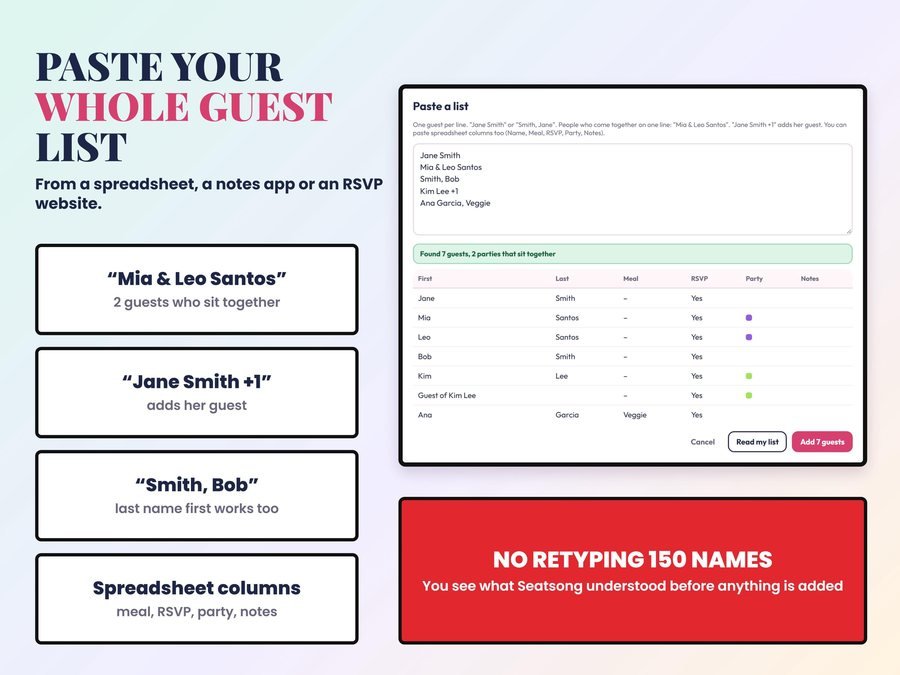
Paste your whole guest list at once

Copy it from a spreadsheet, a notes app or an RSVP website. "Mia & Leo Santos" becomes two guests who sit together, "Jane Smith +1" adds her guest, and "Smith, Jane" works too. You check it before anything is added.

Drag guests to tables

Or on a phone, tap the guest and then the table. Couples, families and groups move together.

Keep apart

Pick two guests who shouldn't share a table, and Seatsong warns you if they end up together.

Fill the rest

Seats everyone who's left, keeping parties together and keep-apart pairs apart. You check it and move anyone you like.

The big Find your seat sign

A to Z or by table, at 8x10, 11x14, 16x20, 18x24 and 24x36 inches, plus A4, A3 and A2. The names get as big as they can for the size you pick.

Cards and lists to print

Table numbers at 4x6, 5x7 or Letter/A4, folded place cards 4 to a sheet with the name on both sides, flat 3.5x2 inch escort cards 10 to a sheet with cut lines, plus the caterer list, a check-in list and the room plan.

6 looks, any color

Blush Script, Modern Minimal, Classic Serif, Garden, Party Pop and Ivory & Gold, any accent color, and 5 paper colors: White, Cream, Blush, Sage and Black.

Guests find their seat on their phone

Add the optional QR code to your sign: guests scan it and type their name to see their table. Your guest list is stored inside the code itself, so nothing is uploaded.


From guest list to seating chart in 3 steps

  1. Paste a whole wedding guest list into Seatsong: couples, +1 guests, last-name-first names and spreadsheet columns are read for you.
    Paste your guest list

    Copy it from a spreadsheet, a notes app or an RSVP website and paste it in.

  2. Plan the room: round, long, square and sweetheart tables plus dance floor, DJ, bar and cake, on one page for your venue with the seats filled at every table.
    Seat your guests

    Drag them to tables on the room plan, or let Fill the rest seat everyone who's left.

  3. Everything prints from one guest list: seating sign, table numbers, place cards, escort cards, caterer list, check-in list and room plan as PDF files.
    Print everything

    The sign, table numbers, place cards, escort cards, the caterer list, a check-in list and the room plan, as PDF files.

Watch the how-to

See one wedding set up in Seatsong, start to finish: paste the guest list, seat your guests, plan the room and print the sign and cards.

Plus the free how-to PDF guide comes with your purchase.

Weddings, parties and events

One app for any party or event: birthdays, quinceañeras, baby showers, bridal showers, anniversaries, graduations, retirements, reunions, galas and banquets, and holiday parties. Put your own title words on the sign, like "Please find your seat", "Welcome" or "Our favorite people".

Seating sign PDFTable numbersPlace cardsEscort cardsCaterer listCheck-in listRoom plan
  • As many events as you like: planners can keep one per client
  • Meals for the caterer: each guest's meal and notes, with totals by table

What you get, how you get it and what you need

What you get

  • Seatsong, a seating chart app that opens in your browser on a computer, tablet or phone
  • The free how-to PDF guide with pictures, with your private app link inside
  • Your Etsy order number unlocks it once on each device

How you get it

  • It's a digital download: nothing is shipped. After you buy on Etsy, open Purchases in a web browser and click Download Files. The Etsy phone app can't download files.
  • Open the guide PDF and tap your private app link.
  • Type your Etsy order number once to unlock Seatsong on that device. Your guide shows each step with pictures.

What you need

  • Your guest list, and how many tables and seats you'll have (your venue can tell you)
  • A computer, tablet or phone with a modern browser: Chrome, Safari, Edge or Firefox
  • Your Etsy order number and internet the first time you open it. After that it works offline.
  • A home printer for cards and lists; any print shop that prints posters from a PDF for the big sign

What it does NOT do

  • It doesn't send invitations or collect RSVPs. You type or paste the replies you get.
  • It doesn't connect to RSVP or invitation websites. Copy your list from them and paste it.
  • It doesn't print or ship anything. You get PDF files to print at home or at a print shop.
  • It doesn't draw your venue to scale. The room plan is a simple layout.
  • It doesn't move your events between devices by itself. Use Back up and Restore.
  • It doesn't decide who should sit with whom.

Reviews

Seatsong doesn't have reviews yet.

Our Etsy shop has 150 reviews with a 4.8-star average.

Read all our reviews on Etsy →

Questions

Can I paste my guest list from a spreadsheet or an RSVP website?

Yes. Copy it from a spreadsheet, a notes app or an RSVP website and paste it. "Smith, Jane" works too, and a column of meals or allergies goes where it belongs. You check it before anything is added.

What sizes can I print the seating sign?

8x10, 11x14, 16x20, 18x24 and 24x36 inches, plus A4, A3 and A2. The names get as big as they can for the size you pick.

Is it only for weddings?

No. Seatsong turns your guest list into a finished seating chart for any party or event: birthdays, quinceañeras, baby showers, bridal showers, anniversaries, graduations, retirements, reunions, galas and banquets, and holiday parties.

How do guests find their seat on their phone?

Add the optional QR code to your sign: guests scan it and type their name to see their table. Your guest list is stored inside the code itself, so nothing is uploaded.
What happens when someone changes their RSVP?

Change an RSVP and every printout updates by itself.

Does it send invitations or collect RSVPs?

No. It doesn't send invitations or collect RSVPs. You type or paste the replies you get.

Does it work on my phone?

Yes. It opens in your browser on a computer, tablet or phone. On a phone, tap the guest and then the table. After the first time it works offline.

Is my guest list uploaded anywhere?

No. Your guest list stays on your device: no account, no sign-up. Use Back up and Restore to move your events to another device.

How do I get it after I buy?

It's a digital download. After you buy on Etsy, open Purchases in a web browser and click Download Files, then open the guide PDF and tap your private app link.

Goes great with Seatsong

More for weddings and parties.

Questions before you buy? Send us a message. Lost your download link? Message us.

Scroll to Top