

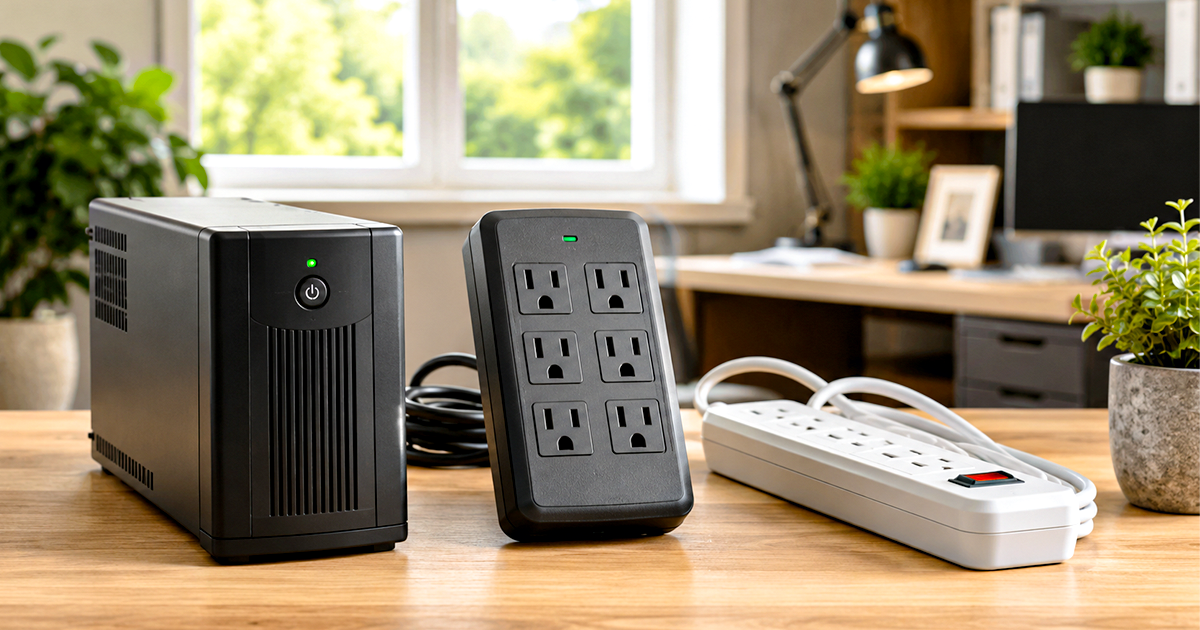
UPS vs Surge Protector vs Power Strip
Three devices that look alike and do completely different jobs. One gives you outlets, one stops spikes, and only one keeps working when the power goes out. Here is which your desk actually needs — and the thing nobody tells you about the one you already own.
Smart Tech Buying is reader-supported. When you buy through links on our site, we may earn an affiliate commission at no extra cost to you. We only recommend gear we would set up in our own office. Prices and availability update live.
UPS vs surge protector: the 30-second answer
The UPS vs surge protector question comes down to three devices doing three different jobs, and they are not interchangeable:
- A power strip gives you more outlets. That is all. It protects nothing.
- A surge protector absorbs voltage spikes so they never reach your gear. It does nothing when the power goes out.
- A UPS (uninterruptible power supply) carries your equipment through an outage on a battery. It also has surge protection built in, but weaker than a dedicated unit.
The mistake that costs people money is assuming the strip under their desk is doing something. Most are not.
UPS vs surge protector vs power strip: side by side
| Power strip | Surge protector | UPS | |
|---|---|---|---|
| More outlets | Yes | Yes | Yes |
| Stops voltage spikes | No | Yes | Partly — weaker than a dedicated unit |
| Keeps working in an outage | No | No | Yes — typically 5–15 minutes |
| Fixes brownouts and sags | No | No | Line-interactive and online models only |
| Protects unsaved work | No | No | Yes |
| Safe shutdown for a NAS | No | No | Yes, with USB management |
| Wears out silently | Nothing to wear out | Yes — joules are a lifetime budget | Battery is a consumable |
| Typical cost | $10–25 | $25–40 | $90–200 |
Short version: a power strip is an extension cord. A surge protector is insurance against spikes. A UPS is the only one of the three that does anything when the power actually goes out.
Why people confuse a UPS, surge protectors and power strips
UPS vs surge protector confusion starts because they all look the same: a rectangle with outlets and a cord. Two of them cost about the same. And the packaging on a plain power strip is very happy to sit next to the surge protectors on the shelf without saying, in plain English, that it does nothing at all.
So people buy a $12 strip, plug a $2,000 desktop into it, and believe they are covered. They are not. The strip is an extension cord with ambitions.
Meanwhile, the person who bought the surge protector believes they will not lose work in an outage. They will. A surge protector has no battery. When the power stops, everything plugged into it stops.
Neither belief gets tested until the day it matters, and by then it is a receipt.
Surge protector vs power strip: what a power strip actually does
A power strip splits one wall outlet into several. That is the entire product.
Inside a plain strip there is a length of busbar, a switch, and usually a circuit breaker sized to trip before the strip itself catches fire. There is no protection circuitry. A voltage spike that comes down the line goes straight through the strip and into whatever you plugged in, unimpeded.
The circuit breaker is not surge protection. It protects against overcurrent — too much draw for too long, like plugging four space heaters into one strip. A surge is a voltage event lasting microseconds. The breaker never even sees it.
How to tell what you have: look for a joule rating on the box or the underside. No joule rating means no surge protection. A strip that protects will say so loudly, because it costs more and that is the reason.
What a surge protector actually does
A surge protector sits between the wall and your gear and swallows voltage spikes before they reach anything expensive.
Most do this with MOVs — metal oxide varistors. At normal voltage an MOV behaves like an insulator and does nothing. Above a threshold it becomes conductive almost instantly and shunts the excess energy to ground. Your equipment sees a normal sine wave; the MOV eats the spike.
Spikes come from more places than lightning. The compressor in your fridge kicking off, an air conditioner cycling, a laser printer’s fuser drawing hard, utility switching down the street. Small internal surges are far more common than dramatic ones, and they are the ones that quietly age electronics over years.
Joule rating explained — and the thing nobody tells you
The joule rating is how much surge energy the unit can absorb over its lifetime, not per event.
That is the important sentence, and almost no product page says it plainly. Every MOV degrades slightly each time it clamps a spike. A 1,000-joule protector that has eaten 1,000 joules of spikes over three years is done. It still has outlets. Power still flows through it. Your gear is now unprotected and nothing on the device says so.
Some units have a “protected” indicator LED. Many do not. And a plain strip has no way to tell you anything, because there was never anything to fail.
Practical floor: 1,000 joules for a home office, and 2,000+ if your power is dirty or you live somewhere with real storms. Buy one with a protection-status LED, and write the install date on the underside in marker — because you will not remember.
Do surge protectors work? Yes — until they quietly stop
They work well, and the physics is sound. The problem is not effectiveness, it is that failure is invisible.
A surge protector does not announce its own death. It does not stop passing power. It does not blink. Unless it happens to have a status LED, and unless that LED is itself still working, a protector that has spent its joule budget is indistinguishable from a new one. The only honest way to manage this is on a calendar: three to five years, or immediately after any serious event, regardless of how it looks.
What it cannot do
A surge protector does nothing about an outage. Nothing about a brownout. Nothing about the sag when the AC compressor starts and your monitor flickers. It has one job — clamp the spike — and it does that job well and no other.
What is a UPS, and what does it actually do?
A UPS is a surge protector with a battery and a brain.
When utility power is present, it passes through to your equipment and charges the internal battery. When power drops — fully out, or sags below a threshold — the UPS switches to battery in a handful of milliseconds. Fast enough that your desktop does not notice.
That gap is the whole product. A desktop has no internal battery, so a power cut kills it instantly: unsaved work gone, and if the cut lands mid-write to a disk, a corrupted file or a corrupted array. A laptop rides out an outage on its own battery and never notices. A tower does not.
A UPS is not a generator. Nobody is working through a four-hour outage on a desk UPS. A typical unit gives you five to fifteen minutes with a normal load — enough to save, shut down properly, and go make coffee. That is the design intent, and it is enough.
Standby, line interactive and online UPS types, plainly
Standby (offline) UPS. Passes utility power straight through to your gear and keeps the battery charged in the background. When the power fails, a transfer switch flips the load to the battery, typically in 2–10 milliseconds. Cheapest, most common, and genuinely fine for a desk. The limitation: it only acts when power fails completely or drifts far out of range. Small sags and swells pass straight through.
Line-interactive UPS. Adds an autotransformer that can boost a sagging voltage or trim an over-voltage without touching the battery. This matters more than it sounds. If your lights dim when the AC starts, a standby unit either ignores it or drops to battery — and every unnecessary battery cycle is battery life you spent for nothing. A line-interactive unit corrects it electrically and leaves the battery alone. For most home offices with imperfect power, this is the sweet spot.
Online (double-conversion) UPS. Converts incoming AC to DC, charges the battery, and converts back to AC continuously. Your equipment never touches utility power directly, so there is no transfer time at all and no disturbance ever reaches it. It is the best protection money buys, and it is overkill for a desk: more expensive, less efficient, and it runs a fan you will hear.
Pure sine wave vs simulated sine wave
Cheaper UPS units produce a stepped approximation of a sine wave when running on battery. Most electronics tolerate it. Modern PC power supplies with active PFC often do not — they can shut down, buzz, or refuse to switch over cleanly, which defeats the entire purpose at the exact moment it matters.
If your desktop was built in the last several years, assume it has an active PFC supply and buy pure sine wave. This is the single most common way people discover their UPS does not work: not on the shelf, but during the first outage.
Its surge protection is real, but weaker
Every UPS includes surge suppression. It is genuinely there. But the suppression module inside a UPS is typically rated for far fewer joules than a dedicated surge protector, and it is not a substitute for one in an area with frequent lightning.
The common professional setup is both: the UPS handles the outage, and a good surge protector handles the spike. Which raises the question everyone asks next.
UPS vs surge protector: can you plug them into each other?
In UPS vs surge protector terms, some combinations are fine. One is genuinely dangerous.
Surge protector plugged into a UPS output: fine, and usually the right answer. Your equipment gets battery backup from the UPS and proper surge clamping from the dedicated unit. This is standard practice in home and office setups.
UPS plugged into a surge protector: avoid. Some UPS manufacturers void the warranty for this, and the protector between the wall and the UPS can interfere with the UPS’s ability to read the incoming line properly. Plug the UPS into the wall directly.
Power strip daisy-chained into another power strip: never. This is a fire hazard, it violates most electrical codes for permanent installations, and it is one of the most common causes of workspace electrical fires. Each strip is rated for a certain current. Chaining them lets you draw far more than the first strip’s rating through the first strip’s wiring. If you need more outlets, you need another wall outlet, not another strip.
Anything with a motor or a heating element into a UPS: no. Space heaters, laser printers, vacuum cleaners. A laser printer’s fuser can pull 1,000+ watts in a spike that will trip the UPS instantly. Printers go on the surge-protected side, never the battery side.
Battery backup vs surge protector: which do you actually need?
Work from what you are protecting.
And if a battery backup is where you land, size it right the first time: our What Size UPS Do I Need? guide turns your real wattage into the right VA rating in three steps.
If you use a laptop and nothing else: a good surge protector. Your laptop already has a battery, so it rides out outages by design. You are protecting the charger and the peripherals from spikes. A UPS buys you very little. See our Best Business Laptops guide if the machine itself is the question.
If you use a desktop or an all-in-one: a UPS. This is the case the product exists for. No internal battery means a power cut is an instant hard shutdown, and hard shutdowns are how you lose an afternoon’s work and, eventually, a drive. Our Best Desktop Computers guide covers the machines this applies to.
If you have a NAS or a home server: a UPS, and this is not optional. See below — it is the strongest case in this article.
If you work from home and your power flickers: a UPS on the router and modem. They draw almost nothing, so even a small unit runs them a long time, and it means a brownout does not end a client call. Pairs with our Best Wi-Fi Routers guide.
If you are building the whole room: power protection is the part everyone leaves until last and should not. Our Smart Home Office guide covers how it fits with the rest.
If you only need more outlets and nothing is expensive: a power strip is fine. Lamps, fans, chargers. Just do not lie to yourself about what it is doing.
The NAS case, because it is the one that bites hardest
A NAS is the piece of equipment with the most to lose from a power cut and the least ability to complain about it.
When a NAS loses power mid-write, the risk is not one corrupted file. Depending on the filesystem and what it was doing, you can lose the array’s consistency — and a rebuild on a multi-terabyte volume takes many hours, during which a second drive failure loses everything. That is the scenario the backup was supposed to prevent, arriving through the wall socket.
Most NAS operating systems will talk to a UPS over USB, watch the battery level, and shut themselves down gracefully before it runs out. That handshake is the whole reason to buy a UPS with USB management rather than a bare battery. If you own a NAS and not a UPS, this is the most valuable $150 on this page. Our Best NAS Devices guide and the What Is a NAS? explainer cover the machines themselves.
UPS vs surge protector: what this costs over time
UPS vs surge protector is one of the few decisions where the math is genuinely simple, because the downside is a number you can look up.
A mid-range surge protector runs roughly $25–40 and should be swapped every three to five years, or after any serious event. Call it $8 a year.
A decent home-office UPS runs roughly $90–200 and lasts five to eight years, though the battery inside is a consumable and usually wants changing around year three or four. Call it $30 a year including a battery.
An afternoon of unsaved work is whatever your time is worth. This is not a category where the expensive option is a flex. It is insurance with a legible premium.
UPS vs surge protector: our picks
For the outage — APC Back-UPS BE600M1 (600VA/330W)
The honest entry point. Enough to carry a router, a modem and a small desktop long enough to shut down cleanly. If you have never owned a UPS and you are not sure you need one, this is the one that proves it.

- KEEP YOUR COMPUTER, WI-FI AND ROUTER RUNNING THROUGH POWER OUTAGES: Supplies short-term battery power during outages to …
- POWER PROBLEMS DON’T ONLY HAPPEN DURING STORMS: 23 minutes of runtime (at 100W load) guards against outages, while surge…
- PROTECT EVERYTHING ON YOUR DESK: 5 well-spaced outlets with full battery backup and surge protection, plus 2 surge-only …
For a real desktop — CyberPower CP1500PFCLCD (1500VA/1000W)
Pure sine wave output, which matters because modern PC power supplies with active PFC can behave badly on the simulated sine wave that cheaper units produce. If you have a desktop with a modern PSU, this is the tier to start at, not the one to aspire to.
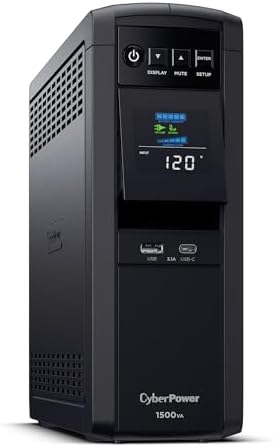
- 1500VA/1000W PFC Sinewave Uninterruptible Power Supply (UPS): Uses sine wave output to provide battery backup power for …
- 12 NEMA 5-15R OUTLETS: 6 battery backup & surge protected outlets, 6 surge protected outlets; INPUT: NEMA 5-15P right an…
- MULTIFUNCTION, COLOR LCD PANEL: Displays immediate, detailed information on battery and power conditions; Color display …
For a NAS or home server — Eaton Tripp Lite SMART1500LCDT (1500VA/900W)
USB management that NAS operating systems recognize, which is the feature that turns a UPS from a battery into a graceful shutdown. If you run a NAS, this is the pick on this page that earns its money the fastest.
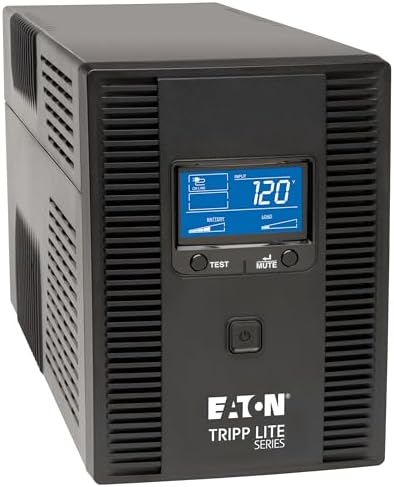
- COMPUTER UNINTERRUPTIBLE POWER SUPPLY UNITS: 900W battery backup with 10 outlets guard your devices against power surges…
- RELIABLE PROTECTION: 10 outlets provide UPS battery backup & surge protection to protect servers, computers & peripheral…
- AUTOMATIC VOLTAGE REGULATION: AVR corrects brownouts & over voltages between 92V and 150V back to safe standard 120V wit…
For smart control — Kasa Smart Plug Power Strip KP303
Three individually controlled smart outlets with surge protection built in. The point here is not protection — the Tripp Lite below does that with a far bigger joule budget. The point is that each outlet switches on its own, from your phone or on a schedule, so the monitor, the lamp and the charger stop being one decision. If you want your desk to power down at 6pm without you reaching under it, this is the strip that does it.

- Surge protection: ETL-certified surge protection shields sensitive electronics and appliances from sudden power surges.
For the spikes — Eaton Tripp Lite TLP808B (1,440 J, 8 outlets)
1,440 joules sits comfortably above the floor we set above, which is the number that actually matters — it is the lifetime budget your protector spends over the years, not a per-hit rating. At $34.72 with a 4.8-star average across more than two thousand reviews, this is the most trustworthy protection on the page, and the 8ft flat plug and keyhole mounting slots make it a sensible thing to put behind a desk. Eaton backs it with a lifetime warranty and $75,000 of connected-equipment insurance, which is the part the cheap strips never offer.
One honest note: eight outlets is a realistic count rather than a headline number, and three of them are wide-spaced for bulky transformers, so plan what goes where before you mount it. The unit is rated for 15A total and has its own breaker, so it is safe as designed — but the number of sockets is never permission to draw more than the circuit can give. Do not run space heaters off it, and do not chain another strip into it.
Write the install date on the underside in marker. In three to five years it will be the only way you know.

- FLAT PLUG POWER STRIP SURGE PROTECTOR: Features 8 outlets, 1440 joule rating, and an 8ft flat plug extension cord. Three…
- PREMIUM SAFETY FEATURES: Reliable surge protector is both UL Certified and UL Listed to ensure your devices are protecte…
- VERSATILE INSTALLATION: The surge protector features a 8ft power extension cord and keyhole slots on the bottom panel fo…
Full lineup and sizing help: our Best UPS Battery Backup guide covers eight units across every budget.
Frequently asked questions
Is a power strip the same as a surge protector?
No, and this is the most expensive misunderstanding in the category. A plain power strip splits one outlet into several and offers no protection at all. A surge protector contains circuitry — usually MOVs — that absorbs voltage spikes. Look for a joule rating: no joule rating means no protection. They look identical and sit next to each other on the shelf.
Do surge protectors wear out?
Yes, and usually silently. The MOVs inside degrade a little every time they clamp a spike, and the joule rating is a lifetime budget rather than a per-event capacity. A protector that has absorbed its rated energy still passes power and still looks fine, but no longer protects. Some units have a status LED; many do not. Swap every three to five years, and immediately after any serious surge event.
Does a UPS protect against surges too?
Yes, but less than a dedicated unit. Every UPS includes surge suppression, and it is real, but the module inside is typically rated for far fewer joules than a standalone surge protector. In areas with frequent lightning, the usual approach is both: a UPS for the outage, and a surge protector plugged into the UPS output for the spike.
Is a UPS worth it?
It depends entirely on what you plug into it. If you use a laptop, mostly not — it has its own battery and an outage is a non-event. If you use a desktop, an all-in-one, or a NAS, it is one of the highest-value purchases on your desk, because those machines have no battery and a power cut is an instant hard shutdown. At roughly $30 a year amortized against a $1,200 machine and your unsaved work, the arithmetic is not close.
Can lightning damage a UPS?
Yes. A direct or near-direct lightning strike can exceed what any plug-in device is designed to absorb, UPS or surge protector alike. Plug-in protection is built for the ordinary spikes that make up the vast majority of real events — compressors, utility switching, distant strikes — not for a strike on your own service drop. If you live somewhere with frequent lightning, the layered approach is a panel-mounted protector at the service entrance plus plug-in protection at the desk. And in a severe storm, unplugging is still the only guaranteed answer.
Can I plug a surge protector into a UPS?
Yes — into the UPS output, and that is the recommended arrangement for most homes and offices. Do not do it the other way around: a UPS should plug into the wall directly, since a protector in between can interfere with how the UPS reads incoming line voltage, and some manufacturers void the warranty for it.
How long will a UPS run my computer?
Less than most people expect, and that is by design. A typical home-office unit gives five to fifteen minutes on a normal load. A UPS is not a generator; it is a window to save your work and shut down properly. If you need to work through long outages, you want a portable power station or a generator, not a bigger UPS.
Do I need a UPS if I only use a laptop?
Usually not. Your laptop already has a battery, so an outage is a non-event for it. What you want is a good surge protector for the charger and peripherals. The UPS argument gets strong the moment you own a desktop, an all-in-one, or a NAS — anything with no internal battery.
Is it safe to plug one power strip into another?
No. Daisy-chaining strips is a genuine fire hazard and violates electrical code for permanent installations. Each strip is rated for a certain current, and chaining lets you pull more than the first strip’s rating through the first strip’s wiring. If you need more outlets, you need another wall outlet or a properly rated unit.
What joule rating do I need?
For a home office, treat 1,000 joules as the floor and go higher — 2,000+ — if your power is dirty or storms are common where you live. Remember the rating is a lifetime budget, not a per-hit capacity, so a higher number buys you longevity as much as it buys you headroom.
Related guides
- Best UPS Battery Backup for PCs & Home Offices — eight units, sizing help, pure sine wave explained
- Best Portable Power Stations — for when minutes are not enough
- Best NAS Devices for Home Office & Small Business — the machine that most needs a UPS
- Best Desktop Computers — the machine with no battery
- Best Home Office Monitors — the other thing on that outlet
- How to Build the Ultimate Smart Home Office — where power protection fits
Why You Can Trust Smart Tech Buying
Every recommendation is based on extensive product research, manufacturer specifications, customer feedback, long-term reliability, value, and suitability for real-world use. When we have personal experience with a product, we include those insights. We regularly review our guides to keep recommendations current as new products are released.