

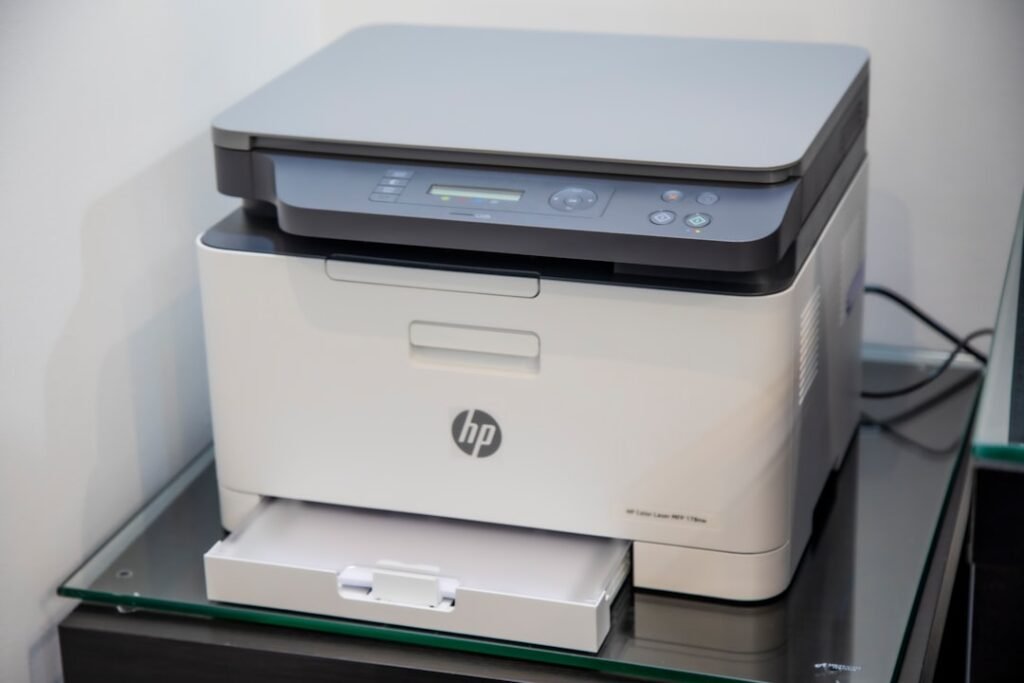
Best Home Office Printers of 2026
Six printers we'd actually buy – every one sold by Amazon, Prime eligible and rated 4.0 or better.
Choosing the best home office printer in 2026 comes down to one question: how do you actually print? If you print occasionally, a budget laser printer saves you money on cartridges. If you print constantly, an ink tank printer eliminates the cost of replacement ink entirely. If you print photos, you need a dedicated photo printer. And if your home office runs like a small business, you need a color laser all-in-one that can handle volume.
We researched and compared the top home office printers available on Amazon right now across six categories to give you one clear recommendation for every type of home office user. Every printer below is available on Amazon with verified listings and affiliate-tagged Buy buttons.
If you are also setting up a complete home office, see our Best Business Laptops for 2026 and Best Home Office Monitors for 2026 guides for recommendations that pair well with any printer on this list.
QUICK PICKS – BEST HOME OFFICE PRINTERS 2026
- Best overall: Epson WorkForce Pro WF-3823 – color all-in-one with fax, ADF and auto duplex
- Best color laser: Brother MFC-L3720CDW – color laser all-in-one, auto duplex, 19 ppm
- Best budget ink tank: Canon PIXMA G3270 – ultra-low running costs, wireless, entry-level ink tank
- Best all-in-one: HP Smart Tank 5003 – ink tank, wireless, up to 3 years of ink included
- Best laser all-in-one: Brother DCP-L2640DW – mono laser with scan and copy, 3,600+ owner ratings
- Best budget laser: Brother HL-L2405W – compact wireless mono laser, entry-level price
All 6 printers compared at a glance

| Type | Inkjet All-in-One |
| Ink | Cartridges |
| Functions | Print, Scan, Copy, Fax, ADF |
| Wireless | Wi-Fi |
| Speed | 21 ppm black |

| Type | Color Laser All-in-One |
| Ink | Toner cartridges |
| Functions | Print, Scan, Copy, Fax, ADF |
| Wireless | Wi-Fi, USB |
| Speed | 19 ppm color |

| Type | Inkjet All-in-One |
| Ink | MegaTank refillable |
| Functions | Print, Scan, Copy |
| Wireless | Wi-Fi |
| Speed | 4 ppm color |
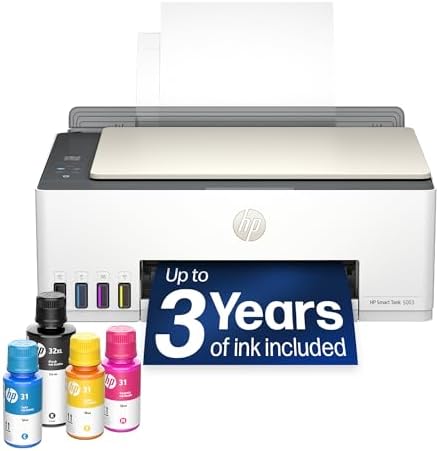
| Type | Inkjet All-in-One |
| Ink | Smart Tank refillable |
| Functions | Print, Scan, Copy |
| Wireless | Wi-Fi |
| Ink Included | Up to 3 years |

| Type | Mono Laser All-in-One |
| Ink | Toner cartridges |
| Functions | Print, Scan, Copy, Duplex |
| Wireless | Wi-Fi |
| Owner ratings | 3,789 |

| Type | Mono Laser Printer |
| Ink | Toner cartridge |
| Functions | Print only |
| Wireless | Wi-Fi, Mobile |
| Speed | 26 ppm black |
What the 6 cost, side by side
Live Amazon prices — cheapest to dearest. Tap any row for the current price.
Prices fluctuate — tap any row for the live price on Amazon. Bars run from zero, so they show what these actually cost. The pattern worth remembering: ink tank printers cost more up front but far less per page — the cheapest printer to buy is rarely the cheapest to own. The cheapest here is 35% of the price of the dearest.
Best home office printers 2026 – full reviews
1. Epson WorkForce Pro WF-3823 – Best Overall Home Office Printer 2026
- Epson printing system is designed to be used exclusively with Epson Genuine Cartridges. Use of non-genuine ink could cau…
- Built for speed — PrecisionCore Heat-Free Technology delivers fast, high-volume printing with 21 (black)/11 (color) ISO …
- High-precision printing — accurate dot placement and DURABrite Ultra instant-dry pigment inks for professional-quality p…
The Epson WorkForce Pro WF-3823 is the all-rounder for a home office that prints a bit of everything. It prints, scans, copies and faxes, runs up to 21 pages per minute in black and 11 in color, and takes a 250-sheet tray with a 35-page automatic document feeder for multi-page jobs. Automatic 2-sided printing is standard. Epson’s PrecisionCore Heat-Free technology means there is no warm-up before the first page, and the DURABrite Ultra pigment inks are instant-dry, so a sheet is smudge-proof as it leaves the tray.
Who should buy it: Home office users who print regularly – documents, invoices, contracts, forms – and want scanning, copying and fax in the same machine without stepping up to a laser.
Who should skip it: Anyone printing heavy color volume, where 11 pages per minute will feel slow, and anyone who wants to stop buying cartridges altogether – this one takes Epson Genuine cartridges rather than refillable tanks.
Pros
- Print, scan, copy and fax in one machine
- Up to 21 pages per minute in black
- 35-page automatic document feeder
- Automatic 2-sided printing
- 250-sheet paper tray
Cons
- Takes Epson Genuine cartridges, not refillable ink tanks
- Color runs at 11 pages per minute against 21 in black
- 19.4 lb, heavier than a compact all-in-one
2. Brother MFC-L3720CDW – Best Color Laser Printer for Home Office

- Professional Performance: Dominate your business printing with this Brother Genuine color laser printer delivering excep…
- Advanced Connectivity: Take command of your workflow with dual-band wireless networking (2.4GHz/5GHz), Wi-Fi Direct, and…
- Productivity Powerhouse: Maximize efficiency with the 50-sheet auto document feeder, 250-sheet adjustable paper tray, an…
The Brother MFC-L3720CDW is a color laser all-in-one for home offices that want toner rather than ink. It prints up to 19 pages per minute in both color and black, and automatic duplex printing puts two-sided pages out without reloading the tray. A 50-sheet automatic document feeder and a 250-sheet adjustable paper tray keep multi-page jobs moving, and a 3.5 inch color touchscreen with 48 customizable shortcuts handles the menus. It connects over dual-band Wi-Fi at 2.4GHz or 5GHz, Wi-Fi Direct, or USB.
Who should buy it: Home offices that print color regularly – presentations, client documents, marketing materials – and want laser output with scanning, copying and fax in one machine.
Who should skip it: Casual home users who print rarely. Users who only need black and white output.
Pros
- 19 ppm in both color and black
- Automatic duplex printing
- 50-sheet ADF and a 250-sheet tray
- 3.5 inch color touchscreen
- Dual-band Wi-Fi and Wi-Fi Direct
Cons
- A color laser costs more up front than the ink tank picks here
- Toner replacement costs over time
- 44 lb, a large footprint
3. Canon PIXMA G3270 – Best Budget Ink Tank Printer

- Wireless Print/Copy/Scan
- Up to 2 years of ink included (2)
- Print up to 6,000 black & white / 7,700 color pages using a single set of inks! (1)
The Canon PIXMA G3270 MegaTank is the best entry-level ink tank printer for home office users who print frequently. Canon MegaTank uses refillable ink tanks instead of cartridges – delivering an extremely low per-page cost over the life of the printer. Canon rates the G3270 for up to 6,000 black pages or 7,700 color pages per set of bottles. The wireless all-in-one covers print, scan, and copy, and the compact footprint fits easily on any home office desk.
Who should buy it: Budget-conscious home office users who print frequently and want to eliminate cartridge costs. Students, freelancers, and home-based workers who want maximum value.
Who should skip it: Users who need fast color speeds, fax, or an automatic document feeder.
Pros
- Best value ink tank printer on this list
- Ultra-low per-page running cost
- Up to 7,700 color pages per ink set
- Compact design for small desks
- Wireless printing and mobile support
Cons
- Slower color speed at 4 ppm
- No automatic document feeder
- No fax capability
- No Ethernet – Wi-Fi only
4. HP Smart Tank 5003 – Best All-in-One Home Office Printer
The HP Smart Tank 5003 is the pick if the thing you dislike about printers is buying ink. It is a cartridge-free refillable tank printer that ships with up to three years of HP ink in the box – enough for roughly 6,000 color or black pages – and you top it up by plugging a bottle into the tank and letting it drain rather than squeezing it. It prints, scans and copies, handles borderless prints, and connects over Wi-Fi with AirPrint, HP ePrint and Mopria for phones and tablets.
Who should buy it: Home offices that print steadily and want the running cost as close to nothing as it gets, with no cartridge to replace.
Who should skip it: Anyone who needs to fax, which this model does not do, and anyone printing in volume – 10 pages per minute in black and 5 in color is slow next to a laser.
Pros
- Up to 3 years of ink in the box, roughly 6,000 pages
- Cartridge-free refillable tanks
- Mess-free bottle refill system
- Borderless printing
- AirPrint, HP ePrint and Mopria support
Cons
- No fax
- 10 pages per minute in black, 5 in color
- Wi-Fi and USB only, no Ethernet port
5. Brother DCP-L2640DW – Best Laser All-in-One for Scanning and Copying
- BEST FOR SMALL BUSINESSES – Engineered for extraordinary productivity, the Brother DCP-L2640DW Monochrome (Black & White…
- FAST PRINTER WITH EFFICIENT SCANNING – Produces documents quickly with print speeds up to 36 ppm(2) and scan speeds up t…
- FLEXIBLE CONNECTION OPTIONS – Easily navigate the changing demands of your business with secure multi-device connectivit…
The Brother DCP-L2640DW is the one to buy if most of what you print is black text and you want it fast. It is a monochrome laser three-in-one – print, scan and copy – rated up to 36 pages per minute, with automatic 2-sided printing. A 50-page automatic document feeder handles multi-page scanning and copying, and the scanner reads in color at up to 23.6 images per minute in black and 7.9 in color even though the printer itself prints only in black. It connects over dual-band wireless at 2.4GHz or 5GHz, wired Ethernet, or USB.
Who should buy it: Home offices and small businesses whose printing is mostly documents – contracts, invoices, forms – and who want laser speed and toner rather than ink.
Who should skip it: Anyone who needs to print in color, because this one does not, and anyone who needs to fax.
Pros
- Up to 36 pages per minute in black
- Laser print, scan and copy in one machine
- 50-page automatic document feeder
- Scans in color at up to 7.9 ipm, 23.6 in black
- Ethernet, dual-band Wi-Fi and USB
Cons
- Monochrome only – it does not print in color
- No fax
- 25 lb, with a 15.7 by 16.1 inch footprint
6. Brother HL-L2405W – Best Budget Laser Printer for Home Office

- BEST FOR HOMES & HOME OFFICES – Engineered for consistent, premium print quality, the Brother HL-L2405W Monochrome (Blac…
- COMPACT, CONNECTED PRINTER – Flexible connection options make this an ideal printer for home use and at-home offices. Se…
- BROTHER MOBILE CONNECT APP – Manage your printer remotely and print from your mobile device anytime, from almost anywher…
The Brother HL-L2405W is the best budget laser printer for home offices that primarily print text documents. It delivers 26 pages per minute in crisp monochrome laser output – faster and sharper than any inkjet at this price. The compact design fits on any desk. Wireless printing, mobile printing, and Alexa integration are all included. Brother Refresh toner subscription automatically delivers toner before you run out.
Who should buy it: Home office users who print text documents, contracts, reports, and forms in black and white at the lowest possible price.
Who should skip it: Users who need color printing or scanning and copying – this is a print-only monochrome device.
Pros
- Best value laser printer on this list
- 26 ppm – fast for documents
- Compact design for small home offices
- Wireless and mobile printing
- Brother Refresh toner subscription
Cons
- Monochrome only – no color printing
- Print only – no scanner or copier
- No duplex printing
How to choose the best home office printer in 2026
Ink tank vs laser printer: which is better for home office?
Ink tank printers win on running cost. If you print more than 50 pages per month, an ink tank printer like the HP Smart Tank 5003 or Canon PIXMA G3270 will cost significantly less to operate than a cartridge or laser printer. The higher upfront cost pays for itself within months for regular users. For the full cost-per-page breakdown, see our ink tank vs ink cartridge printers comparison.
Laser printers win on speed and document quality. For fast, sharp black-and-white text documents, the Brother HL-L2405W at 26 ppm outperforms any inkjet at the same price. For color laser output, the Brother MFC-L3720CDW prints color at the same 19 ppm it prints black, where inkjet all-in-ones usually slow down in color.
Do you need print, scan, copy and fax?
Most home office users benefit from an all-in-one that prints, scans, and copies. Fax is only necessary if your work requires it – government, legal, healthcare, and real estate sectors still use fax regularly. The Epson WorkForce Pro WF-3823 and the Brother MFC-L3720CDW both list fax among their functions.
Wireless connectivity: what to look for
Every printer on this list includes Wi-Fi. Wired Ethernet is less common in this price range, so check the connectivity spec of the model you choose if you need it – the Brother MFC-L3720CDW, for instance, connects over Wi-Fi, Wi-Fi Direct or USB. All six support mobile printing via Apple AirPrint or the manufacturer app. If you are setting up a complete home office, pair your printer with a solid laptop and monitor – see our Best Business Laptops for 2026 and Best Home Office Monitors for 2026 guides.
Setting up a complete home office?
A great printer pairs best with a great laptop and monitor. See our complete guides to the best business laptops and monitors for 2026.
Read: Best Business Laptops for 2026 – Top 5 Picks
Read: Best Home Office Monitors for 2026 – Top 6 Picks
Frequently asked questions about home office printers
What is the best home office printer in 2026?
The Epson WorkForce Pro WF-3823 is the best home office printer for most users – it prints, scans, copies and faxes, runs up to 21 pages per minute in black, and holds 250 sheets. For color laser output, the Brother MFC-L3720CDW is the pick here. For the best budget ink tank, the Canon PIXMA G3270 is the entry-level pick.
What is the best printer for remote work?
The Epson WorkForce Pro WF-3823 and HP Smart Tank 5003 are the best printers for remote workers. Both print, scan and copy wirelessly. The WF-3823 adds fax; the Smart Tank 5003 trades fax for up to three years of ink in the box. For remote workers who only need black and white document printing, the Brother HL-L2405W is the most affordable option.
Is an ink tank printer worth it for home office?
Yes, for most home office users. If you print more than 30-50 pages per month, the higher upfront cost of an ink tank printer pays for itself within months compared to buying replacement cartridges. The HP Smart Tank 5003 includes enough ink for up to three years of typical printing out of the box.
What is the best all-in-one printer for home office?
The best all-in-one printer for home office in 2026 is the Epson WorkForce Pro WF-3823 for most users. The HP Smart Tank 5003 is the pick if you want the lowest running cost. The Brother MFC-L3720CDW is the pick if you want color laser output with fax.
What is the best laser printer for home office?
For black and white document printing on a budget, the Brother HL-L2405W is the best laser printer for home office. For color laser all-in-one with fax, the Brother MFC-L3720CDW is the pick.
What is the best budget printer for home office?
The Brother HL-L2405W is the best budget printer for home office document printing. For the best budget all-in-one with color and ultra-low running costs, the Canon PIXMA G3270 is the top pick.
What is the best small business printer in 2026?
For small businesses wanting color laser output, the Brother MFC-L3720CDW is the pick. For small businesses prioritizing low running costs, the HP Smart Tank 5003 eliminates ink cartridge costs while delivering reliable wireless all-in-one performance.
Related buying guides
- Best Business Laptops for 2026
- Best Home Office Monitors for 2026
- Best MacBook Air M5 for Business in 2026
Smart Tech Buying participates in the Amazon Services LLC Associates Program. As an Amazon Associate we earn from qualifying purchases at no additional cost to you. Current pricing is displayed live from Amazon on each product above.
Why You Can Trust Smart Tech Buying
Every recommendation is based on extensive product research, manufacturer specifications, customer feedback, long-term reliability, value, and suitability for real-world use. When we have personal experience with a product, we include those insights. We regularly review our guides to keep recommendations current as new products are released.