

Building a smart home office in 2026 comes down to layering the right technology in the right order: start with a reliable computer, fast Wi-Fi, a good monitor, and a quality webcam, then add smart displays, voice automation, and ergonomic upgrades that quietly remove friction from your workday. You don’t need to buy everything at once — this guide walks through the full stack, what each piece does for your productivity, and the specific products worth considering at every step.
By Authur C. Art, Founder & Lead Reviewer — Smart Tech Buying.
Disclosure: Smart Tech Buying is reader-supported. As an Amazon Associate we earn from qualifying purchases. This does not affect our recommendations or the price you pay.
Remote Work Changed the Office for Good
Remote and hybrid work are no longer a temporary arrangement — for millions of people, the home office is the office. And once you spend forty-plus hours a week in a space, small inefficiencies start to matter. A slow morning startup routine, a desk you can’t find anything on, a call that drops at the worst moment: each one is a tiny tax on your focus and your mood.
A smart home office is the answer. By combining solid core technology with connected, automated devices, you can create a workspace that’s more productive, more organized, more comfortable, and genuinely more pleasant to spend your day in. Smart devices can automate everyday tasks, cut down on distractions, and help you stay focused from your first meeting to your last. This guide covers the entire build — beginner-friendly, but detailed enough for pros — so you can start where it makes sense and grow from there.
What Is a Smart Home Office?
A smart home office is a workspace where your technology is connected and, where possible, automated — so the room works with you instead of needing constant attention. Instead of a collection of gadgets you operate one by one, a smart office links them together through voice assistants, apps, and routines.
In practice, that means a few things working in concert:
- Automation — routines that turn on your lights, equipment, and climate with a single trigger.
- Voice assistants — Alexa or Google Assistant handling reminders, timers, and device control hands-free.
- Smart lighting — bright, cool light for focus and warmer tones to wind down.
- Faster networking — Wi-Fi that keeps calls, cloud apps, and smart devices running smoothly.
- Smart displays — a glanceable hub for your calendar, schedule, and reminders.
- Security and energy efficiency — cameras, sensors, and smart plugs that protect your gear and trim wasted power.
You don’t need all of it to have a “smart” office. Even one or two connected devices can make a real difference. The goal is a workspace that removes friction — and the rest of this guide shows you how to build it, layer by layer.
Start with a Powerful Computer
Every productive workspace is built on one foundation: your computer. No amount of smart lighting or automation matters if your machine is slow, unreliable, or constantly fighting you. So before anything else, make sure your core hardware is up to the job.
There are three main paths, depending on how you work. A desktop PC gives you the most power per dollar and room to upgrade, making it ideal if your office is a fixed spot. A business laptop trades some raw power for portability, perfect if you move between rooms, travel, or work hybrid. And a mini PC tucks a full computer behind your monitor, keeping your desk clean without sacrificing everyday performance.
Whichever route fits you, buy enough computer to last a few years — adequate RAM, a fast SSD, and a current processor. For specific recommendations across budgets and use cases, see our in-depth guides to the best desktop computers 2026, the best business laptops 2026, and the best mini PCs 2026.
Upgrade Your Internet Connection
If your computer is the foundation, your internet connection is the plumbing — invisible until it fails, and then it’s all you can think about. A frozen video call, a stalled upload, or a buffering screen share doesn’t just waste time; it makes you look unprofessional in front of clients and colleagues.
Reliable, fast Wi-Fi matters more than ever because so much of modern work depends on it: video meetings, cloud storage that syncs constantly, large file downloads, secure VPN connections, streaming, and the growing fleet of smart devices in your office all compete for bandwidth. An older router can become a silent bottleneck, especially once you add the smart gear in this guide.
If your router is more than a few years old — or you’re adding several connected devices — upgrading is one of the highest-impact changes you can make. A modern Wi-Fi 6 or Wi-Fi 7 router (or a mesh system for larger spaces) keeps everything running smoothly. Our guide to the best Wi-Fi routers 2026 breaks down the right pick for your home and speed tier. Not sure which standard you actually need? Our Wi-Fi 7 vs Wi-Fi 6 guide explains the difference in plain English.
Add a Second Monitor for Better Productivity
Few upgrades deliver a more immediate productivity boost than a second monitor — or a single large one. The reason is simple: more screen space means less time lost to shuffling windows, and more room to actually see your work.
The benefits show up everywhere. You can keep reference material open while you write, run true split-screen multitasking, and stop losing your place every time you switch tasks. It’s especially valuable for work like video editing, accounting and spreadsheets, programming, and content creation, where seeing more at once directly speeds you up. Studies and everyday experience alike point the same way: people simply get more done with more screen real estate.
Whether you go dual-monitor or a single ultrawide, look for a comfortable resolution, an ergonomic stand or VESA mount, and USB-C if you want one-cable laptop docking. See our picks in the best home office monitors 2026 guide.
Improve Video Meetings with a Quality Webcam
Most laptop webcams are mediocre, and on an important call it shows. Upgrading to a dedicated webcam is a small change that makes a disproportionate difference in how you come across.
A good external webcam delivers sharper image quality, a more professional appearance, and far better low-light performance — so you don’t look washed out or grainy in a dim room. Many also include better built-in microphones than your laptop, and some add AI auto-framing that keeps you centered as you move. On client calls and interviews, looking clear and put-together is quiet credibility.
Pair the webcam with decent lighting (more on that below) and you’ll look great on every call. For specific recommendations across budgets, see the best webcams 2026 guide.
Everything in this build at a glance

| Screen | 5.5 in |
| Assistant | Alexa+ |
| Owner ratings | 71,591 |

| Screen | 8.7 in HD |
| Audio | Spatial |
| Assistant | Alexa+ |
| Screen | 11 in Full HD |
| Audio | Spatial |
| Assistant | Alexa+ |
| Type | Smart speaker |
| Assistant | Alexa+ |
| Owner ratings | 199,015 |

| Outlets | 3 smart + 2 USB |
| Hub | Not required |
| Works with | Alexa, Google |

| Type | RGBICWW bars |
| Works with | Matter, Alexa |
| Modes | Scene and music |

| Built in | Alexa and Siri |
| Sensor | Included |
| Extra | Air quality monitor |

| Type | 3-in-1 foldable |
| Standard | Qi2 certified |
| Charges | Phone, watch, buds |

| Capacity | 600VA / 330W |
| Runtime | 23 min at 100W |
| Owner ratings | 29,165 |

| Type | RGBIC desk lamp |
| Works with | Matter, Alexa |
| Modes | 64 scenes |

| Coverage | Up to 1,733 sq ft |
| Filter | 3-in-1 HEPA |
| Owner ratings | 24,797 |
Use Smart Displays to Stay Organized
With the core hardware sorted, this is where your office starts getting genuinely smart. A smart display is a voice assistant with a touchscreen, and on a desk it becomes a glanceable hub for your day — showing your calendar, the weather, your daily schedule, reminders, and to-do lists without ever cluttering your main screen.
The payoff is fewer interruptions. Instead of tabbing away to check your next meeting or reaching for your phone (and falling into it), you glance to the side and get back to work. Smart displays also handle voice commands and hands-free reminders, support video meetings, and double as a control hub for the rest of your smart office. Amazon’s Echo Show line is the most popular choice, and it comes in three sizes for any desk. For a deeper look at how these fit a workday, see our explainer on how smart displays boost home office productivity.
Amazon Echo Show 5 — Compact and Affordable
- Alexa can show you more – Echo Show 5 includes a 5.5” display so you can see news and weather at a glance, make video ca…
- Small size, bigger sound – Stream your favorite music, shows, podcasts, and more from providers like Amazon Music, Spoti…
- Keep your home comfortable – Control compatible smart devices like lights and thermostats, even while you’re away.
The Echo Show 5 is the entry point — a compact 5.5-inch display that takes up almost no desk space and runs around $99.99. It’s perfect for a small desk or a tight budget, handling reminders, scheduling, timers, and voice control without fuss. If you just want a glanceable assistant beside your keyboard, start here.
Amazon Echo Show 8 — Best for Most Offices
- Powerfully smart, beautifully built: The redesigned 8.7″ smart display features a vibrant HD touchscreen with 15% more v…
- Content sounds incredible: Stream music or watch shows on Prime Video, Netflix, and more. All with room-filling spatial …
- Your everyday assistant: See recipes and calendars at a glance, easily find meal inspo and manage your shopping lists. W…
The Echo Show 8 is the sweet spot for most home offices. The newest model steps up to a vibrant 8.7-inch HD screen, room-filling spatial audio, a faster AZ3 Pro chip, a built-in smart-home hub, and a 13 MP auto-framing camera that makes video calls genuinely good. At around $199.99, it’s the best balance of size, features, and price in the lineup.
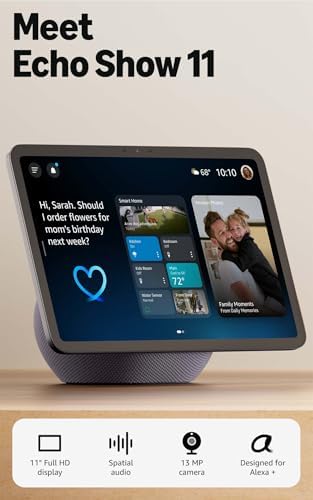
Amazon Echo Show 11 — Premium Hub, Biggest Screen
- New size, more viewing area: The 11“ smart display features a vibrant Full-HD touchscreen with 60% more viewing area ver…
- Content looks and sounds incredible: Watch shows on Prime Video, Netflix, and more on the vibrant Full-HD 11″ screen and…
- Your everyday assistant: The 11″ display makes it easy to see recipes and calendars at a glance, find meal inspo, and ma…
The Echo Show 11 is the premium pick, with a big 11-inch Full-HD screen — roughly 60% more viewing area than the Show 8 — plus a 13 MP auto-framing camera that keeps you in frame on calls as you move. Paired with room-filling spatial audio and a full smart-home hub, it’s the best choice (around $249.99) if you want your display to be the true command center of a connected office.
Automate Your Workspace with Smart Devices
This is the heart of a smart office. Once you connect a few devices to a voice assistant, you can stop managing your workspace manually and let routines do it for you. The magic moment is a single command:
“Alexa, start work mode.” In one breath, your office lights turn on, your monitor and desk lamp power up, the coffee maker starts brewing, and the temperature nudges toward your comfort zone — all before you’ve sat down. That’s not a gimmick; it’s a genuinely faster, calmer start to the day. Here are the building blocks that make it happen.
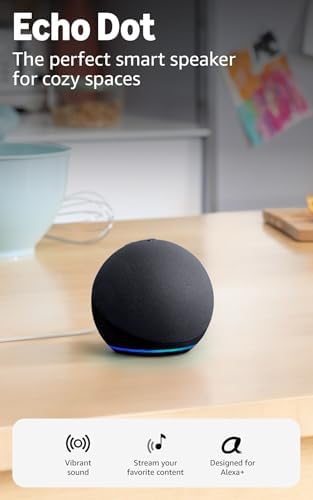
Echo Dot — Your Voice Assistant Hub
- Your favorite music and content – Play music, audiobooks, and podcasts from Amazon Music, Apple Music, Spotify and other…
- Alexa is happy to help – Ask Alexa for weather updates and to set hands-free timers, get answers to your questions and e…
- Keep your home comfortable – Control compatible smart home devices with your voice and routines triggered by built-in mo…
If you don’t need a screen, the Echo Dot is the cheapest way to add Alexa to your office — around $79.99. It’s the voice that runs your routines, sets timers and reminders, and controls every other smart device here. Handy bonus: the newest Dot has built-in temperature and motion sensors, so it can trigger automations on its own, like turning on a fan when the room warms up or starting your lights when you walk in.
Smart Power Strip — Control Everything at Once
- Surge protection: ETL-certified surge protection shields sensitive electronics and appliances from sudden power surges.
The Kasa KP303 is the unsung hero of an automated desk. It gives you three individually controlled smart outlets plus two USB ports, so you can voice-control or schedule each device — monitor, lamp, charger — independently, with Alexa and Google Home and no hub required. Surge protection is built in, and it lands around $29.99. This single device is what makes “start work mode” actually power up your gear, and “end of day” actually shut it down. For more on what surge protection does and does not cover, see our UPS vs surge protector vs power strip explainer.
Smart Lighting — Set the Mood for Focus

- Segmented Dynamic Color: Featuring RGBICWW technology, this silver light bar offers tunable cool-to-warm white and vivid…
- Music Sync Lighting: The built-in mic detects ambient sound to dynamically sync color and effects. Enjoy ultra-responsiv…
- Matter-Supported Smart TV Lightbar: Voice-control colors, brightness & power via Alexa, Google Home. Create cozy scenes,…
Lighting quietly shapes how you feel and focus. Govee’s Smart LED Light Bars (around $54.99) add bright, color-tunable light behind your monitor or on your desk, controllable by voice or app. Set a cool, energizing scene for deep work and a warm, low glow to wind down — and tie it all into your routines so the right light arrives automatically.
Smart Thermostat — Comfort Without Leaving Your Chair
- Save up to 26% on your energy bills: ENERGY STAR certified. Automatically adjusts your temperature based on occupancy. C…
- Manage hot or cold spots in your home: The included SmartSensor ($50 dollar value) detects which rooms you’re actually u…
- See and talk to visitors from your thermostat: Stream a live view of your front door and use two-way talk to answer visi…
A cold or stuffy office is a focus killer. The ecobee Smart Thermostat Premium (around $250) lets you set your office temperature by voice or schedule, learns your patterns, and includes sensors to balance comfort room by room. It even has a built-in air quality monitor and Alexa on board, so it pulls double duty as a comfort and automation device. Want the full automation stack? Our guide to the best smart devices for home office productivity goes deeper on plugs, lighting, and sensors.
Organize Your Desk
A cluttered desk is a cluttered mind. Physical organization may be the least “smart” part of this guide, but it has an outsized effect on focus: when everything has a place, you spend less energy hunting for things and more on actual work.
The essentials are familiar — good cable management to tame the spaghetti behind your desk, a laptop stand to raise your screen to eye level, a headphone stand to keep your headset off the desk, and storage organizers for the small stuff. A docking station deserves special mention: with one cable, it connects your laptop to monitors, power, and peripherals, instantly de-cluttering your setup. And a wireless charger keeps your phone and earbuds topped up without another tangle of cables.
Wireless Charging Station — Tidy and Always Topped Up

- FAST CHARGE W/ THE LATEST Qi2 TECHNOLOGY: Conveniently fast charge your iPhone or Qi2 devices up to 25W on the magnetic …
- ULTRA-FAST CHARGING FOR ALL YOUR DEVICES: With Belkin 3 in 1 wireless charging you can charge an iPhone from 0-50% in 29…
- SIMULTANEOUS CHARGING, EASY ALIGNMENT: Wirelessly charge your iPhone, Apple Watch, and AirPods at the same time to prepa…
The Belkin Qi2 3-in-1 foldable stand (around $99.99) charges your phone, watch, and earbuds from a single compact, foldable stand — replacing three cables with one tidy spot on your desk. It props your phone at a viewing angle while it charges, so you can glance at notifications without picking it up. A small thing that makes the desk feel instantly more organized.
Protect Your Equipment
You’re about to have a lot of valuable, productivity-critical gear on one desk. Protecting it — and the work on it — is the step most people skip until the day a storm or outage costs them hours of work or a piece of hardware.
A few safeguards cover most risks. A UPS battery backup keeps your computer and router running through short outages, giving you time to save and shut down safely (and keeping your Wi-Fi alive on battery). A good surge protector guards against spikes. Automatic cloud backups mean a dead drive never means lost work. And basic cybersecurity hygiene — a password manager, a reputable VPN for public networks, and current software — protects the data itself.
UPS Battery Backup — Stay Online Through Outages
- KEEP YOUR COMPUTER, WI-FI AND ROUTER RUNNING THROUGH POWER OUTAGES: Supplies short-term battery power during outages to …
- POWER PROBLEMS DON’T ONLY HAPPEN DURING STORMS: 23 minutes of runtime (at 100W load) guards against outages, while surge…
- PROTECT EVERYTHING ON YOUR DESK: 5 well-spaced outlets with full battery backup and surge protection, plus 2 surge-only …
The APC Back-UPS BE600M1 (around $79.99) is the affordable insurance every home office should have. Its five battery-backed outlets keep your computer, modem, and router running during a blackout — enough time to save your work and shut down cleanly, or to ride out a brief flicker without dropping your call. Two more outlets add surge-only protection, and a USB port keeps your phone charged when the lights are out.
Make Your Office Comfortable
Comfort isn’t a luxury — it’s productivity infrastructure. Discomfort is a constant, low-level distraction, and over months and years, a poor setup takes a real toll on your body. Investing in comfort pays off in both focus and health.
The big levers are an ergonomic chair that supports your back, a standing desk (or converter) so you can alternate sitting and standing, and monitor arms to position your screens at eye level. Smaller touches add up too: a footrest, good desk lighting to reduce eye strain, a few indoor plants for a calmer space, and noise reduction — whether that’s a quality headset or a door you can close.
Smart Desk Lamp — Better Light, Less Eye Strain
- RGBICWW Technology & Upgraded Illumination: Enjoy multi-color displays, 500lm brightness (higher than previous models), …
- Newly Preset Modes: With 64+ diverse preset scenes and 8 music syncing modes, this smart table lamp can enrich your part…
- Matter Suppported: Beyond Alexa, Google Home, and SmartThings, the bedside lamp supports HomeKit via Matter. Seamlessly …
Good task lighting reduces eye strain and keeps you alert through the afternoon slump. The Govee RGBIC Smart Table Lamp 2 (around $79.99) offers adjustable, color-tunable light with dozens of scene modes, controllable by voice, app, or touch, and it works with Matter and Alexa so it folds neatly into your routines. Cool and bright when you need to focus, warm and soft when you’re winding down.
Air Purifier — Clearer Air, Clearer Head
- 𝐋𝐀𝐑𝐆𝐄-𝐑𝐎𝐎𝐌 𝐏𝐄𝐑𝐅𝐎𝐑𝐌𝐀𝐍𝐂𝐄: AHAM VERIFIED with the following CADR ratings; Smoke: 231 CFM; Dust: 240 CFM; Pollen: 259 CFM; d…
- 𝟑-𝐒𝐓𝐀𝐆𝐄 𝐅𝐈𝐋𝐓𝐑𝐀𝐓𝐈𝐎𝐍: Pre-filter captures dust, lint, fibers, hair and pet fur; main filter captures 99.97 percent down to…
- 𝐀𝐈𝐑 𝐐𝐔𝐀𝐋𝐈𝐓𝐘 𝐑𝐄𝐒𝐏𝐎𝐍𝐒𝐄: AirSight Plus laser dust sensor detects PM2.5 levels and displays the reading in real time, then A…
Air quality affects how clearly you think, and a closed-up home office can get stale fast. The Levoit Core 400S (around $219.99) is a smart, app- and voice-controlled purifier with true-HEPA filtration for rooms up to about 1,733 sq ft, with a real-time air quality display and auto mode that ramps up only when needed. A quiet upgrade you feel more than you notice.
Smart Home Office Checklist
Here’s the full build in one place. Use it as a shopping list and tick items off as your office comes together — you don’t need everything at once, so start at the top and work down.
- Reliable computer (desktop, laptop, or mini PC)
- Fast Wi-Fi router
- Large or dual monitor
- Quality webcam
- Smart display (Echo Show)
- Smart lighting
- Smart plugs / power strip
- UPS battery backup
- Cable management
- Ergonomic chair
- Standing desk
- External / cloud storage
- Docking station
Frequently Asked Questions
What is a smart home office?
A smart home office is a workspace where your devices are connected and, where possible, automated — so the room helps you work instead of demanding attention. It typically combines core gear (computer, Wi-Fi, monitor, webcam) with smart devices like displays, plugs, lighting, and voice assistants that handle routine tasks hands-free through apps and routines.
Do smart home devices improve productivity?
Yes, mostly by removing small frictions that add up. Smart displays keep your schedule glanceable, voice assistants handle reminders and timers without breaking your focus, and automations (like a single “work mode” command) eliminate repetitive setup. None of it is dramatic on its own, but together it gives you a faster, calmer, more focused workday.
What smart devices are worth buying first?
Start with the foundation — a reliable computer, fast Wi-Fi, a good monitor, and a webcam — since nothing else matters if those are weak. For your first smart additions, a smart display (like an Echo Show 8) and a smart plug or power strip give you the most immediate payoff: a glanceable hub plus voice control over your gear. Add lighting, a thermostat, and automation from there.
How much does it cost to build a smart home office?
It scales to your budget. The smart-device layer alone — a display, an Echo Dot, a smart power strip, and smart lighting — can be assembled for a few hundred dollars. A complete build including computer, monitor, webcam, ergonomic furniture, and protection runs more, but the key is that you don’t buy it all at once. Add pieces over time and spread the cost.
Is Alexa useful for remote workers?
Very. Alexa handles hands-free timers, reminders, and to-do lists, reads out your calendar, answers quick questions, and controls your lights, plugs, and thermostat by voice — all without pulling you away from your screen or into your phone. On an Echo Show, it also shows your schedule at a glance and supports video calls.
What is the best smart display for productivity?
For most home offices, the Amazon Echo Show 8 hits the best balance of screen size, audio, camera quality, and price. Choose the smaller Echo Show 5 if desk space or budget is tight, or step up to the larger Echo Show 11 if you want a premium command center for a fully connected office.
Final Thoughts
Building the ultimate smart home office isn’t about buying everything in one weekend — it’s about layering the right pieces over time. Start with the essentials that everything else depends on: a reliable computer, fast Wi-Fi, a quality monitor, and a good webcam. Once that foundation is solid, add smart displays, voice automation, and the ergonomic upgrades that make long days easier on your body and your focus.
Do it gradually and intentionally, and your office stops being a collection of gadgets and becomes a system that genuinely works for you. When you’re ready to dig into any individual piece, explore our in-depth buying guides for laptops, monitors, routers, webcams, and more — and build the workspace you actually want to spend your day in.
Keep Building Your Home Office
Explore the guides referenced throughout this article:
- Best Desktop Computers 2026
- Best Business Laptops 2026
- Best Home Office Monitors 2026
- Best Wi-Fi Routers 2026
- Wi-Fi 7 vs Wi-Fi 6: Which Should You Buy?
- Best Webcams 2026
- How Smart Displays Boost Home Office Productivity
- Best Smart Devices for Home Office Productivity 2026
- Best Smart TVs for Home Offices 2026
Why You Can Trust Smart Tech Buying
Every recommendation is based on extensive product research, manufacturer specifications, customer feedback, long-term reliability, value, and suitability for real-world use. When we have personal experience with a product, we include those insights. We regularly review our guides to keep recommendations current as new products are released.