

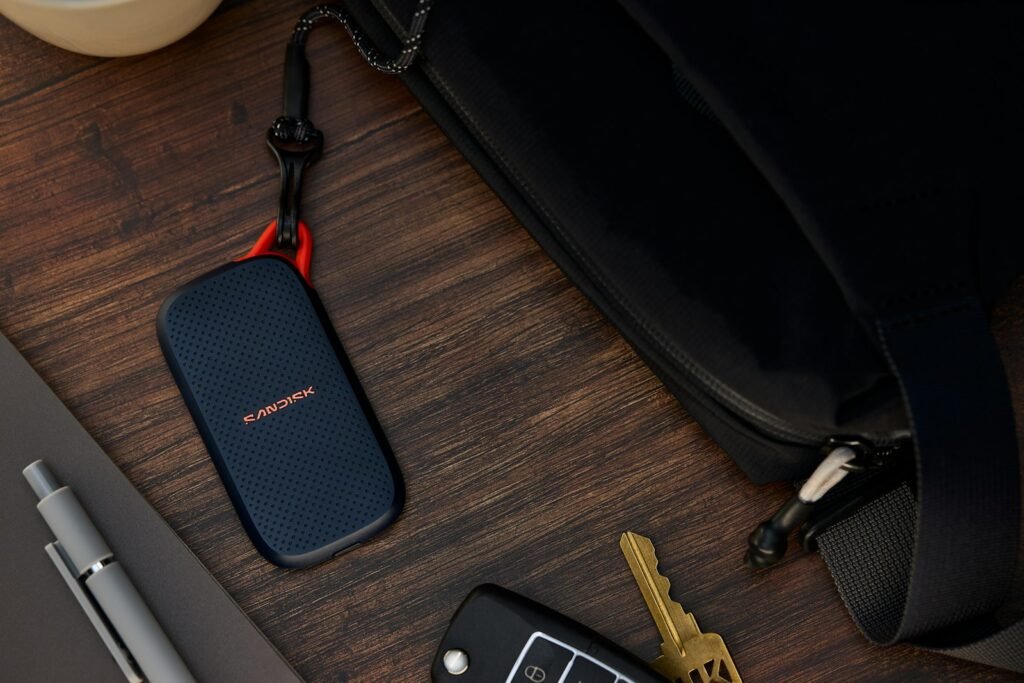
Best External SSDs for Business
Eight drives we'd trust with real business data – judged on reliability, encryption and sustained speed, not just peak numbers.
A business runs on its files. Contracts, client work, financial records, design assets, video footage, virtual machines — lose them, and you lose time, money, and trust. An external SSD is the fastest, most portable way to move that data, back it up, and carry a working copy between machines. But the drive that is right for a gamer or a casual user is often the wrong choice for a business, where reliability, encryption, warranty, and sustained performance matter far more than a flashy peak speed.
I have spent years specifying, deploying, and troubleshooting storage for offices and remote teams, and the questions are always the same: Which drives actually hold up? Which ones protect data if a laptop bag goes missing? When is a slower drive the smarter buy? This guide answers all of that. Every recommendation below is currently available, chosen for real business use, and judged on the things that count when the data is your livelihood.
The best external SSDs for business in 2026
These eight drives cover every realistic business need, from a pocket backup drive to a Thunderbolt 5 powerhouse for video teams. We deliberately left off the Crucial X9 Pro and X10 Pro — long-time favorites — because Micron is winding down its consumer Crucial line through 2026, and we will not point you at drives that are disappearing from shelves. We also explain, further down, why we did not name a popular rugged drive that has a troubled reliability history.
1. Samsung Portable SSD T9
Best for: The all-purpose office drive — fast daily work, secure backups, and large transfers, with the broadest reliability track record.
The T9 is the drive I hand most businesses without a second thought. It runs on the USB 3.2 Gen 2×2 (20 Gbps) interface for rated speeds up to 2,000 MB/s read and 1,950 MB/s write, which is roughly twice what a standard 10 Gbps drive delivers. More important for business, it pairs that speed with built-in hardware encryption you control with a password through Samsung’s software, an aluminum body wrapped in a grippy rubber skin that survives drops up to three meters, and a five-year warranty. Samsung’s “Dynamic Thermal Guard” keeps the case below uncomfortable temperatures during long copies, and the TurboWrite buffer keeps big transfers fast for longer.
Pros
- Fast 20 Gbps performance (up to ~2,000 MB/s)
- Hardware encryption with password
- Excellent reliability reputation; 5-year warranty
- Strong thermal control and Magician monitoring software
Cons
- Full speed needs a 20 Gbps (Gen 2×2) port
- The rubber finish attracts dust and lint
- Physical damage is not covered by warranty
Bottom line: If you want one drive that does everything well for an office or a remote worker, the T9 is the safe, sensible pick. The combination of speed, hardware encryption, and Samsung’s reliability record is hard to beat.

- NONSTOP SPEED: Race through projects with our fastest SSD for creators; Load, edit and transfer with sustained read and …
- DYNAMIC THERMAL GUARD: When you’re elbow-deep in a passion project, the T9 Portable SSD stays cool; Its advanced thermal…
- ADAPTS TO EVERY NEED: Whether you’re using a desktop, camera or a gaming console3, count on the T9 Portable SSD for exte…
2. Samsung T7 Shield
Best for: Business travelers, field staff, and anyone who works outside a tidy desk — the best dust and water protection in its class.
The T7 Shield is the toughest mainstream pocket SSD you can buy, and it is the one I recommend for people who actually leave the office. Its rubberized shell carries an IP65 rating, meaning full dust protection and resistance to water jets — better sealing than the IP55 you get on most rivals — plus three-meter drop resistance. Speeds top out around 1,050 MB/s read and 1,000 MB/s write on the 10 Gbps interface, which is plenty for documents, photo libraries, and field backups. It also includes hardware encryption. The trade-off versus the T9 is speed and a shorter three-year warranty.
Pros
- Class-leading IP65 dust and water resistance
- Survives three-meter drops; grippy, slim body
- Hardware encryption included
- Consistent, dependable real-world performance
Cons
- Half the peak speed of 20 Gbps drives
- Three-year warranty, not five
- No 20 Gbps or USB4 option
Bottom line: For a drive that travels, gets tossed in a bag, and occasionally meets rain or dust, the T7 Shield is the most trustworthy choice on this list. Speed is secondary when durability is the job.

- GO THE DISTANCE: Withstand whatever adventure with the wildly reliable T7 Shield; It’s designed for the elements with wa…
- YOUR CONTENT CAPTURED: Take on the project, then transfer all your heavy files within seconds with the USB 3.2 Gen 2 Por…
- SHARE IDEAS IN A FLASH: The T7 is embedded with PCIe NVME technology that brings you fast read and write speeds up to 1,…
3. WD My Passport SSD
Best for: Simple, secure backups for a single laptop or a small office, with password protection that anyone can set up.
The My Passport SSD is the drive I point non-technical staff toward when the priority is “back up my laptop and keep it private.” It pairs password-enabled hardware encryption with WD’s easy Security and backup software, and it is compatible with Apple Time Machine after a quick reformat. Speeds reach up to 1,050 MB/s read and 1,000 MB/s write over the 10 Gbps interface, capacities run up to 4TB, and it is backed by a five-year warranty. The metal shell is sleek but on the thin side, so it is shock and drop resistant to about 6.5 feet rather than built like a tank.
Pros
- Hardware encryption with simple software
- Genuinely easy backup setup for non-technical users
- Capacities up to 4TB; five-year warranty
- Time Machine compatible for Mac users
Cons
- 10 Gbps speeds, not the fastest here
- Thinner metal case feels less rugged
- No IP dust/water rating
Bottom line: A dependable, secure backup drive that ordinary employees can actually use without help. Not the fastest, but speed is rarely the point for scheduled backups.

- Blazing fast NVMe technology with speeds of up to 1050MB/s and write speeds of up to 1000MB/s. | Based on reading speed …
- Password enabled 256-bit AES hardware encryption
- Shock and vibration resistant. Drop resistant up to 6.5ft (1.98m)
4. Samsung T9 2TB
Best for: Power users who want the fastest speed a standard USB-C port can deliver — large transfers, editing, virtual machines.
The T9 is the fastest drive here that does not require a Thunderbolt port. Over USB 3.2 Gen 2×2 it is rated up to 2,000 MB/s read and write, roughly double a 10 Gbps drive, and Samsung pairs that with a rubberized shell rated for a two-meter drop. The important practical detail is sustained performance: the T9 uses a dynamic thermal guard that holds speed through long writes instead of collapsing a few gigabytes into a transfer, which is what separates a working drive from a benchmark drive. At 2TB it is the capacity most people actually want for project files.
Pros
- Up to 2,000 MB/s over standard USB-C
- Holds speed through long sustained writes
- Two-meter drop rating and a five-year warranty
- Hardware encryption built in
Cons
- Needs a Gen 2×2 port for full speed; many laptops only do 10 Gbps
- Costs more per terabyte than a 10 Gbps drive
- Not IP-rated against water or dust
Bottom line: The speed pick for anyone without Thunderbolt. Check that your laptop supports USB 3.2 Gen 2×2 before paying for it, because on a 10 Gbps port you are buying headroom you cannot use.
- NONSTOP SPEED: Race through projects with our fastest SSD for creators; Load, edit and transfer with sustained read and …
- DYNAMIC THERMAL GUARD: When you’re elbow-deep in a passion project, the T9 Portable SSD stays cool; Its advanced thermal…
- ADAPTS TO EVERY NEED: Whether you’re using a desktop, camera or a gaming console3, count on the T9 Portable SSD for exte…
Delivery note: this one currently ships from a marketplace seller rather than from Amazon. The listing is genuine and the price is live, but delivery and returns run through that seller rather than through Amazon.
5. OWC Envoy Ultra (Thunderbolt 5)
Best for: Video editors, photographers, and data-heavy teams on the newest Thunderbolt 5 Macs and PCs who need internal-drive speed externally.
This is the fastest portable drive on the list and one of the first true Thunderbolt 5 SSDs. OWC rates it above 6,000 MB/s read and write — up to twice as fast as Thunderbolt 4 or USB4 — with sustained writes of around 1,350 MB/s on the 2TB model and 1,700 MB/s on the 4TB. It is fanless yet stays cool, sealed to an IP67 crush-, dust-, and waterproof rating, bus-powered through a built-in cable, and covered by a five-year warranty. It is overkill for ordinary office work, and you only reach top speed on a native Thunderbolt 5 machine, but for moving 4K and 8K footage it is in a class of its own.
Pros
- Over 6,000 MB/s — internal-drive speed externally
- Rugged IP67 sealed body; silent fanless design
- Backward compatible with TB4/TB3/USB4
- Five-year OWC warranty; capacities up to 8TB
Cons
- Full speed needs a Thunderbolt 5 host
- Premium pricing; overkill for office tasks
- Built-in (captive) cable can’t be swapped easily
- No built-in hardware encryption (use OS encryption)
Bottom line: The drive to buy when speed genuinely pays for itself — offloading camera cards on location, shuttling large media between editors, or matching internal storage performance without Apple’s upgrade pricing.

- Ultra-Fast: Over 6000MB/s…up to 2x faster than Thunderbolt 4 and USB4
- Ultra Maximizer: Gets the most speed possible from Thunderbolt 3, Thunderbolt 4, and USB4 machines
- Ultra Ready: Easily handle daily data needs to pro level creative projects while matching internal storage performance
6. SanDisk Extreme Portable SSD (2025)
Best for: Field workers and travelers who want 20 Gbps speed in a drive that survives being thrown in a bag, a van or the rain.
SanDisk’s refreshed Extreme Portable is the rare drive that is both quick and genuinely rugged. It runs transfer speeds up to about 2,000 MB/s over USB-C — the same 20 Gbps class as the fastest drives here — while keeping the IP65 water and dust rating, silicone shell, carabiner loop and up to 3m drop protection that made this line a site-work staple. The previous generation ran at half this speed, so the old trade of survivability against throughput is simply gone.
One listing covers 1TB, 2TB and 4TB, so choose the capacity at checkout; we price the 2TB here. It is a newer listing (4.6★ across 199 ratings so far), so the review base is still growing even though the Extreme line itself has been a business-travel staple for years. SanDisk advertises 256-bit AES encryption on this line, but for business data we would still turn on OS-level BitLocker or FileVault.
Pros
- Fast 20 Gbps class, up to ~2,000 MB/s transfers
- IP65 water and dust resistance, up to 3m drop protection
- Carabiner loop and silicone shell for site work
- 1TB, 2TB and 4TB available on the same listing
Cons
- Newer listing, so the review base is still small (199 ratings)
- Pricier per gigabyte than the value picks
- IP65 covers splashes and dust, not submersion
Bottom line: The drive to buy if it will live in a bag rather than on a desk — and now it has the speed to sit alongside the fastest picks here rather than below them.

- NEARLY 2X FASTER THAN OUR PREVIOUS GENERATION(8) – move 1,000 high-res photos in under 60 seconds(6) with up to 2000MB/s…
- IP65 RATING AND UP TO 3M DROP PROTECTION(3) – protects against spills and drops.
- POCKET-SIZED – fits easily in pockets and small bags.
7. SanDisk Extreme Portable 4TB
Best for: The team that keeps running out of room — the most storage of any pick on this list, in a drive rugged enough to travel.
This is the same drive as our rugged all-rounder above, at double the capacity, and it earns its own place because 4TB is the most storage any pick here offers. SanDisk rates it at up to 2,000 MB/s over USB-C, with 256-bit AES encryption and password protection, an IP65 water and dust rating, up to 3 meters of drop protection and a five-year limited warranty. If one person holds the project archive, or a small team shares a single working drive, this is the capacity that stops the shuffling — and unlike a desk-bound archive drive, it still goes in a bag.
Pros
- 4TB — the most storage of any pick here
- Up to ~2,000 MB/s over USB-C
- 256-bit AES encryption with password protection
- IP65 water and dust resistance, up to 3 meters of drop protection
- Five-year limited manufacturer warranty
Cons
- It is the same drive as pick 6 — buy one capacity or the other, not both
- You are paying for room, not speed: it is the same ~2,000 MB/s as the 2TB
- IP65 covers splashes and dust, not submersion
Bottom line: Buy this instead of the 2TB above when capacity is the thing you keep running out of. Same drive, same protection, twice the room.
- NEARLY 2X FASTER THAN OUR PREVIOUS GENERATION(8) – move 1,000 high-res photos in under 60 seconds(6) with up to 2000MB/s…
- IP65 RATING AND UP TO 3M DROP PROTECTION(3) – protects against spills and drops.
- POCKET-SIZED – fits easily in pockets and small bags.
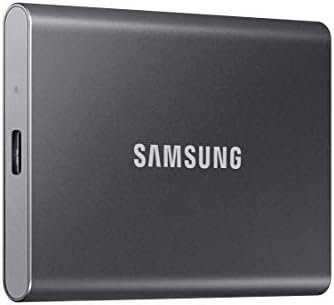
8. Samsung T7 1TB
Best for: Businesses buying several drives at once for staff backups and everyday transfers.
The plain T7 is the sensible volume buy. It has the deepest owner record of any drive here, at 12,206 ratings, runs up to 1,050 MB/s over USB 3.2 Gen 2, and weighs about as much as a credit card deck. It drops the T9’s Gen 2×2 speed and the Shield’s rubber armor, which is exactly why it costs less, and for handing a drive to each member of staff that is the right set of compromises.
Pros
- 4.7★ from 12,206 owners
- Hardware encryption with password protection
- Pocketable and light enough to forget you are carrying it
- Works with Windows, Mac and Android out of the box
Cons
- Half the speed of the T9 above
- No IP rating; the bare aluminum shell scratches
- Runs warm under sustained load
Bottom line: The one to buy in quantity. Cheapest per drive of the Samsung line while keeping the hardware encryption that matters for company data.
- MADE FOR THE MAKERS: Create; Explore; Store; The T7 Portable SSD delivers fast speeds and durable features to back up an…
- SHARE IDEAS IN A FLASH: Don’t waste a second waiting and spend more time doing; The T7 is embedded with PCIe NVMe techno…
- ALWAYS MAKE THE SAVE: Compact design with massive capacity; With capacities up to 4TB, save exactly what you need to you…
External SSD comparison table
| Drive | Interface | Read | Write | Capacities | Encryption | Warranty | Best for |
|---|---|---|---|---|---|---|---|
| Samsung T9 (1TB & 2TB) | USB 3.2 Gen 2×2 (20 Gbps) | ~2,000 MB/s | ~1,950 MB/s | 1–4TB | Hardware encryption | 5 yr | Best overall |
| Samsung T7 Shield | USB 3.2 Gen 2 (10 Gbps) | ~1,050 MB/s | ~1,000 MB/s | 1–4TB | Hardware encryption | 3 yr | Rugged travel |
| Samsung T7 | USB 3.2 Gen 2 (10 Gbps) | ~1,050 MB/s | — | up to 4TB | Hardware encryption | 3 yr | Volume buy |
| WD My Passport SSD | USB 3.2 Gen 2 (10 Gbps) | ~1,050 MB/s | ~1,000 MB/s | 500GB–4TB | Hardware encryption | 5 yr | Secure backup |
| OWC Envoy Ultra | Thunderbolt 5 | 6,000+ MB/s | 6,000+ MB/s* | 2–8TB | OS-level only | 5 yr | Max performance |
| Transcend ESD380C | USB 3.2 Gen 2×2 (20 Gbps) | ~2,000 MB/s | ~2,000 MB/s | 500GB–4TB | Software (Elite) | 5 yr | Rugged value |
| SanDisk Extreme Portable (2025) | USB 3.2 Gen 2×2 (20 Gbps) | ~2,000 MB/s | — | 1–4TB | 256-bit AES | — | Fast all-rounder |
| SanDisk Extreme Portable 4TB | USB 3.2 Gen 2×2 (20 Gbps) | ~2,000 MB/s | — | 4TB | 256-bit AES | 5 yr | Most storage here |
*OWC Envoy Ultra sustains roughly 1,350 MB/s (2TB) to 1,700 MB/s (4TB) on very long continuous writes after the initial burst. “OS-level only” means the drive has no built-in hardware encryption; use BitLocker (Windows) or FileVault/encrypted APFS (Mac) to secure it — equally strong and free.
How to choose an external SSD for business
Picking the right drive is less about the biggest number and more about matching the drive to the work. Here is how to think it through.
Interfaces: USB-C, USB 3.2, USB4 and Thunderbolt
The connector shape (USB-C) does not tell you the speed — the standard behind it does. This trips up a lot of buyers, so here is the plain-English version:
- USB 3.2 Gen 2 (10 Gbps): About 1,000 MB/s. The most common standard, and more than fast enough for backups, documents, and photo libraries. Works on nearly every modern computer.
- USB 3.2 Gen 2×2 (20 Gbps): Around 2,000 MB/s, but only if your computer has a 20 Gbps port. On a normal USB-C port these drives drop to 10 Gbps. Many PCs and most Macs do not have native 20 Gbps USB ports, so check before you pay for the speed.
- USB4 (40 Gbps): Up to roughly 3,800 MB/s. Found on newer laptops, and the practical sweet spot for high-speed work without Thunderbolt prices. It also runs at full speed on Macs, unlike 20 Gbps USB.
- Thunderbolt 4: Also 40 Gbps and common on recent Macs and premium PCs. Similar real-world speed to USB4 for storage.
- Thunderbolt 5: The newest standard, up to 80 Gbps, enabling drives that exceed 6,000 MB/s. Only on the latest hardware; worth it only if your machine has it and your work demands it.
The golden rule: a drive can only run as fast as the slowest link — the drive, the port, and the cable. Buy the drive that matches the port you actually have. If your laptop is short on the right ports, a good docking station can add the fast USB-C or Thunderbolt connection these drives need.
NVMe vs SATA, and what’s inside
Nearly every drive worth buying today uses fast NVMe flash rather than older, slower SATA-based SSDs. NVMe is what makes 1,000 MB/s-plus speeds possible. You rarely need to think about it — all eight picks here are NVMe-class — but if you see a suspiciously cheap “portable SSD” rated around 400–550 MB/s, that is older SATA technology and not worth it for business.
TLC vs QLC NAND, DRAM and SLC cache
Two technical details affect long-term reliability and sustained speed:
- TLC vs QLC NAND: TLC flash is more durable and faster under load; QLC is cheaper and used for higher capacities but wears faster and slows on big writes. For business data, lean toward TLC-based drives where you can. The mainstream picks here (Samsung, WD) use TLC-class flash.
- SLC cache: Most drives reserve a fast “cache” area to absorb large writes quickly. When that cache fills during a very large transfer, speed drops. That is why some drives feel fast at first, then slow on a huge copy — and why drives with bigger buffers hold their speed longer.
- DRAM: Many compact drives are “DRAM-less” to save space and cost, which is fine for backups and transfers. Some pricier drives keep DRAM, which steadies performance on bigger jobs. Heavy, sustained workloads benefit most from drives that manage heat and cache well.
Encryption: hardware vs software
For any business, encryption is not optional. If a drive is lost or stolen, encryption is the difference between an inconvenience and a data breach.
- Hardware encryption (the Samsung T9, T7 Shield and T7, the WD My Passport SSD, and both SanDisk Extreme Portables) is built into the drive. You set a password, and the data is scrambled at the hardware level — fast, simple, and tied to the drive itself.
- Software / OS encryption works on any drive. On Windows, BitLocker To Go encrypts an external drive in a few clicks; on Mac, you can format the drive as encrypted APFS or use FileVault. This is how you secure the drives here that lack built-in hardware encryption (the OWC Envoy Ultra, and the Transcend if you would rather not use its own software lock).
The takeaway: a drive without hardware encryption is still perfectly secure for business if you turn on OS-level encryption. Do not skip this step on any drive that leaves the building.
Rugged drives and IP ratings
If a drive travels, ruggedness matters. An IP rating tells you its dust and water resistance: the first digit is dust, the second is water. IP55 resists dust and light water spray; IP65 adds full dust-proofing and stronger water-jet resistance; IP67 and IP68 mean fully sealed and briefly submersible. Drop ratings (often two to three meters) and military drop-test standards indicate physical toughness. For field work, the T7 Shield (IP65) and OWC Envoy Ultra (IP67) lead on sealing, while the Transcend ESD380C is drop-resistant rather than IP-sealed — Transcend says its rubber case meets U.S. military drop-test standards. Important caveat: IP ratings apply when the drive is unplugged — never connect a wet drive.
Heat management
Fast drives generate heat, and heat causes throttling — the drive slows down to protect itself. This is why a drive can start a big transfer fast and then crawl. Metal bodies (most of these picks) spread heat well; Samsung’s Dynamic Thermal Guard and OWC’s heat-dissipating aluminum both manage it passively, with no fan to fail. For occasional transfers, heat rarely matters. For hours of sustained writes, choose a drive built to stay cool.
Mac and Windows compatibility
All of these drives work on both Windows and Mac, but most ship formatted as exFAT for cross-platform use. If you work entirely on Mac — especially with Time Machine — reformat to APFS first. If you are entirely on Windows and want BitLocker, NTFS is fine. The only friction is choosing one format up front; after that they just work. Thunderbolt 5 drives reach full speed only on machines with the matching port, but they still run (more slowly) on older USB-C connections. The same drives pair naturally with a clean desk setup — see our guide to the best home office monitors if you are building one out.
How much capacity do you need?
- 1TB: Fine for a single laptop backup, documents, and everyday transfers.
- 2TB: The business sweet spot — room for backups plus working files and some media.
- 4TB: For photo and video libraries, multiple machine backups, or virtual machines.
- 8TB: For a central archive or backup hub — on this list only the OWC Envoy Ultra reaches 8TB.
One honest note for 2026: an industry-wide flash shortage, driven by AI demand, has pushed storage prices up and tightened availability. Buy the capacity you need now rather than waiting for a price drop that may not come soon — and check the live listing, since stock moves.
External SSD vs external hard drive: which does your business need?
Hard drives still have a place, and it is worth being clear-eyed about the trade-off rather than assuming SSD is always the answer. The honest split:
- Choose an SSD for anything you touch regularly: working drives, laptop backups you restore from, drives that travel, or storage you run software and virtual machines off. SSDs are far faster, silent, have no moving parts to fail when dropped, and shrug off the bumps of daily carry.
- Choose a hard drive when you need a lot of cheap capacity for cold, off-site archives — the third copy in your backup plan that you rarely touch. Per terabyte, hard drives cost a fraction of SSDs, which matters when you are storing many terabytes of finished projects you simply want to keep.
For most small businesses the smartest setup uses both: a fast SSD as the everyday working-and-backup drive, and a high-capacity hard drive (or cloud) as the cheap off-site archive. You get speed where you feel it and capacity where it is cheapest.
A simple business backup strategy
An external SSD is a tool, not a backup plan by itself. The proven approach is the 3-2-1 rule: keep 3 copies of important data, on 2 different types of media, with 1 copy off-site. In practice for a small business: your working files on your computer (copy 1), a scheduled backup to an external SSD like the T9 or My Passport (copy 2), and a cloud or off-site copy (copy 3). If you back up several machines across the office to one drive or NAS, a fast, modern network helps — our explainer on Wi-Fi 7 vs Wi-Fi 6 covers whether an upgrade is worth it. One more SSD-specific tip: solid-state drives can slowly lose data if left completely unpowered for many months, so an SSD used purely for cold archival storage should be powered on occasionally. For long-term cold storage, a hard drive or cloud copy is the better off-site layer.
Quick picks by scenario
If you would rather skip straight to a recommendation, here is what I would buy for common business situations:
- Solo consultant or small office: A Samsung T9 (2TB) as your working-and-backup drive. Fast, encrypted, reliable — one drive that does it all.
- You travel constantly: A Samsung T7 Shield. The IP65 sealing and drop resistance are built for life in a bag.
- You just need secure laptop backups for staff: WD My Passport SSD drives — easy enough for anyone to set a password and schedule a backup.
- Small video or creative team: An OWC Envoy Ultra for the editors who need Thunderbolt 5 speed, a SanDisk Extreme Portable for everyone who wants 20 Gbps in a rugged shell, and a Transcend ESD380C for anyone who needs a drop-resistant drive on a budget.
- You want one central backup hub: A SanDisk Extreme Portable at 4TB on the main workstation, backing up over your network or on a schedule.
- Buying in bulk on a budget: Samsung T7 drives — the cheapest per drive here that still has hardware encryption built in.
Common mistakes to avoid
A few avoidable errors come up again and again. Steer clear of these and your data is far safer:
- Treating one SSD as “the backup.” A single drive is a single point of failure. If it is lost, stolen, or fails, the data is gone. Always keep a second copy elsewhere.
- Skipping encryption. An unencrypted drive that leaves the building is a breach waiting to happen. Turn on hardware or OS-level encryption from day one.
- Paying for speed the computer can’t use. A 20 Gbps or Thunderbolt 5 drive on a basic USB-C port runs far below its rating. Match the drive to the port.
- Using an SSD for cold storage and forgetting it. SSDs left unpowered for a year or more can lose data. For long-term archives, use a hard drive or cloud, and power up archival SSDs occasionally.
- Never testing a restore. A backup you have never restored from is just hope. Periodically confirm you can actually recover files.
Frequently asked questions
What is the best external SSD for business overall?
For most businesses, the Samsung T9 is the best all-around choice. It combines fast 20 Gbps speeds, built-in hardware encryption, a strong reliability record, and a five-year warranty. If your priority is rugged travel, the Samsung T7 Shield is better; if it is simple secure backup, the WD My Passport SSD is ideal.
Do I really need an external SSD if I use cloud storage?
Cloud and local backups solve different problems. Cloud storage protects against fire, theft, and total hardware loss, but it depends on internet speed and a subscription. A local SSD gives you instant access, fast restores, and a copy you physically control. The best practice is to use both — that is the core of the 3-2-1 backup rule.
Is hardware encryption better than BitLocker or FileVault?
Both are secure. Hardware encryption is built into the drive and is simple to enable with a password, which is great for non-technical staff. Software encryption (BitLocker on Windows, FileVault or encrypted APFS on Mac) works on any drive and is equally strong. If a drive lacks hardware encryption, turning on OS-level encryption makes it just as safe for business use.
What is the difference between USB 3.2 Gen 2 and Gen 2×2?
Gen 2 runs at 10 Gbps (about 1,000 MB/s) and works on almost every computer. Gen 2×2 runs at 20 Gbps (about 2,000 MB/s) but only if your computer has a 20 Gbps port — otherwise the drive falls back to 10 Gbps. Many machines lack native 20 Gbps ports, so confirm yours before paying for the faster drive.
Do I need Thunderbolt 5 or USB4?
Only if you move very large files often — high-resolution video, large image libraries, or virtual machines — and your computer has the matching port. For everyday office work, backups, and documents, a 10 Gbps or 20 Gbps drive is plenty. USB4 is the value sweet spot for speed; Thunderbolt 5 is for professionals who genuinely need 6,000 MB/s.
How long do external SSDs last?
For typical business use, a quality external SSD should last many years — well beyond its warranty in most cases. Endurance is rated in terabytes written, which everyday backups and transfers rarely approach. The bigger risks are physical damage and loss, which is why ruggedness, encryption, and a solid backup strategy matter more than raw endurance numbers.
Will these drives work with both Mac and Windows?
Yes. Every drive here works on both. Most ship formatted as exFAT, which both systems read and write. If you are Mac-only and want Time Machine, reformat to APFS first; if you are Windows-only and want BitLocker, NTFS works well. Choose your format once and the drive just works after that.
Can I run software or virtual machines directly from an external SSD?
Yes, and it is a genuine advantage of SSDs over hard drives. A fast external SSD can run portable apps, host virtual machines, or serve as a scratch disk for editing. For that use, choose a faster interface (20 Gbps, USB4, or Thunderbolt) and a drive that manages heat well, since sustained workloads run hotter than simple file copies.
What capacity should a small business buy?
2TB is the sweet spot for most: enough for a full laptop backup plus working files. Choose 1TB for a single user with modest needs, 4TB for media-heavy work or backing up multiple machines, and the OWC Envoy Ultra (up to 8TB) if you need a central backup hub bigger than 4TB.
Are rugged drives worth the extra cost?
If the drive travels or works outside an office, yes. An IP-rated, drop-resistant drive like the Samsung T7 Shield survives the dust, bumps, and spills of real fieldwork. If your drive lives on a desk, a standard drive is fine and your money is better spent on capacity or speed.
Why are SSD prices higher in 2026?
An industry-wide shortage of NAND flash memory — driven largely by AI data-center demand — has pushed storage prices up and tightened availability across the board. It affects nearly every brand. The practical advice is to buy the capacity you need when you find it in stock rather than waiting indefinitely for prices to fall.
How do I securely erase an external SSD before reselling or retiring it?
If the drive uses hardware encryption, the simplest secure method is a cryptographic erase — resetting the encryption key through the manufacturer’s software (Samsung Magician, WD Security, and similar), which renders old data unrecoverable. Otherwise, use your operating system’s secure-erase or full-format option. For highly sensitive business data, encrypt the drive from day one so that wiping the key is always enough.
What is the fastest external SSD I can buy right now?
Among portable drives, Thunderbolt 5 models like the OWC Envoy Ultra is the fastest, exceeding 6,000 MB/s on a compatible machine. They only reach those speeds on a native Thunderbolt 5 port, so they make sense for video and data-heavy professionals on the newest hardware.
The bottom line
For most businesses, the Samsung T9 is the drive to buy: fast, encrypted, reliable, and well supported. Travelers and field staff should look at the Samsung T7 Shield; anyone who just wants secure, simple backups will be happy with the WD My Passport SSD. If speed pays for itself in your work, the OWC Envoy Ultra delivers Thunderbolt 5 performance for video and creative teams. Whatever you choose, remember that the drive is only half the job — turn on encryption, follow the 3-2-1 backup rule, and your business data stays both fast to reach and safe to keep.
Smart Tech Buying is reader-supported. When you buy through links on our site, we may earn an affiliate commission at no extra cost to you. We only recommend products we believe genuinely serve our readers, and our editorial choices are never influenced by commissions. Specifications are manufacturer-rated and current at the time of writing; always confirm details on the product listing before purchasing.
Why You Can Trust Smart Tech Buying
Every recommendation is based on extensive product research, manufacturer specifications, customer feedback, long-term reliability, value, and suitability for real-world use. When we have personal experience with a product, we include those insights. We regularly review our guides to keep recommendations current as new products are released.