


Best Smart Devices for a Home Office
Seven picks that earn desk space — display, audio, camera, climate, light, power and air.
The best smart device for home-office productivity in 2026 is the Amazon Echo Show 5. A compact smart display puts your calendar, timers, reminders and hands-free controls one glance away — the single most useful upgrade for a desk. From there, the right webcam, lighting, climate and air devices each remove a small daily friction that quietly drains focus.
By Authur C. Art, Founder & Lead Reviewer — Smart Tech Buying.
Disclosure: Smart Tech Buying is reader-supported. As an Amazon Associate we earn from qualifying purchases. This does not affect our recommendations or the price you pay.
A good laptop and fast internet are the price of entry for working from home. They are not what makes a home office productive. The difference between a desk you tolerate and one you actually do your best work at is usually a handful of small things: whether you can see your next meeting without alt-tabbing, whether you look professional on camera, whether the room is the right temperature and brightness at 4 p.m., and whether the air you breathe for eight hours is doing your concentration any favors.
That is where smart devices earn their place. The good ones automate the boring stuff, sharpen how you show up on calls, and remove the tiny interruptions that add up over a workday. The bad ones are gimmicks that sit in a drawer after a week. This guide is about the first kind. Below you will find one clear pick per job, real specifications, honest notes on performance, and a plain account of who each device is wrong for — because every one of them makes a trade-off. Prices and availability shift constantly, so use the buttons throughout to check the current price before you buy.
A quick note on ecosystems: most of these devices work with Amazon Alexa, Google Assistant and Apple HomeKit, but not always all three. We have flagged where it matters, because the smoothest smart office is one where your gear speaks the same language. If you are starting from scratch, pick a voice assistant first and buy toward it.
If you take a lot of meetings or calls, capturing them well is its own upgrade — see our guide to the best AI voice recorders for hands-free transcription and automatic summaries.
Quick Comparison: the Best Smart Devices for Home Office Use in 2026
| Device | Type | Works With | Best For | Rating |
|---|---|---|---|---|
| Amazon Echo Show 5 | Smart display, 5.5″ | Alexa | Best overall / scheduling | 4.2 |
| Sonos Era 100 | Smart speaker | Alexa, AirPlay 2 | Best audio & calls | 4.4 |
| Insta360 Link 2 | 4K AI webcam | Zoom, Teams, Meet | Best video meetings | 4.6 |
| ecobee Smart Thermostat Premium | Smart thermostat | Alexa, Siri, Google | Best comfort & savings | 4.3 |
| LIFX Color A19 | Smart bulb | Alexa, Google, HomeKit | Best lighting / focus | 4.4 |
| TP-Link Kasa EP25 (4-pack) | Smart plugs | Alexa, Siri, Google | Best budget automation | 4.2 |
| Levoit Core 400S-P | Smart air purifier | Alexa, Google | Best air quality | 4.7 |
What the 7 cost, side by side
Live Amazon prices, cheapest to dearest. Tap any row for the current price.
LIFX Color A19Best lighting / focus · 4.4★ (4,359)$24.98on Amazon TP-Link Kasa EP25 (4-pack)Best budget automation · 4.2★ (5,104)$41.99on Amazon Amazon Echo Show 5Best overall / scheduling · 4.2★ (73,072)$99.99on Amazon Insta360 Link 2Best video meetings · 4.6★ (1,563)$149.99on Amazon Sonos Era 100Best audio & calls · 4.4★ (2,820)$219.00on Amazon Levoit Core 400S-PBest air quality · 4.6★ (25,058)$219.99on Amazon ecobee PremiumBest comfort & savings · 4.3★ (4,190)$244.99on AmazonPrices fluctuate — tap any row for the live price on Amazon. These seven aren't rivals; they do different jobs. The bars show what each costs, not which is better.
Which ecosystem does it join?
The question that actually decides your shortlist — will it talk to what you already own?
Voice-assistant support per the manufacturer, as listed in the comparison table above. Three picks are ecosystem-agnostic and work with all of them — the thermostat, the bulb and the plugs — so they are safe buys whatever you already run. The Echo Show is Alexa-only by design, and the Sonos speaks Alexa plus AirPlay 2 rather than Google. The Insta360 Link 2 shows no marks because it is not a smart-home device at all: it is a webcam that talks to Zoom, Teams and Meet, and it earns its place in this guide on video quality, not on voice control. Apple support here means HomeKit or AirPlay, whichever the maker provides.
How We Picked the Best Smart Devices for Home Office Work
We start with the job, not the gadget. The best smart devices for home office work earn their place by removing one specific friction, not by adding another screen. For each slot we asked what specific friction it removes from a real workday, then weighed five things: whether it genuinely saves time or attention (not just novelty), how reliably it works day after day, how well it fits the major voice ecosystems, privacy and data handling, and total value once you account for any subscriptions or accessories. We cross-check verified owner reports against manufacturer specs and independent testing, and we name one clear pick per category. Where a device has a real catch — a missing ecosystem, a subscription wall, an imminent replacement — we say so plainly. That is the bar every one of the smart devices for home office use below had to clear.
Best Overall Smart Device for Productivity: Amazon Echo Show 5
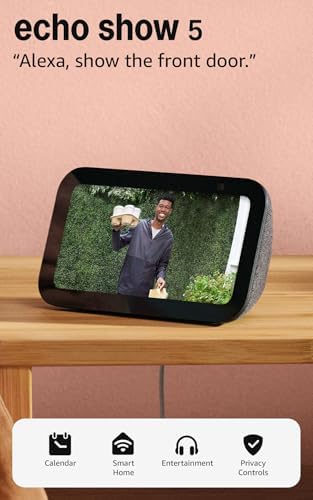
- Alexa can show you more – Echo Show 5 includes a 5.5” display so you can see news and weather at a glance, make video ca…
- Small size, bigger sound – Stream your favorite music, shows, podcasts, and more from providers like Amazon Music, Spoti…
- Keep your home comfortable – Control compatible smart devices like lights and thermostats, even while you’re away.
If you buy one smart device for your desk, make it a smart display — and the Echo Show 5 is the one that earns its footprint. The newest third-generation model pairs Alexa with a 5.5-inch touchscreen, so your agenda, timers, reminders and smart-home controls live in your peripheral vision instead of behind a browser tab. That glanceability is the whole point: the less you have to stop and dig for information, the longer you stay in flow.
Key specifications:
- Display: 5.5-inch touchscreen
- Assistant: Alexa, designed for the newer Alexa+ (free with a Prime membership)
- Audio: redesigned speaker with deeper bass and clearer vocals
- Camera: 2 MP front camera with a physical shutter for privacy
- Smart home: controls lights, plugs, thermostats and cameras; built-in support for compatible devices
- Footprint: compact, designed to sit on a desk or shelf
- Price: around $99.99 (frequently discounted to $50–65)
Why it works at a desk. The Echo Show 5 is at its best doing unglamorous things quickly: “Alexa, what’s on my calendar,” a five-minute focus timer, a reminder that doesn’t interrupt your screen, a quick video call, or turning the desk lamp off without getting up. The display turns Alexa from a voice you talk to into a dashboard you glance at, which is a meaningfully different experience for work.
Performance and privacy. The latest model is the fastest Show 5 yet, so smart-home commands and Alexa responses feel snappier than older units. A mic/camera off button and a built-in camera shutter address the most common privacy worry about putting a camera on your desk. The trade-off is ecosystem lock-in: this is an Alexa device, and it leans on a Prime membership for the best Alexa+ experience.
Pros
- The single most useful smart device for scheduling and glanceable info
- Excellent value, especially on sale; compact desk footprint
- Physical camera shutter and mic-off control for privacy
Cons
- Alexa-only; best features assume a Prime membership
- 5.5-inch screen is small for watching content or multitasking
- Sound is fine for a display, not a substitute for a real speaker
Who should buy it: anyone who wants their calendar, timers and smart-home controls one glance away. Who should skip it: committed Google or Apple households, who will get smoother results from a Nest or HomeKit-centric setup.
Best Smart Speaker for a Home Office: Sonos Era 100

- Powered by a 47% faster processor, the next-gen dual-tweeter acoustic architecture produces detailed stereo separation w…
- Place this speaker anywhere and everywhere you want to listen. The compact design fits beautifully on your bookshelf, ki…
- Stream from all your favorite services over WiFi. Pair a Bluetooth device with the press of a button. Connect a turntabl…
A smart display handles information; a great speaker handles everything you actually listen to all day — focus playlists, podcasts between meetings, and the audio side of calls. The Sonos Era 100 is the one we’d put on a working desk. It sounds dramatically better than the assistant pucks most people default to, and it stays flexible about how you feed it audio, which matters when you live across a Mac, a PC and a phone.
Key specifications:
- Acoustics: two angled tweeters plus a 25% larger midwoofer, driven by three Class-D amplifiers, for real stereo separation and bass
- Tuning: Trueplay automatically tunes the sound to your room
- Connectivity: Wi-Fi, Bluetooth, AirPlay 2, and line-in via the Sonos Line-In Adapter (sold separately)
- Voice: Amazon Alexa and Sonos Voice Control built in (no Google Assistant)
- Controls: touch surface; microphone hardware switch for privacy
- Build: compact, humidity-resistant; pairs with a second unit for stereo
- Price: around $219.00
Why it works at a desk. AirPlay 2 and Bluetooth mean you can send audio straight from a Mac, iPhone or laptop without fuss, and Wi-Fi streaming covers every major service. The sound quality genuinely helps on long days — clearer voices on podcasts and calls, and music that fills a home office from a single compact unit. Add a second Era 100 later and you have a stereo pair.
The honest trade-offs. Sonos dropped Google Assistant support, so your voice options here are Alexa or Sonos Voice Control. It’s also the priciest single-purpose device on this list, and spatial-audio content isn’t supported by its acoustic architecture. For a home office, none of those are dealbreakers — but if you want Google’s assistant or a budget speaker, look elsewhere.
Pros
- Easily the best sound here for music, podcasts and call audio
- Flexible inputs: Wi-Fi, Bluetooth, AirPlay 2 and optional line-in
- Trueplay room tuning; expandable to a stereo pair
Cons
- No Google Assistant (Alexa or Sonos Voice Control only)
- Most expensive single device on the list
- Line-in adapter and second speaker cost extra
Who should buy it: anyone who works to music or takes a lot of calls and wants genuinely good audio with AirPlay flexibility. Who should skip it: Google Assistant loyalists, or budget buyers who just need basic voice control.
Best AI Webcam for Video Meetings: Insta360 Link 2

- Premium Image Quality: Upgrade to Link 2 4K webcam with a 1/2″ sensor. Captures true-to-life webcam 4K visuals with HDR …
- Professional Audio: Experience best-in-class audio with advanced AI noise-canceling algorithms. Filter out unwanted back…
- True Focus: Insta360 Link 2 streaming camera with Phase Detection Auto Focus (PDAF). No more blurry shots—this web cam e…
Video meetings are where remote workers are judged, fairly or not, and a built-in laptop webcam does you no favors. The Insta360 Link 2 is the upgrade that makes you look like you take the job seriously. It’s a 4K camera on a motorized gimbal that physically pans and tilts to keep you framed as you move — true AI tracking, not the digital crop most “AI” webcams use.
Key specifications:
- Resolution: 4K with a 1/2-inch sensor and HDR for strong low-light performance
- Tracking: 2-axis gimbal physically pans and tilts to follow you (AI Tracking)
- Focus: Phase Detection Autofocus (PDAF) for fast, sharp focus
- Audio: dual mics with AI noise-canceling
- Modes: DeskView, Whiteboard and Portrait modes; gesture and smartphone control; privacy mode (lens tilts down when idle)
- Compatibility: Windows, macOS and major platforms (Zoom, Teams, Twitch); note — not compatible with ARM-based Windows or Windows Hello face recognition
- Price: around $149.99
Why it works at a desk. The gimbal tracking is the standout: stand up at a whiteboard, lean toward a second monitor, or shift in your seat, and the camera follows. DeskView tilts down to show your desktop for demos, and Whiteboard mode squares up and sharpens a physical board — both genuinely useful for presenting. The AI noise-canceling mics are a real step up from laptop audio.
The honest trade-offs. Check your hardware first: the Link 2 doesn’t work with ARM-based Windows machines (an increasingly common category) or with Windows Hello face sign-in. It’s also more camera than someone who takes the occasional call needs. But for anyone on video several hours a day, the professional polish is worth it.
Pros
- True motorized AI tracking keeps you framed as you move
- Excellent 4K image with strong low-light HDR
- DeskView and Whiteboard modes are great for presenting
Cons
- Not compatible with ARM Windows or Windows Hello
- Overkill (and pricey) for light webcam use
- Gimbal adds a little bulk versus a fixed webcam
Who should buy it: consultants, creators, coaches and anyone on camera for hours who wants to look polished. Who should skip it: occasional callers on ARM Windows laptops, or anyone who just needs a basic 1080p upgrade.
Best Smart Thermostat for a Home Office: ecobee Smart Thermostat Premium

- Save up to 26% on your energy bills: ENERGY STAR certified. Automatically adjusts your temperature based on occupancy. C…
- Manage hot or cold spots in your home: The included SmartSensor ($50 dollar value) detects which rooms you’re actually u…
- See and talk to visitors from your thermostat: Stream a live view of your front door and use two-way talk to answer visi…
Temperature is the productivity variable nobody thinks about until they’re shivering or sweating at their desk. A smart thermostat fixes it on a schedule and saves money while you’re heating or cooling a house you’re sitting in all day. The ecobee Smart Thermostat Premium is the most complete option, bundling a remote SmartSensor and a built-in air-quality monitor that the cheaper models leave out.
Key specifications:
- Included SmartSensor for occupancy and balancing temperature across rooms
- Built-in indoor air-quality monitor with alerts and filter reminders
- Radar-based occupancy detection; eco+ automation for energy savings (ecobee cites up to 26% on heating and cooling)
- Built-in speaker with your choice of Siri or Alexa; works with Apple HomeKit, Alexa, Google Assistant and SmartThings
- Optional smoke-alarm detection and security features (require an ecobee Smart Security subscription)
- Hardwired install; Power Extender Kit included; 3-year warranty
- Price: around $250
Why it works at a desk. The SmartSensor means the thermostat keeps your office comfortable, not just the hallway where the thermostat hangs. Occupancy sensing and eco+ trim energy use automatically, and the air-quality monitor nudges you when it’s time to change a filter — a small win for focus and wellness. Voice control through HomeKit, Alexa or Google fits whatever ecosystem you’ve chosen.
The honest trade-offs. It needs hardwired installation (the included Power Extender Kit helps, but it’s still a DIY electrical job), and the headline security features — smoke-alarm listening, intrusion alerts — sit behind a subscription. Siri control requires a compatible Apple home hub. As a comfort-and-savings device for a home office, though, it’s the class leader.
Pros
- Includes a SmartSensor and air-quality monitor others charge extra for
- Works with all three major ecosystems, plus SmartThings
- Real energy savings and automatic occupancy-based control
Cons
- Requires hardwired installation
- Advanced security features need a paid subscription
- More thermostat than a small apartment may need
Who should buy it: home-office workers who want a comfortable, energy-efficient room and like having one device tie into any ecosystem. Who should skip it: renters who can’t hardwire, or anyone who just wants basic scheduling on a budget.
Best Smart Lighting for Focus: LIFX Color A19

- BRIGHTNESS AND DIMMING: Enjoy 1100 lumens of vivid illumination from this LED smart light bulb, equivalent to a 75 W A19…
- FULL COLOR CONTROL: Explore billions of colors with RGB light bulbs technology and a 1500 to 9000 K white range. Create …
- ICONIC A19 DESIGN: Modern A19 bulb shape delivers balanced whole room coverage while enhancing pendants and exposed fixt…
Lighting affects alertness and eye strain more than most people realize, and the fix is cheap. The LIFX Color A19 is a bright, do-everything smart bulb that needs no hub: screw it into your desk lamp, connect it to Wi-Fi, and you can shift from energizing cool white during deep-work hours to warm, low tones as the day winds down — all on a schedule or by voice.
Key specifications:
- Brightness: up to 1100 lumens — among the brighter smart bulbs
- Color: full color plus tunable white (cool to warm)
- Connectivity: Wi-Fi (2.4 GHz), no hub or bridge required; standard A19 / E26 fitting
- Control: LIFX app, schedules, and Day & Dusk circadian automation; works with Alexa, Google Assistant and Apple HomeKit
- Lifespan: rated around 22 years of typical use
- Price: around $24.98 per bulb
Why it works at a desk. Cooler, brighter light during focus blocks helps alertness; warmer, dimmer light later reduces eye fatigue. The Day & Dusk schedule automates that shift so you don’t think about it, and because the radio is built into the bulb, there’s no hub to buy or maintain. It’s the lowest-effort way to make a workspace feel right at every hour.
The honest trade-offs. A single bulb is a starting point, not whole-room lighting, and Wi-Fi bulbs put a small load on your network as you add more (a dozen Wi-Fi bulbs is where hub-based systems start to look appealing). For a desk lamp or two, though, the no-hub simplicity and brightness are exactly right.
Pros
- Bright, vivid, with full color and tunable white for any time of day
- No hub required; works with all three major ecosystems
- Circadian scheduling automates focus-to-wind-down lighting
Cons
- One bulb only covers a lamp, not a whole room
- Wi-Fi bulbs scale less gracefully than hub-based systems
- Pricier per bulb than basic white smart bulbs
Who should buy it: anyone who works long hours under a desk lamp and wants better, schedulable light without a hub. Who should skip it: people lighting many fixtures at once, who may prefer a hub-based ecosystem like Hue.
Best Budget Productivity Upgrade: TP-Link Kasa Smart Plug EP25 (4-Pack)
- 【Apple Homekit Support】This Apple HomeKit compatible smart plug fully integrates into your Apple ecosystem, just ask Sir…
- 【Energy Monitoring and 15A Max Load】Use the smart Wi-Fi home plug to monitor your connected device’s energy usage in rea…
- 【Super Easy Setup】Enjoy an extremely easy and quick setup process with this Amazon Frustration-Free Setup (FFS) and Goog…
Smart plugs are the cheapest way to automate a workspace, and the Kasa EP25 four-pack is the one we recommend. Each slim plug turns a dumb device — a desk lamp, a fan, a coffee maker, a charging station, a space heater — into something you can schedule, control by voice, or switch off from your phone. Crucially, this version adds energy monitoring, so you can see exactly what your gear costs to run.
Key specifications:
- Energy monitoring: real-time and historical power use in the Kasa app
- Capacity: 15A / 1800W max load per plug
- Ecosystems: Apple HomeKit, Alexa, Google Assistant and SmartThings
- Automation: schedules, timers, countdowns and an away mode that simulates occupancy
- Design: compact “slim” body that won’t block the second outlet; UL certified; 2.4 GHz Wi-Fi; no hub required; 2-year warranty
- Price: around $41.99 for four
Why it works at a desk. Have your desk lamp and monitor power on with your morning routine, kill the space heater automatically at 6 p.m., or check from your phone whether you left the coffee maker on. Energy monitoring answers the “what’s actually drawing power” question, which is satisfying and occasionally money-saving. Four plugs for around $41.99 makes this the easiest entry point into a smart office.
The honest trade-offs. Smart plugs do simple things — they switch power on and off — so don’t expect them to make a “dumb” appliance truly smart beyond scheduling. HomeKit remote control needs a home hub (an Apple TV or HomePod), and like all of these, they’re 2.4 GHz Wi-Fi only. None of that dims the value.
Pros
- Four plugs for around $41.99 — outstanding value
- Energy monitoring and full ecosystem support including HomeKit
- Slim design, easy setup, no hub needed
Cons
- Only switches power; can’t add real “smarts” to an appliance
- HomeKit remote access needs an Apple home hub
- 2.4 GHz Wi-Fi only
Who should buy it: anyone who wants to automate desk gear cheaply and see what it costs to run. Who should skip it: people who need to control high-draw appliances beyond a single plug’s rating.
Best for Air Quality: Levoit Core 400S-P Smart Air Purifier

- 𝐋𝐀𝐑𝐆𝐄-𝐑𝐎𝐎𝐌 𝐏𝐄𝐑𝐅𝐎𝐑𝐌𝐀𝐍𝐂𝐄: AHAM VERIFIED with the following CADR ratings; Smoke: 231 CFM; Dust: 240 CFM; Pollen: 259 CFM; d…
- 𝟑-𝐒𝐓𝐀𝐆𝐄 𝐅𝐈𝐋𝐓𝐑𝐀𝐓𝐈𝐎𝐍: Pre-filter captures dust, lint, fibers, hair and pet fur; main filter captures 99.97 percent down to…
- 𝐀𝐈𝐑 𝐐𝐔𝐀𝐋𝐈𝐓𝐘 𝐑𝐄𝐒𝐏𝐎𝐍𝐒𝐄: AirSight Plus laser dust sensor detects PM2.5 levels and displays the reading in real time, then A…
You breathe your home-office air for eight-plus hours a day, and air quality has a real effect on concentration and comfort. The Levoit Core 400S-P is the smart purifier we’d put in a working room: it covers a large space, monitors the air automatically, and reports what it finds to an app and an on-device display — so it’s not just cleaning, it’s telling you when it needs to.
Key specifications:
- Coverage: large rooms up to roughly 1,733 sq ft; AHAM Verifide
- Filtration: 3-in-1 system with a pre-filter, H13 True HEPA filter and activated carbon for odors and VOCs
- Sensing: AirSight Plus laser dust sensor with a real-time PM2.5 reading on the display
- Modes: Auto mode reacts to air quality; Sleep mode runs as quiet as 24 dB
- Smart control: VeSync app for settings, schedules, filter life and air-quality data; works with Alexa and Google Assistant
- Price: around $219.99 (often on sale lower)
Why it works at a desk. Auto mode means you set it and forget it — the purifier ramps up when the laser sensor detects particles and settles down when the air is clean. Sleep mode is quiet enough to leave running during calls, and the app lets you check air quality or schedule it around your workday. For anyone in a city, a home with pets, or an allergy-prone office, cleaner air is a low-key focus upgrade.
The honest trade-offs. Replacement filters are an ongoing cost (every 6–12 months depending on use), and full smart features live in Levoit’s VeSync app and account. It’s also sized for a large room — overkill for a tiny office, where a smaller, cheaper Core model would do. But as the do-it-all smart purifier for a real workspace, it’s the pick.
Pros
- True HEPA filtration with a real laser air-quality sensor and PM2.5 display
- Quiet auto and sleep modes; app scheduling and voice control
- Covers a large room and is AHAM Verifide
Cons
- Ongoing replacement-filter cost
- Smart features require the VeSync app and account
- Oversized for very small offices
Who should buy it: home offices in cities, homes with pets, or allergy sufferers who want cleaner air managed automatically. Who should skip it: tiny rooms, where a smaller purifier saves money and space.
How to Choose Smart Devices for Home Office Work
The right set of smart devices for home office work isn’t a pile of gadgets — it’s a few well-chosen pieces that talk to each other and remove daily friction. Here’s how to weigh the decisions that matter before you buy.
Start with one problem, not a shopping spree
Most people buy smart devices for home office use in the wrong order. Pick the single biggest drag on your workday and solve that first. If you’re always missing the start of meetings, get the smart display. If you look rough on camera, get the webcam. If your room is uncomfortable, start with climate or air. Smart offices are best built one solved problem at a time, then expanded — exactly as you confirm each piece actually helps.
Choose an ecosystem and buy toward it
The smoothest setup is one where everything answers to the same assistant. Decide between Amazon Alexa, Google Assistant and Apple HomeKit based on the phone and devices you already use, then favor gear that supports it. Most devices here work with two or three ecosystems, but not all — the Echo Show 5 is Alexa-only, the Sonos Era 100 dropped Google, and Siri on the ecobee needs an Apple home hub. The increasingly common Matter standard is making cross-brand setups easier, so a Matter-compatible device is a safer long-term bet.
Take privacy seriously
A productive office shouldn’t cost you your privacy. Look for hardware mic switches and camera shutters (the Echo Show 5 and Sonos Era 100 have mic controls; the Echo Show 5 and Insta360 Link 2 have physical camera privacy). Review what each app collects, keep firmware updated, and put smart devices on a network you trust. The convenience is only worth it if you’re comfortable with the data trade.
Mind the subscriptions and accessories
The sticker price isn’t always the real price. ecobee’s security features need a subscription; the Echo Show 5 leans on Prime; the Sonos line-in and a second speaker cost extra; air purifiers need replacement filters. None are dealbreakers, but factor them in so the device that looks cheapest is actually cheapest for how you’ll use it.
Favor easy setup and reliable apps
A smart device you fight with is a productivity drain, not a gain. Hub-free Wi-Fi devices (the LIFX bulb, the Kasa plugs) are the simplest to start with; just note that many Wi-Fi gadgets use 2.4 GHz, so make sure your router exposes that band. Reliable companion apps and regular updates matter more over the life of the device than any single spec.
Frequently Asked Questions
Are smart devices actually worth it for a home office?
Yes, when they solve a real problem. The best ones automate repetitive tasks, sharpen how you appear on calls, and keep your space comfortable — small wins that add up across a workday. The trick is buying for a specific friction (scheduling, video, lighting, comfort, air) rather than collecting gadgets.
Which smart assistant is best for productivity?
Amazon Alexa and Google Assistant both have strong productivity features, and Apple’s Siri works well within an Apple-centric setup. The best choice is usually the one tied to the phone and devices you already use, because keeping everything in one ecosystem makes voice control and automations far smoother.
Do I need a smart display, or is a speaker enough?
They do different jobs. A smart display like the Echo Show 5 is best for glanceable information — calendar, timers, reminders, video calls. A speaker like the Sonos Era 100 is best for what you listen to — focus music, podcasts and call audio. Many home offices benefit from both; if you can only pick one, choose the display for scheduling or the speaker for audio quality.
Can smart devices lower my energy bills?
They can help. A smart thermostat with occupancy sensing and eco-automation can cut heating and cooling costs (ecobee cites up to 26%), and smart plugs with energy monitoring let you find and switch off power-hungry gear. Smart bulbs use efficient LEDs and can be scheduled off automatically. The savings vary, but the visibility alone often changes behavior.
Will these devices work together if they’re different brands?
Often, yes — especially through a shared voice assistant or the Matter standard, which is designed to let devices from different brands work together. Before buying, check that each device supports your chosen ecosystem (Alexa, Google or HomeKit). Sticking to one assistant, or to Matter-compatible gear, avoids most cross-brand headaches.
How do I protect my privacy with smart-office devices?
Buy devices with hardware mic switches and camera shutters, review each app’s data settings, keep firmware updated, and consider a separate network for smart gadgets. Cameras and microphones on your desk are the most sensitive, so favor models — like the Echo Show 5 and Insta360 Link 2 — that give you physical control over the lens.
What’s the best smart device to buy first?
For most people, a smart display like the Echo Show 5: it’s affordable, immediately useful for scheduling and timers, and doubles as a hub for controlling other devices later. If your work is video-heavy, start with a good webcam instead. Solve your biggest daily friction first.
Do smart bulbs and plugs need a hub?
Not these. The LIFX Color A19 and Kasa EP25 plugs connect directly over Wi-Fi with no hub or bridge required, which makes them easy to start with. Just note they use the 2.4 GHz Wi-Fi band, so confirm your router supports it. Hub-based systems become more attractive only when you’re running many devices at once.
Key Takeaways: Smart Devices for Home Office Buyers
- Best overall: Amazon Echo Show 5 — the most useful single device for scheduling and glanceable info.
- Best audio & calls: Sonos Era 100 — far better sound than an assistant puck, with AirPlay 2 flexibility.
- Best video meetings: Insta360 Link 2 — true motorized AI tracking and excellent 4K.
- Best comfort & savings: ecobee Smart Thermostat Premium — SmartSensor and air-quality monitor included.
- Best lighting: LIFX Color A19 — bright, hub-free, tunable white for focus.
- Best budget automation: Kasa EP25 4-pack — four energy-monitoring plugs for around $41.99.
- Best air quality: Levoit Core 400S-P — true HEPA with a real air-quality sensor.
- Choose an ecosystem first, solve one problem at a time, and watch for subscriptions and accessories — the smart devices for home office setups that last are the ones bought deliberately.
Final Verdict: the Best Smart Devices for Home Office Productivity
The best smart devices for home office productivity are not the most numerous ones — the most productive setup is the one where a few well-chosen devices quietly remove friction all day. If you’re starting from scratch, the Amazon Echo Show 5 is the highest-impact first buy, and the Kasa plug four-pack is a near-free way to begin automating your desk. From there, add the Insta360 Link 2 if you live on video, the Sonos Era 100 if you work to audio, and the ecobee, LIFX and Levoit picks to dial in comfort, light and air. Pick a single voice ecosystem and buy toward it, mind the subscriptions, and add each device only once the last one has earned its place. Prices and stock move constantly, so use the buttons throughout this guide to check the current price before you buy. Whichever smart devices for home office work you land on, buy them one at a time and let each prove itself.
Build Out Your Home Office
Pair these smart devices with the right core gear and you’ve got a complete, productive setup. Read our companion guides next:
- Best Tablets for Remote Work & Home Offices 2026
- Best Home Office Monitors 2026
- Best Webcams 2026
- Best Headsets for Remote Work 2026
- Best Wi-Fi Routers 2026
- Best Docking Stations 2026
Why You Can Trust Smart Tech Buying
Every recommendation is based on extensive product research, manufacturer specifications, customer feedback, long-term reliability, value, and suitability for real-world use. When we have personal experience with a product, we include those insights. We regularly review our guides to keep recommendations current as new products are released.