

By Authur C. Art
Best UPS Battery Backup for Gaming PCs, Desktops & Home Offices
Eight units we'd actually plug a PC into – sized by real watts, not flattering VA numbers, with pure sine wave where it matters.
A power flicker that lasts half a second can crash an hours-long render, corrupt the file you forgot to save, drop you out of a client call, or knock your NAS offline mid-backup. A good UPS battery backup is the cheapest insurance you can buy against all of it — it sits between the wall and your gear and switches to battery in a few thousandths of a second, so your computer never even notices the lights went out.
The problem is that buying one is more confusing than it should be. The spec sheets are full of VA ratings that don’t match the watts you actually care about, half the outlets on the unit don’t even have battery backup, and there’s a quiet compatibility trap — simulated sine wave — that can make a cheap UPS reboot the very PC it was supposed to protect. Most buying guides skip right past all of that and just list whatever’s on sale.
This guide does the opposite. Below are eight UPS units I’d actually recommend in 2026 — for a desktop, a whole home office, a network closet, a gaming or creator rig, and a server — followed by a plain-English explainer of how a UPS works, how to size one correctly, and exactly what the jargon means. If you only remember one thing: for any modern computer, buy pure sine wave. I’ll explain why.
How I chose these
I focused on the things that actually matter for a home office or small business: pure sine wave output for computers with active-PFC power supplies, line-interactive topology with automatic voltage regulation (AVR), enough watt capacity for a real desk (not just a flattering VA number), a sensible split of battery-backup vs. surge-only outlets, user-replaceable batteries, and a USB connection for automatic shutdown software. Every product’s specifications, outlet configuration, and availability were verified against current manufacturer and retailer listings before publication.
I don’t test units in a lab, and I say so plainly. These picks come from spec analysis, manufacturer documentation, and the consensus of long-term owner and professional reviews — weighed against the buyer each unit is actually for. You can read more about the approach on our editorial standards page.
The 8 best UPS units at a glance
- Best overall — CyberPower CP1500PFCLCD
- Best premium — APC Back-UPS Pro BR1500MS2
- Best value — APC Back-UPS Pro BX1500M
- Best compact pure sine — CyberPower CP850PFCLCD
- Best for keeping the internet on — APC BE600M1
- Best for a high-end PC — APC Back-UPS Pro Gaming BGM1500B
- Best for servers & heavy loads — CyberPower PR1500LCD
- Best for a network closet — Tripp Lite SMART1500LCD
- Lithium (LiFePO4) — why we have no pick
1. CyberPower CP1500PFCLCD — Best overall UPS
Best for: the typical home-office desktop, monitor, and peripherals — the unit most people should buy.
If you want one recommendation and no homework, this is it. The CP1500PFCLCD pairs the two things that matter most — true pure sine wave output and a genuinely useful 1000W capacity — at a price that undercuts most of its pure-sine rivals. That extra 100 watts over the typical 900W competition is real headroom: it comfortably covers a desktop, two monitors, a router, and a couple of peripherals with room to spare, which means longer runtime and a battery that isn’t constantly stressed.
You get twelve outlets split evenly into six battery-backup-plus-surge and six surge-only, a color LCD that tilts up to 22° so you can read it from under a desk, and both USB-A and USB-C charge ports that keep a phone alive during an outage. Automatic Voltage Regulation quietly corrects brownouts and over-voltage without touching the battery, and the whole thing is backed by a three-year warranty that includes the battery plus a $500,000 connected-equipment guarantee. Expect roughly 10 minutes at half load — plenty to save everything and shut down gracefully, or ride out a brief outage entirely.
Pros
- True pure sine wave — safe for any active-PFC PC
- 1000W capacity beats most 900W rivals
- USB-C charging and a tilting color LCD
- Replaceable battery (cartridge RB1290X2)
Cons
- Mini-tower footprint takes some desk or floor space
- Lead-acid battery still needs swapping every 3–5 years
- No cloud monitoring without an add-on card
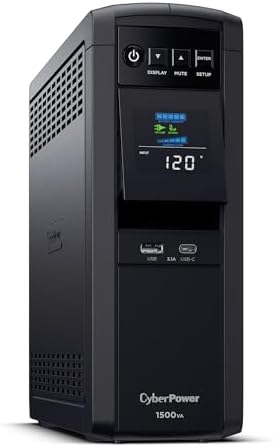
- 1500VA/1000W PFC Sinewave Uninterruptible Power Supply (UPS): Uses sine wave output to provide battery backup power for …
- 12 NEMA 5-15R OUTLETS: 6 battery backup & surge protected outlets, 6 surge protected outlets; INPUT: NEMA 5-15P right an…
- MULTIFUNCTION, COLOR LCD PANEL: Displays immediate, detailed information on battery and power conditions; Color display …
2. APC Back-UPS Pro BR1500MS2 — Best premium UPS
Best for: buyers who want APC’s build quality, PowerChute software, and the most polished hardware in the class.
APC essentially invented the consumer UPS, and the BR1500MS2 is the model that shows why the brand still commands a premium. It matches our top pick on the fundamentals — pure sine wave, line-interactive, AVR — and edges ahead on fit and finish, a crisp LCD, and the maturity of APC’s PowerChute shutdown software, which many IT-leaning users already know and trust. Ten outlets give you six with battery backup and four surge-only, and there are USB-A and USB-C charging ports up front.
The internal battery is rated for up to five years and uses the widely stocked APCRBC163 cartridge when it’s time, and APC quotes around 11 minutes of runtime at a 500W load. One thing to set straight: this is not the SmartConnect model, so it doesn’t include APC’s cloud monitoring — that feature lives on the pricier SMC/SMT Smart-UPS line. If you don’t need remote dashboards, you won’t miss it.
Pros
- Excellent build quality and a clean LCD
- Mature PowerChute software ecosystem
- Pure sine wave with USB-C charging
- Easy, well-stocked replacement battery
Cons
- 900W vs. the CyberPower’s 1000W for similar money
- No cloud monitoring (that’s the Smart-UPS line)
- Usually priced a step above our top pick

- 1500VA/900W – POWERS YOUR FULL SETUP: Handles demanding systems with real headroom. Up to 73 minutes of runtime at 100W …
- PURE SINE WAVE UPS – SAFE FOR SENSITIVE ELECTRONICS: Unlike basic UPS units that output simulated sine wave, this delive…
- AVR PROTECTS AGAINST BROWNOUTS & SPIKES: Automatically corrects voltage that’s too high or too low without switching to …
3. APC Back-UPS Pro BX1500M — Best value UPS
Best for: an office PC, networking gear, and AV setups where you want dependable APC backup and long runtime for the least money.
This is the value workhorse — APC’s best-selling home-office UPS, and the one you’ll see recommended everywhere. It pairs the same 1500VA/900W capacity as the premium pick with AVR, a clear LCD, and a long runtime for its class (APC quotes roughly 11 minutes at half load, and up to 68 minutes powering just a router and modem) for noticeably less than the pure-sine units above. You get ten outlets split into five battery-backup and five surge-only, plus built-in coaxial and Ethernet dataline protection. For an office PC with a standard power supply, a router and modem, a NAS, or a home-entertainment stack, it’s an easy, affordable yes.
The one honest caveat is the waveform: on battery the BX1500M outputs a stepped approximation to a sine wave rather than a true pure one. APC rates it active-PFC compatible, and in practice it runs the vast majority of desktops without complaint — but for a demanding modern gaming or workstation rig, the safest choice is still a genuine pure-sine unit that removes any doubt. If that’s your main machine, step up to a pure-sine pick (1, 2, or 4). For everything else, this is the most trusted UPS you can get for the money.
Pros
- Excellent capacity and runtime for the price
- Trusted APC build with AVR and a clear LCD
- Coax + Ethernet dataline protection built in
- Active-PFC compatible; USB shutdown software
Cons
- Stepped waveform — pure sine is safer for a demanding PC
- No USB charge ports for phones or tablets
- Lead-acid battery, 3–5 year lifespan

- 1500VA / 900W RELIABLE BACKUP POWER: The highest VA capacity available for home use; delivers short-term battery power t…
- TEN PROTECTED OUTLETS: Power your entire setup with 5 battery backup outlets for essential devices, and 5 surge-only out…
- AUTOMATIC VOLTAGE REGULATION (AVR): Corrects low voltage brownouts (88V+) and surges (+/-13%) without draining battery. …
4. CyberPower CP850PFCLCD — Best compact pure sine
Best for: a single PC or a tidy desk where you want clean power without a big mini-tower.
Not everyone needs 1500VA. If you’re protecting one computer and a monitor — especially a Mac mini, a small-form-factor PC, or a single-monitor setup — the CP850PFCLCD gives you the same pure sine wave protection as our top pick in a smaller, cheaper package. You still get active-PFC compatibility, AVR, a tilting color LCD, and a fast 4ms transfer time, plus phone/network (RJ11/RJ45) and coax line protection that the bigger units sometimes skip.
At 510W it’s sized for a modest load, and runtime lands around 11 minutes at half load. Don’t try to hang a power-hungry gaming rig or a second 4K monitor off it — size up if your desk draws more. But for a clean, compact, correctly-specified backup for one machine, it’s the smart minimalist choice and the cheapest way into genuine pure-sine protection.
Pros
- Real pure sine wave in a compact body
- Cheapest route to active-PFC-safe power
- Coax + network line protection included
- Fast 4ms transfer, tilting color LCD
Cons
- 510W ceiling — one PC and a monitor, not more
- Single battery means shorter runtime under load
- $250K guarantee (vs. $500K on larger units)
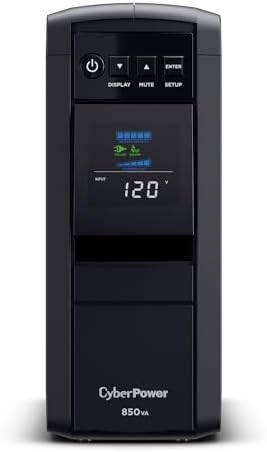
- 850VA/510W PFC Sine Wave Battery Backup Uninterruptible Power Supply (UPS) System designed to support active PFC and con…
- 10 NEMA 5-15R OUTLETS: Five battery backup & surge protected outlets; Five surge protected outlets; INPUT: NEMA 5-15P ri…
- MULTIFUNCTION, COLOR LCD PANEL: Displays immediate, detailed information on battery and power conditions; Color display …
5. APC BE600M1 — Best for keeping the internet on
Best for: keeping your router, modem, and a NAS alive for hours so you can work from a laptop through an outage.
Here’s the pick nobody tells you about. Your router and modem together draw only about 15–30 watts — which means a small, inexpensive UPS can keep your internet running for hours, not minutes. Pair the BE600M1 with a laptop on its own battery and you can work straight through most outages as if nothing happened. It’s also an ideal dedicated backup for a NAS or a small network shelf.
You get seven outlets (five with battery backup, two surge-only), a USB-A charging port, and APC’s usual surge protection, all in a footprint that tucks behind the desk. APC quotes around 23 minutes at a 100W load — and your networking gear draws far less than that, so real-world router uptime stretches much longer. It’s the cheapest high-impact UPS most people can buy, and many homes should own one in addition to a bigger unit on the main PC.
Pros
- Hours of router/modem uptime for very little money
- Compact and quiet — hides easily
- USB charging and five battery outlets
- Trusted APC surge protection
Cons
- 330W — not meant to back up a desktop PC
- Simulated sine wave (fine for network gear)
- Battery is serviceable, not tool-free

- KEEP YOUR COMPUTER, WI-FI AND ROUTER RUNNING THROUGH POWER OUTAGES: Supplies short-term battery power during outages to …
- POWER PROBLEMS DON’T ONLY HAPPEN DURING STORMS: 23 minutes of runtime (at 100W load) guards against outages, while surge…
- PROTECT EVERYTHING ON YOUR DESK: 5 well-spaced outlets with full battery backup and surge protection, plus 2 surge-only …
6. APC Back-UPS Pro Gaming BGM1500B — Best for a high-end PC
Best for: a powerful gaming or creator desktop, plus consoles — where clean power and a bit of style both matter.
A modern gaming or creator PC almost always uses an active-PFC power supply, which makes pure sine wave non-negotiable — a stepped-wave UPS can drop the system on battery transfer at exactly the wrong moment. The Back-UPS Pro Gaming delivers clean sine-wave power with a 1500VA/900W rating that suits a single high-performance rig, a monitor, and peripherals, and it handles a PS5 or Xbox Series X with ease.
APC dresses it up for a battlestation — customizable RGB lighting and a tilted “reactor” status display — but the substance is what counts: ten outlets (six battery-backup), dedicated USB-A and USB-C charging for controllers and phones, and the surge protection and AVR you’d expect from the Back-UPS Pro line. If your desktop is more about raw power than spreadsheets, this is the pick that won’t flinch when the grid does.
Pros
- Pure sine wave for demanding active-PFC rigs
- Handles a gaming PC, monitor, and console
- USB-C charging and a tilted status display
- RGB if you want it (it can be toned down)
Cons
- You pay a little for the gaming styling
- 900W ceiling — not for dual-GPU monsters
- RGB is wasted if it lives under the desk

- UNINTERRUPTED GAMEPLAY: Stay in the match even during power outages with 1500VA/900W of reliable battery backup designed…
- SINEWAVE POWER: Protect expensive hardware from damage with clean power that mimics utility electricity, ensuring your s…
- CUSTOMIZABLE RGB LIGHTING: Personalize your battle station with 12 customizable RGB LED colors that sync with your gamin…
7. CyberPower PR1500LCD — Best for servers & heavy loads
Best for: a home lab, a multi-bay NAS, or a workstation that needs the full 1500 watts and serious management software.
Most “1500VA” units top out around 900–1000 watts. The PR1500LCD is the one that delivers a full 1500 watts — a true 1:1 VA-to-watt ratio — which is exactly what you want for a dense, sustained load like a multi-drive NAS, a home server, or a power-hungry workstation that the lighter units would choke on. It’s pure sine wave (CyberPower’s Smart App Sinewave), line-interactive with AVR, and built for “always on” duty.
This is also the management pick: it ships with PowerPanel Business, supports graceful unattended shutdown across multiple machines, and accepts an optional remote-management card for SNMP/network monitoring. You get eight outlets, a detailed LCD, a three-year warranty, and a $375,000 connected-equipment guarantee. It costs more and gives you fewer outlets than the consumer towers — but if your load is genuinely heavy or mission-critical, nothing else here keeps up.
Pros
- Full 1500W — real headroom for servers/NAS
- Pure sine wave and robust AVR
- PowerPanel Business + optional SNMP card
- Built for continuous, critical operation
Cons
- More expensive than consumer 1500VA towers
- Only 8 outlets, no USB charging ports
- Overkill for a single everyday desktop

- 1500VA/1500W Sinewave Uninterruptible Power Supply (UPS): Uses sine wave output to provide battery backup power for Acti…
- EIGHT NEMA 5-15R OUTLETS: Provide battery backup and surge protection to safeguard corporate servers, department servers…
- EXTENDABLE MULTIFUNCTION LCD PANEL: Can be removed and relocated when installed in hard to reach places using attached 4…
8. Tripp Lite SMART1500LCD — Best for a network closet
Best for: a small business or prosumer who wants deep monitoring, wide AVR range, and dataline protection.
Eaton’s Tripp Lite SMART1500LCD is the choice when you care about visibility and control over your power. Its standout is an unusually wide AVR window — it corrects input anywhere from 75V to 147V back to a safe 120V without touching the battery — which is genuinely useful in older buildings or rural areas with sagging or surging mains. The large rotatable LCD reports input/output voltage, load, and runtime at a glance, and PowerAlert software handles unattended shutdown, event logging and SNMP monitoring.
It mounts in 2U of rack space or stands vertically as a tower with the included adapter, which is what makes it the natural fit for a network closet rather than a desk. You also get built-in RJ45 dataline surge protection for your network line, eight NEMA 5-15R outlets, 480 joules of surge suppression, user-replaceable batteries, a three-year warranty, and a $250,000 equipment insurance policy. It’s ideal for routers, switches, a NAS, and small-server gear. One note for PC buyers: it outputs a modified sine (PWM) waveform on battery, so for a modern active-PFC desktop, pair it with network gear and put the workstation on one of the pure-sine picks.
Pros
- Very wide AVR range (75–147V)
- Rotatable LCD + PowerAlert monitoring with SNMP
- Mounts in 2U of rack space or as a tower
- User-replaceable batteries, $250K insurance, 3-year warranty
Cons
- Modified sine (PWM) on battery, not pure sine
- Best for network gear, not active-PFC PCs
- 29 lb and 2U — needs a rack or the tower stand

- 1500VA/900W UPS: Eight NEMA 5-15R outlets provide reliable UPS battery backup & surge protection for servers, computers,…
- 2U RACK MOUNT UPS: Versatile mounting options in 2U rackmount space or vertical tower with included adapter. Ideal for s…
- AUTOMATIC VOLTAGE REGULATION: AVR corrects brownouts and overvoltages from 75V to 147V back to safe 120V without using b…
Lithium (LiFePO4) UPS: why we do not have a pick
Best for: nobody yet — the technology is genuinely better, but nothing currently on sale meets our sourcing standard.
Every unit above runs on a sealed lead-acid battery you will replace every three to five years. LiFePO4 (lithium iron phosphate) is the real upgrade: rated for 10 or more years and several thousand charge cycles, lighter, faster to recharge, and delivering considerably more runtime per unit of size. Over a decade the total cost of ownership can come out lower even though the sticker price is higher. We wanted to recommend one.
Why there is no product link in this section. We only recommend units that are Prime eligible and sold through Amazon itself rather than a marketplace seller. Every consumer lithium UPS we checked failed that test. The category is dominated by one newer brand whose listings ship from its own store without Prime, and the alternatives are either enterprise rack-mount units at four figures or listings with fewer than thirty reviews. Neither clears the bar we hold every other pick on this page to, so rather than quietly link one anyway, we are telling you why the slot is empty.
What to do instead. Buy one of the lead-acid units above and budget for a replacement battery cartridge in year three to five. A cartridge costs a fraction of the unit and takes about five minutes to swap, which makes the lifetime maths much closer than it first appears. The CyberPower CP1500PFCLCD and the APC BR1500MS2 both use user-replaceable cartridges.
If you decide to buy lithium anyway, check three things before ordering: that the listing ships from Amazon rather than a third-party store, that it states pure sine wave output rather than simulated, and that it has a genuine USB shutdown connection to your computer. Plenty of lithium boxes marketed as a UPS are really portable power stations with a passthrough socket, and those switch over too slowly to protect a desktop.
UPS comparison: specs side by side
A quick reference for the eight picks. Remember that watts — not VA — is the number that limits what you can actually run, and that pure sine wave is the safe choice for any modern computer.
| UPS | Capacity | Waveform | Outlets (battery) | Best for |
|---|---|---|---|---|
| CyberPower CP1500PFCLCD | 1500VA / 1000W | Pure sine | 12 (6) | Best overall |
| APC BR1500MS2 | 1500VA / 900W | Pure sine | 10 (6) | Premium / software |
| APC BX1500M | 1500VA / 900W | Stepped | 10 (5) | Best value |
| CyberPower CP850PFCLCD | 850VA / 510W | Pure sine | 10 (5) | Compact pure sine |
| APC BE600M1 | 600VA / 330W | Simulated | 7 (5) | Router / internet uptime |
| APC BGM1500B Gaming | 1500VA / 900W | Pure sine | 10 (6) | High-end PC / console |
| CyberPower PR1500LCD | 1500VA / 1500W | Pure sine | 8 | Servers / heavy loads |
| Tripp Lite SMART1500LCD | 1500VA / 900W | Modified sine | 8 | Network closet / monitoring |
How long will it actually run?
Manufacturer-quoted runtime at roughly half load — the four units on this list that publish a figure.
APC Back-UPS Pro BR1500MS2 · 900W · quoted at a 500W load
APC Back-UPS Pro BX1500M · 900W · up to 68 min on router only
CyberPower CP850PFCLCD · 510W · compact pure sine
Manufacturer-quoted figures, directional — not lab-tested by us. Only these three units on the list publish a runtime figure, so they are the only ones charted — and all three land in the same place, which is itself the useful finding. Runtime falls off fast as load rises: a 1500VA unit that manages about 15 minutes at half load may give only 5 at full load. The BX1500M is quoted at up to 68 minutes when it is powering nothing but a router and modem.
What a UPS actually does (and why you need one)
A UPS — uninterruptible power supply — is a battery in a box that sits between your wall outlet and your equipment. When utility power is healthy, it passes that power straight through to your gear (and cleans it up along the way). The instant the power fails, sags, or spikes, it switches to its internal battery so fast — typically 4 to 10 milliseconds — that your computer never sees an interruption. That’s the whole magic: your work keeps running, and your hardware never takes the hit.
It’s easy to assume a UPS is only about blackouts, but it actually does three jobs at once, and the other two matter just as much:
1. Battery backup
When the lights go out, the UPS gives you a window — usually 5 to 30 minutes depending on the unit and load — to save your work and shut down cleanly, or to ride out a brief outage entirely. A UPS is not designed to let you keep working for hours; its job is to prevent the hard, unsaved-everything crash that a sudden power loss causes. For a desktop with no internal battery, that abrupt cut can corrupt open files, scramble a drive mid-write, or leave a database in a broken state.
2. Surge and spike protection
Power doesn’t just disappear — it misbehaves. Lightning, grid switching, and large appliances cycling on and off send voltage spikes down the line, and when power returns after an outage it often comes back with a surge. Any decent UPS includes surge protection that clamps those spikes before they reach your power supply, motherboard, or drives. This is the slow, invisible damage a UPS prevents over years.
3. Voltage regulation (AVR)
Brownouts (under-voltage) and over-voltage are surprisingly common and can stress electronics just like surges. A line-interactive UPS with Automatic Voltage Regulation quietly boosts low voltage and trims high voltage back to a safe level without draining the battery — so the battery stays charged for real outages and your gear gets clean, stable power day to day. More on AVR below.
VA vs. watts: how to size a UPS correctly
This is where most people go wrong. UPS capacity is advertised in two numbers — VA (volt-amps) and watts — and they are not the same thing. VA is “apparent power” and is always the bigger, more flattering number. Watts is “real power,” and watts is the number that limits what you can actually run. A “1500VA” UPS might only deliver 900W — so a 900W load would max it out despite the impressive VA figure.
Not sure which capacity tier fits your setup? Our What Size UPS Do I Need? explainer walks the VA-vs-watts math in three quick steps before you commit to a pick.
Sizing is simple if you follow three steps:
Step 1 — Add up your watts. Total the real draw of everything you’ll put on battery. Rough figures: a desktop PC 200–500W, a monitor 30–80W, a router 10–20W, a modem 10–15W, a NAS 30–60W. A typical home office lands around 300–500W.
Step 2 — Add 20–30% headroom. Never run a UPS at 100% of its rating. If your gear draws 400W, choose a unit rated for at least 500–520W. Headroom covers start-up spikes, keeps the battery healthy, and dramatically improves runtime. As a shortcut: VA ≈ watts ÷ 0.6, so a ~500W load points you to roughly a 900–1000VA unit or larger.
Step 3 — Decide how much runtime you want. 10–15 minutes is plenty to save and shut down gracefully. 20–30 minutes lets you ride out most brief outages completely. Runtime falls off fast as load rises — a 1500VA unit might give 15 minutes at half load but only 5 at full load — which is the real reason to size up rather than down.
Pure sine wave vs. simulated sine wave (the one that trips people up)
If you read nothing else in this guide, read this. When a UPS runs on battery, it has to recreate the AC waveform your gear expects. There are two ways it does that:
Pure sine wave reproduces the smooth, clean wave that comes from the wall — functionally identical to utility power. Simulated (or stepped/PWM) sine wave approximates it with a blocky, stepped output. Simulated is cheaper, and for simple devices — lamps, fans, basic electronics, most networking gear — it works fine.
The catch is active PFC power supplies, which are in virtually every desktop, gaming rig, and small-server motherboard built in the last decade. Active-PFC supplies can misread a stepped waveform and respond by throwing an error, buzzing, or — worst case — shutting off or rebooting the moment the UPS switches to battery. Which is the exact opposite of what you bought it for. Some PCs tolerate it; many don’t, and you often can’t tell until the power actually fails.
The rule is therefore blunt and worth following: if a modern computer is plugged into it, buy pure sine wave. It costs a bit more, and it removes an entire category of risk. Reserve simulated-sine units (like our value and networking picks) for office PCs with conventional supplies, routers, modems, NAS units, and AV gear — where they’re a smart way to save money.
UPS topologies: standby, line-interactive, and online
You’ll see three “topologies” on spec sheets. Here’s what they mean in plain terms:
Standby (offline) is the cheapest. It passes wall power through and only switches to battery when an outage is detected, with a transfer time of roughly 5–12ms. Fine for basic home electronics and entry-level networking backups.
Line-interactive is the sweet spot for home offices and small businesses — and what nearly every pick in this guide uses. It adds AVR, so it corrects minor voltage swings continuously without switching to battery. That extends battery life and gives cleaner everyday power. For desktops, workstations, NAS, and office networks, this is the class to buy.
Online (double-conversion) continuously converts incoming AC to DC and back to AC, delivering perfectly clean power with effectively zero transfer time. It’s the gold standard — and the most expensive — reserved for data centers, medical equipment, and truly critical infrastructure. The vast majority of home and small-business users do not need it.
Battery type & lifespan: lead-acid vs. lithium
Almost every consumer UPS uses sealed lead-acid (SLA/VRLA) batteries. They’re reliable and cheap, but they wear out — expect 3 to 5 years before a noticeable drop in runtime, after which you replace a user-serviceable cartridge (usually $25–$60). A good UPS warns you with a “replace battery” indicator or a failed self-test. Heat is the enemy: keep the unit ventilated and out of hot, enclosed spaces to get the full lifespan.
The emerging alternative is LiFePO4 (lithium iron phosphate). Lithium units cost more upfront but last far longer — 10+ years and several thousand charge cycles — so you typically never replace the battery, and they’re lighter, recharge faster, and deliver more runtime per unit of size. Over a decade, the total cost of ownership can actually come out lower. The trade-off today is that lithium UPS units are mostly made by newer brands, so you weigh longevity against track record.
Outlets, software, and the auto-shutdown trick
Not every outlet is a battery outlet. Most UPS units split their receptacles into “battery backup + surge” and “surge only.” Plug your computer, monitor, and any critical storage into the battery outlets; put printers, speakers, chargers, and lamps on the surge-only side. Mixing this up is the single most common setup mistake — people plug the PC into a surge-only outlet and wonder why it dies in an outage.
Then use the USB cable. Connect the UPS to your computer or NAS over USB and install the bundled software (CyberPower’s PowerPanel, APC’s PowerChute, Tripp Lite’s PowerAlert, or your NAS’s built-in UPS support). Now, if an outage outlasts the battery, the UPS can automatically save your work and shut the system down cleanly before the power runs out — even if you’re not home. This is the feature that turns a UPS from “a few minutes of panic” into genuinely unattended protection, and it’s the step most people skip.
What you should never plug into a UPS
A UPS is built for electronics, not high-draw appliances. Manufacturers including CyberPower and APC explicitly warn against plugging in:
Laser printers (their fusers pull a huge momentary surge that can overload the unit), space heaters, hair dryers, and other heating appliances, sump pumps and large motors, and paper shredders, copiers, or vacuums. These devices can exceed the UPS’s rating in an instant, trip it, or damage it — and several manufacturers note that connecting them can void the warranty. If you must surge-protect a laser printer, use the surge-only outlets, never the battery side. As a rule: computers, monitors, networking, storage, and small electronics belong on a UPS; anything that makes heat or has a big motor does not.
UPS vs. surge protector vs. generator
These three get confused constantly. They solve different problems — and if you want the full side-by-side, our UPS vs surge protector vs power strip guide breaks down all three, including the power strip most people already have under the desk:
A surge protector ($15–$40) guards against voltage spikes but does nothing during an outage — the moment power drops, everything plugged into it goes dark. It’s the right tool for a laptop, a TV, or non-critical electronics.
A UPS includes surge protection and a battery, so it bridges short outages and gives you time to shut down. It’s the right tool for desktops, NAS units, servers, and networking gear — anything that can’t survive a sudden power cut.
A generator (or a large portable power station) supplies power for hours or days during an extended outage, but it can’t switch over instantly the way a UPS does. The two are complementary, not competing: in a serious setup, the generator keeps the lights on for the long haul while the UPS handles the seamless, sub-10ms handoff that keeps sensitive electronics from ever blinking.
Quick picks by scenario
If you’d rather skip straight to an answer:
“I just want the right one for my desktop.” → CyberPower CP1500PFCLCD (Pick 1). Pure sine, 1000W, done.
“I have a small or single-monitor setup.” → CyberPower CP850PFCLCD (Pick 4). Same clean power, smaller and cheaper.
“I mainly want my Wi-Fi to stay up.” → APC BE600M1 (Pick 5). Hours of router uptime for very little.
“I have a gaming or creator rig.” → APC Back-UPS Pro Gaming BGM1500B (Pick 6). Pure sine, console-ready.
“I run a NAS, home server, or heavy workstation.” → CyberPower PR1500LCD (Pick 7). The full 1500W.
“I want deep monitoring for my network gear.” → Tripp Lite SMART1500LCD (Pick 8). Wide AVR, PowerAlert, dataline protection.
“I never want to replace a battery again.” → No pick. Lithium is the right technology but nothing on sale currently meets our sourcing bar — see the section above.
“I want the best value for an office PC and network gear.” → APC Back-UPS Pro BX1500M (Pick 3).
5 common UPS buying mistakes
1. Buying on VA and ignoring watts. A 1500VA unit can be a 900W unit. Size to your real wattage plus headroom, not the marketing number.
2. Getting simulated sine for a modern PC. The cheapest unit can reboot your active-PFC desktop on battery. For any current computer, pay for pure sine.
3. Plugging the PC into a surge-only outlet. Half the outlets usually have no battery. Read the labels and put critical gear on the battery side.
4. Skipping the shutdown software. The USB cable and bundled app are what make protection automatic and unattended. Install them.
5. Forgetting the battery is a consumable. Lead-acid cells fade in 3–5 years. Budget for a replacement cartridge, or buy lithium and largely sidestep the issue.
UPS battery backup FAQ
What does a UPS do?
A UPS (uninterruptible power supply) sits between the wall and your equipment and instantly switches to its internal battery when the power fails, sags, or spikes — usually within 4 to 10 milliseconds, so your computer never notices. It does three jobs at once: battery backup for outages, surge protection against spikes, and (on line-interactive models) voltage regulation for brownouts.
What size UPS do I need for a home office?
Add up the wattage of everything you want on battery (a typical office runs 300–500W), then add 20–30% headroom. For most home offices a 1500VA unit delivering 900–1000W is the sweet spot. A single PC and monitor can do fine on 600–900VA; a network-only backup needs just 400–750VA.
What’s the difference between VA and watts?
VA (volt-amps) is “apparent power” and is always the larger, more flattering number. Watts is “real power” and is what actually limits your load. A 1500VA UPS often supplies only about 900W, so always size to the watt rating, not the VA figure.
Do I need pure sine wave or is simulated sine wave okay?
For any modern computer, buy pure sine wave. Desktops, gaming rigs, and small servers use active-PFC power supplies that can error out or reboot on a stepped (simulated) waveform the moment the UPS switches to battery. Simulated sine wave is fine for routers, modems, NAS units, AV gear, and office PCs with conventional supplies.
How long will a UPS run my computer during an outage?
Most consumer UPS units provide 5 to 30 minutes depending on the unit and how heavily it’s loaded. That’s by design — a UPS is meant to give you time to save and shut down, not to keep working for hours. Lighter loads run much longer, which is another reason to size up.
Can a UPS keep my Wi-Fi and internet on?
Yes, and it’s one of the best uses for a small UPS. A router and modem together draw only 15–30 watts, so an inexpensive unit like the APC BE600M1 can keep your internet up for hours. Pair it with a laptop on its own battery and you can work straight through most outages.
How often do I need to replace the battery?
Lead-acid UPS batteries typically last 3 to 5 years before runtime noticeably drops, then you swap a user-replaceable cartridge ($25–$60). The unit will usually warn you. LiFePO4 lithium models last 10+ years and effectively never need replacing.
What is AVR and do I need it?
Automatic Voltage Regulation corrects minor under- and over-voltage (brownouts and swells) back to a safe level without draining the battery. It protects your gear from everyday voltage instability and preserves battery charge for real outages. Any line-interactive UPS — which includes most picks here — has it, and yes, it’s worth having.
Can I plug a laser printer or space heater into a UPS?
No. Laser printers, space heaters, hair dryers, sump pumps, and other high-draw or heating devices can overload or damage a UPS, and connecting them may void the warranty. Use a UPS only for computers, monitors, networking, storage, and small electronics. A laser printer can go on a surge-only outlet, never the battery side.
UPS or surge protector — which do I need?
A surge protector blocks spikes but does nothing during an outage. A UPS adds a battery so it bridges outages and lets you shut down safely. Desktops, NAS units, and servers need a UPS; a laptop or TV can often get by with a quality surge protector.
Does a UPS protect against lightning?
It helps with the surges that lightning sends down the line, but a direct strike can overwhelm any protection. In lightning-prone areas, add whole-house surge protection and unplug critical gear during severe storms. Manufacturer connected-equipment guarantees offer some added peace of mind.
Should I leave my UPS on all the time?
Yes. A UPS is designed to run continuously — it charges its battery whether it’s switched on or off and stays ready for the next event. Just keep it ventilated and out of hot, enclosed spaces to maximize battery life, and run its self-test occasionally.
Is a lithium (LiFePO4) UPS worth it?
If you value longevity and runtime, yes. LiFePO4 units cost more upfront but last 10+ years and 5,000+ cycles, recharge faster, weigh less, and often deliver more runtime — so you rarely replace the battery and lifetime cost can be lower. The main trade-off today is that they’re mostly from newer brands rather than APC or CyberPower.
Disclosure: Smart Tech Buying is reader-supported. As an Amazon Associate we earn from qualifying purchases made through links on this page, at no extra cost to you. Product specifications and availability were verified at the time of writing and can change — always confirm the current details on the retailer’s listing before buying. We recommend products based on independent research and editorial judgment; affiliate relationships never determine our picks. See our editorial standards for how we evaluate.
Why You Can Trust Smart Tech Buying
Every recommendation is based on extensive product research, manufacturer specifications, customer feedback, long-term reliability, value, and suitability for real-world use. When we have personal experience with a product, we include those insights. We regularly review our guides to keep recommendations current as new products are released.