

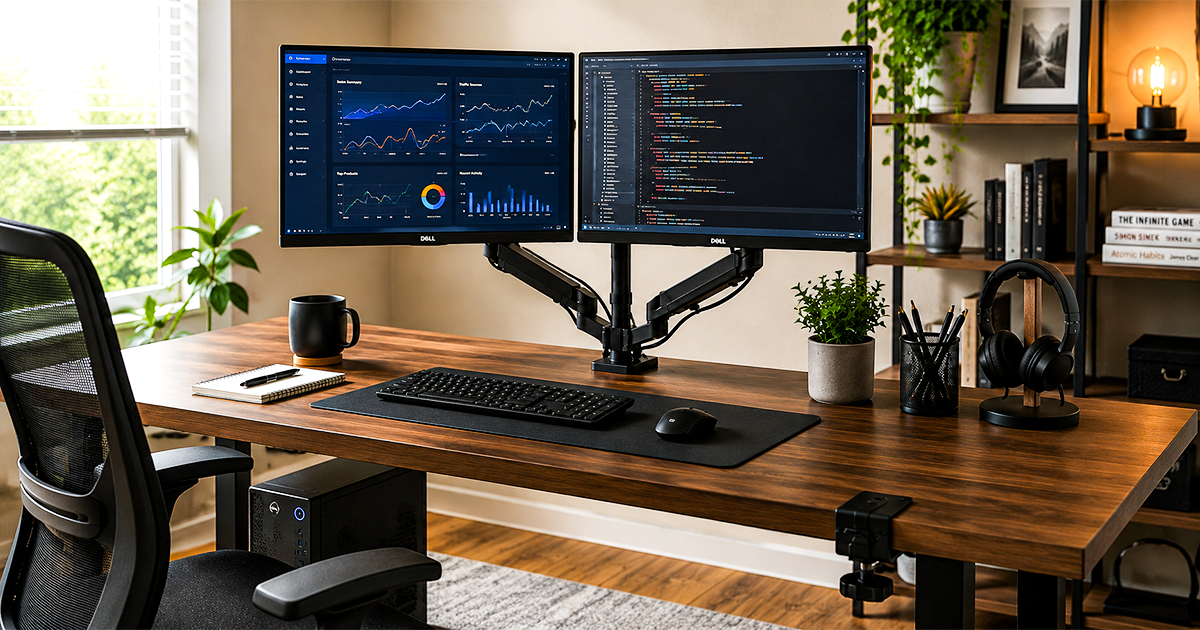
Best Monitor Arms & Mounts of 2026
Twelve mounts we'd actually clamp to a desk – from a $30 wall mount to a 42 lb heavy-duty arm, one for every screen and setup.
The best monitor arms in 2026 pull your screen off its bulky base and put it exactly where your eyes need it — freeing desk space, killing neck strain, and letting you push, pull, tilt and rotate a display in seconds. The one most people should buy is the EVEO Premium Single Monitor Arm, but the right arm depends entirely on your monitor’s size, weight and how your desk is built. Below are twelve clear picks, one per situation, with honest notes on where each one compromises and exactly who it is for.
By Authur C. Art, Founder & Lead Reviewer — Smart Tech Buying.
Disclosure: Smart Tech Buying is reader-supported. As an Amazon Associate we earn from qualifying purchases. This does not affect our recommendations or the price you pay. (Jump to the FAQ.)
A monitor arm — also called a monitor mount or monitor desk mount — is one of the highest-return upgrades you can make to a desk, and it is not really about looks. The plastic pedestal that came with your monitor fixes the screen at one height, one angle and one position — usually too low, which is exactly why your neck aches at 4 p.m. A good arm clamps to the desk, floats the display at true eye level, and lets you reposition it with one hand: pull it close for detail work, push it back for a call, swing it to portrait for reading long documents. Getting the screen to the correct height and distance is one of the single most effective ergonomic changes you can make, and a fixed stand makes it nearly impossible.
The catch is that the market is a mess of near-identical listings ranging from a $25 no-name arm to a $450 commercial mount, and the spec sheets rarely make the meaningful differences clear. The three that actually matter are VESA pattern, monitor weight, and how the arm attaches to your desk — get those wrong and even a great arm will sag, wobble or refuse to fit. This guide names one clear pick for each kind of buyer, from a first monitor arm under $50 to a heavy-duty mount for a 49-inch ultrawide, and closes with a plain-English buying guide so you can confirm compatibility before you spend a cent. If you are still choosing the screen itself, start with our best home office monitors guide; if you are building the whole workstation, our standing desks guide pairs naturally with everything below.
Best Monitor Arms 2026 at a Glance
| Monitor Arm | Best For | Screen / Weight | Mount |
|---|---|---|---|
| VIVO Ultrawide Wall Mount | Best wall mount for ultrawides | Up to 49-in / 44 lb | Wall (VESA) |
| VIVO Single Monitor Stand | Best budget | 17–32-in / up to 19.8 lb | Clamp + grommet |
| VIVO Counterbalance Wall Mount | Best wall mount | Up to 32-in / 19.8 lb | Wall (VESA) |
| VIVO Extra Tall (V011) | Best for tall setups | 13–32-in, ultrawide to 38-in / 22 lb | Clamp + grommet |
| VIVO Dual Monitor Stand | Best dual | 2× 17–32-in / 19.8 lb each | Clamp + grommet |
| VIVO Pneumatic Pole Mount | Best for standing desks | 17–32-in | Clamp (pole) |
| HUANUO Dual Monitor Mount | Best budget dual | 2× 17–32-in / up to 22 lb each | Clamp + grommet |
| EVEO Premium Single Arm | Best overall | 14–34-in | Clamp + grommet |
| VIVO Premium Aluminum | Best premium / heavy-duty | Up to 49-in / 33 lb | Clamp |
| VIVO Triple Pneumatic | Best for three screens | 3× up to 32-in | Clamp + grommet |
| Mount-It! Triple + USB | Best with built-in USB | 3× 13–32-in / 17.6 lb each | Clamp + grommet |
| Ergotron LX Pro | Best brand-name arm | Up to 34-in / 4–22 lb | Clamp (grommet extra) |
How We Picked the Best Monitor Arms
We start with the desk, not the arm. For each pick we asked who it is really for — a first upgrade on a tight budget, a heavy ultrawide, a dual-coding workstation, a moving standing desk — then weighed five things: build quality and the spring mechanism (gas versus mechanical), weight and size capacity against real-world monitors, mounting flexibility and desk compatibility, range of motion, and warranty as a proxy for how long the arm will actually last. We cross-check manufacturer specs against independent testing and a heavy read of verified buyer reviews, and we give one clear pick per use case. Prices and stock move constantly, so use the buttons throughout to confirm the current price and Prime availability before you buy, and always check your monitor’s weight and VESA pattern against the arm’s rating first. The right pick differs whether you want a single monitor arm, a dual monitor arm for two screens, or an ultrawide monitor arm for a big curved panel — but every one comes down to those same fundamentals.
Best Overall Monitor Arm: EVEO Premium Single Arm

- Monitor Arm 34 inch – Enhance your workspace with the EVEO monitor stand, a premium 34 inch Monitor Mount, single monito…
- Experience hassle-free installation with the EVEO monitor arm desk mount. Our single monitor mount installs in minutes, …
- Ergonomic Adjustment: Gas spring monitor arm allows effortless height, tilt, swivel, and rotation adjustments for optima…
Of all the monitor arms we compared, the EVEO Premium Single Monitor Arm is the one most people should buy. It pairs a genuine gas spring with a 34-inch screen ceiling, which covers everything from a 24-inch office panel to a large curved display, and owners rate it 4.6 stars across 1,373 ratings.
Key specifications:
- Fits monitors 14 to 34 inches, including curved and ultrawide panels
- Adjustable gas spring holds any height with one hand
- VESA 75×75 or 100×100; C-clamp and grommet bases both included
- Full tilt, swivel and 360° rotation with integrated cable routing
Why it is the best. It gets the fundamentals right without charging commercial-mount money. The gas spring is properly tensioned rather than stiff, so the screen moves with a fingertip and stays where you leave it. The 34-inch ceiling is the important number: it is the point where most arms stop and where a lot of desks now start, so this is one of the few mid-priced arms that will still hold the monitor you upgrade to.
The honest trade-offs. Its owner sample is smaller than the budget arms below, so there is less accumulated long-term evidence. And while the aluminum finish is good, it is not the machined-from-billet feel of a $300 commercial arm.
Pros
- 4.6 stars from 1,373 ratings
- Handles up to 34 inches, including curved panels
- Clamp and grommet mounting both in the box
Cons
- Smaller owner sample than the budget picks
- Not rated for the heaviest 40 lb-class displays
Who should buy it: anyone wanting one arm that will not need replacing after the next monitor upgrade. Who should skip it: anyone mounting a 49-inch super-ultrawide, which needs the heavy-duty pick below.
Best Budget Monitor Arm: VIVO Single Monitor Stand

- Fits 17″ to 32″ Screens: Universally compatible with most 17″ to 32″ flat and curved screens weighing from 4.4 lbs to 19…
- Mechanical Spring Adjustment: Toolless monitor placement with perfect counterbalance presentation in all directions. Ple…
- Articulation: The mounting bracket offers +90° to -90° tilt, 180° swivel, and 360° rotation for convenient, customizable…
The VIVO Single Monitor Stand is an inexpensive, honest way into monitor arms, and the simplest way to get a screen off its factory base. It uses a mechanical articulating design rather than a gas spring, which is the compromise that makes the price possible, and for a standard office monitor it is entirely sufficient.
Key specifications:
- Fits monitors 17 to 32 inches, up to 19.8 lb
- Mechanical articulating arm with tension adjustment
- VESA 75×75 or 100×100; C-clamp and grommet bases included
- Full tilt, swivel and rotation for portrait orientation
Why it works. A mechanical arm is not worse than a gas spring, it is different: you set the tension once with an Allen key and it holds. If your monitor lives at one height and only occasionally gets nudged, you will never notice the absence of a gas spring, and you save a meaningful amount of money.
The honest trade-offs. Frequent height changes are the weak point. Re-tensioning means reaching for the hex key rather than pushing the screen, so this is the wrong arm for a sit-stand desk or a shared workstation. Cable management is basic.
Pros
- A budget price for a full desk arm, at $39.99
- Clamp and grommet mounting both included
- Rotates to portrait for reading and code
Cons
- Tension is set with a hex key, not by hand
- 4.3 stars, at the lower end of this guide
Who should buy it: anyone who sets a monitor height once and leaves it. Who should skip it: anyone who adjusts their screen through the day, who wants the EVEO above.
Best Premium Monitor Arm: VIVO Premium Aluminum Heavy-Duty

- Ultrawide Compatibility: Fits ultrawide monitors up to 49″ and standard flat and curved monitors up to 32” including the…
- Premium Aluminum Arm Mount: Securely holds one screen weighing up to 33 lbs. Features an elbow spring gauge for perfect …
- Quick Release VESA Bracket: Has 75x75mm and 100x100mm mounting capability. Please Note: If your monitor does not have VE…
The VIVO Premium Aluminum arm is the one to buy when the screen is genuinely large, and the point where cheap monitor arms stop being an option. It is rated to 49 inches and 33 lb, which covers the super-ultrawide panels that most arms in this category quietly cannot hold.
Key specifications:
- Fits ultrawide screens up to 49 inches and 33 lb
- Pneumatic height adjustment with an aluminum body
- Max VESA 100×100; heavy-duty desk mount
- Full tilt, swivel and rotation
Why it is worth the money. Weight rating is the specification that actually fails people. A 49-inch panel on an arm rated for 20 lb will sag within weeks, and no amount of tension adjustment fixes it. This arm is built for that load, and the aluminum construction is what allows the rating rather than being a styling choice.
The honest trade-offs. It is overkill for a 24-inch monitor, where its mass works against you. It is rated 4.3 from 1,897 owners, and heavy-duty arms attract complaints about desk clamp marks simply because of the forces involved.
Pros
- Genuinely rated for 49-inch and 33 lb screens
- Pneumatic height adjustment under real load
- Aluminum build rather than pressed steel
Cons
- Oversized for a standard 24 or 27-inch monitor
- Heavy clamp loads need a solid desk
Who should buy it: owners of 38 to 49-inch ultrawides. Who should skip it: anyone with a normal 27-inch screen, who is paying for capacity they will never use.
Best Dual Monitor Arm: VIVO Dual Monitor Stand
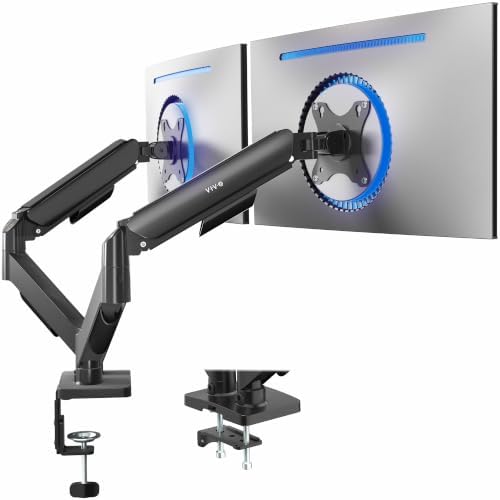
- Screen Compatibility: Universally compatible with most 17-inch to 32-inch flat and curved screens weighing from 4.4 lbs …
- Mechanical Spring Adjustment: Toolless monitor placement with perfect counterbalance presentation in all directions. Ple…
- Articulation, Swivel, & Tilt: The mounting brackets offer +90° to -90° tilt, 180° swivel, and 360° rotation for convenie…
Dual monitor arms are where a mount earns its money, and the VIVO Dual Monitor Stand is the sensible answer for two screens. It puts both monitors on a single clamp, holds each up to 19.8 lb, and does it at a price that makes a two-screen setup an easy decision rather than a considered purchase.
Key specifications:
- Fits two monitors 17 to 32 inches, up to 19.8 lb each
- Mechanical articulating arms with independent tension
- VESA 75×75 or 100×100; C-clamp and grommet bases included
- Each arm tilts, swivels and rotates independently
Why it works. Two screens on one clamp is the whole point: you free the entire desk surface underneath and you stop fighting two separate bases for space. Independent arms matter more than people expect, because most dual setups end up with one screen angled inward rather than both flat.
The honest trade-offs. Like the single VIVO, tensioning is mechanical rather than gas-assisted, so it prefers a set-and-forget height. Two 32-inch panels at the top of the weight range will test any single clamp, and a thin or hollow desk is not the place for it.
Pros
- Both screens on one clamp, clearing the desk
- Arms adjust independently
- Clamp and grommet mounting both included
Cons
- Mechanical tension, not a gas spring
- Needs a solid desk at full load
Who should buy it: anyone running two standard monitors who wants the desk back. Who should skip it: anyone wanting one-handed height changes, who should look at the EVEO above.
Best Heavy-Duty Arm for Ultrawide Monitors: VIVO Heavy-Duty (STAND-V011)
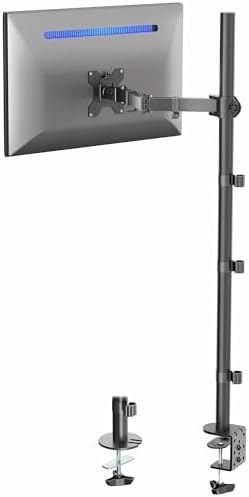
- Extra Tall Pole Monitor Mount: The 39” center pole allows you to adjust the monitor between sitting and standing positio…
- Ultrawide Compatibility: This single-arm mount fits screens that weigh up to 22 lbs with VESA 75x75mm or 100x100mm backs…
- Articulation and Height Adjustment: Adjustable arm offers +90° to -90° tilt, 360° swivel, 360° rotation, and height adju…
The VIVO Heavy-Duty single arm is the value answer to a genuinely awkward problem: most standard arms simply cannot carry a large or ultrawide monitor, and the ones that can are expensive. This VIVO is built with a beefier post and mount specifically for bigger screens, at a fraction of premium heavy-duty pricing.
Key specifications:
- Built for large and ultrawide monitors — confirm your exact size and weight on the listing
- Steel-and-aluminum construction with a reinforced mount
- Height, tilt, swivel and rotation adjustment
- VESA compatible; C-clamp and grommet mounting
Why it works. If you own a 34-inch (or larger) ultrawide and balked at the price of a premium heavy-duty arm, this is the workhorse pick. It brings ultrawide support down to a budget price, and the heavier post and clamp give it the stability lighter arms lack under a wide, off-center panel.
The honest trade-offs. Movement is not as silky as a top-tier gas spring, and the warranty and long-term track record do not match Ergotron’s. Critically, ultrawide weights vary a lot — a 34-inch panel and a 49-inch behemoth are very different loads — so check your specific monitor’s weight against the listing before buying. For the very heaviest 49-inch curved monitors, the Ergotron HX remains the safer (pricier) call.
Pros
- Ultrawide-capable at a budget price
- Reinforced post and clamp for bigger screens
- Clamp and grommet options included
Cons
- Movement less refined than premium arms
- Verify weight rating for very large ultrawides
Who should buy it: ultrawide owners who want capacity without premium pricing. Who should skip it: owners of the heaviest 49-inch curved panels who want maximum assurance.
Best Monitor Wall Mount: VIVO Counterbalance Wall Mount
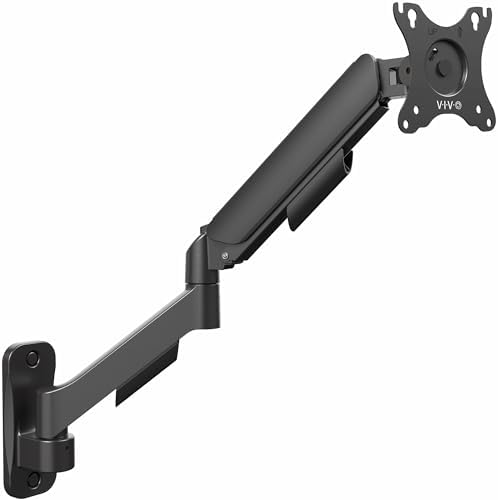
- Fits Standard-Size Screens: Single wall mount for monitors up to 32″ in size and 19.8 lbs in weight with 75x75mm and 100…
- Counterbalance Wall Mount: Deluxe spring-assist arm perfectly counterbalances the weight of your monitor for ergonomic h…
- Screen Articulation: Optimized tilting head structure provides smooth adjustments with +90° to -90° tilt, 180° swivel, a…
The VIVO Counterbalance Wall Mount is the pick when the monitor should come off the desk entirely, and the option most people shopping for monitor arms never consider. Wall mounting is the most under-used option in this category and the one that frees the most space, because it removes not just the base but the arm footprint too.
Key specifications:
- Fits monitors up to 32 inches and 19.8 lb
- Counterbalance spring for one-handed height and depth changes
- Max VESA 100×100; wall plate and hardware included
- Full motion: extends, retracts, tilts, swivels and rotates
Why it works. A counterbalance mechanism is what separates a monitor wall mount from a television bracket. A TV mount is designed to be set once and left; this one is built to be pulled forward, pushed back and re-angled through the day, which is what a screen you actually work at needs.
The honest trade-offs. Wall mounting is permanent in a way a clamp is not, and it needs a stud or proper masonry fixings. Renters should think twice. It also fixes your monitor’s position relative to the room rather than the desk, so if the desk moves, the screen does not.
Pros
- Frees the entire desk, arm footprint included
- Counterbalance allows one-handed repositioning
- Full motion rather than fixed or tilt-only
Cons
- Needs a stud or masonry fixing, and leaves holes
- 32-inch and 19.8 lb ceiling rules out big panels
Who should buy it: anyone with a shallow desk, or a standing desk where the screen should stay put. Who should skip it: renters, and anyone with a screen above 32 inches, who wants the ultrawide mount below.
Best Wall Mount for Ultrawides: VIVO Full Motion Ultrawide Wall Mount
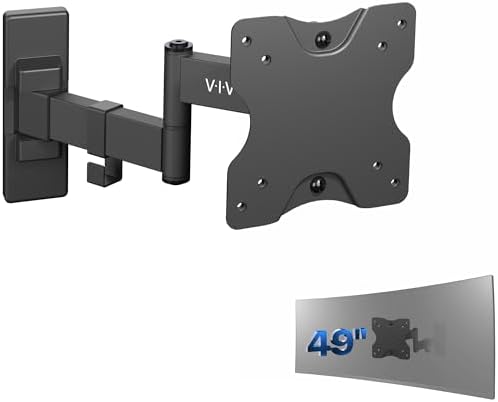
- Ultrawide Compatibility: This flexible wall mount supports most ultra-wide monitors up to 49” with VESA 75×75 and 100×10…
- Low Profile: Collapses flat against the wall for space efficiency and can be fully extended up to 10.5″ from the wall
- Heavy Duty Design: Constructed of high-grade steel to ensure sturdiness and security. Supports up to 44 lbs of weight
The VIVO Full Motion Ultrawide Wall Mount solves the problem the counterbalance mount above cannot, and the one most monitor arms cannot either: big, heavy, wide panels. It is rated to 49 inches and 44 lb, more than double the weight ceiling, and it is priced at $19.99.
Key specifications:
- Fits ultrawide screens up to 49 inches and 44 lb
- Full motion articulating arm with tilt and swivel
- Wall plate, hardware and VESA adapters included
- 4.6 stars across 5,171 owners
Why it works. Weight is the whole argument for wall mounting a large ultrawide. A 44 lb panel on a desk clamp puts enormous leverage on the desk edge; on a wall plate anchored into a stud, that load goes into the building instead. It is the structurally correct answer for a heavy screen, and it happens to cost less than any desk arm here.
The honest trade-offs. There is no counterbalance, so height is set at installation and changing it means unbolting the plate. Measure carefully before you drill. It also has less depth travel than the counterbalance mount, so it suits a screen that sits at a fixed distance.
Pros
- Rated to 44 lb and screens up to 49 inches
- 4.6 stars from 5,171 ratings
- A very low price for a full-motion ultrawide mount
Cons
- Height is fixed once the plate is mounted
- Less depth adjustment than a counterbalance arm
Who should buy it: anyone wall-mounting a large or super-ultrawide panel. Who should skip it: anyone who wants to change screen height regularly.
Best Monitor Arm for Standing Desks: VIVO Pneumatic Pole Mount

- Universal Pneumatic Pole Mount Arm: This powerful counterbalance monitor arm fits any pole from 1.1” to 2.4” in diameter…
- Fits 17″ to 32″ Screens: Designed for 17” to 32” monitors and TVs weighing 4.4 lbs to 17.6 lbs with VESA 75x75mm or 100x…
- Versatile Design: This sturdy mount lets you update your monitor stand’s VESA compatibility and create alternative mount…
The VIVO Pneumatic Pole Mount is the arm to pair with a sit-stand desk. A pole-mount design gives you a tall, secure vertical range and a C-clamp built to stay put as the desk rises and falls throughout the day.
Key specifications:
- Single-monitor pole mount with pneumatic (gas-spring) height adjustment
- Tall vertical travel along the post for big height changes
- Secure C-clamp designed to hold firm on a moving surface
- VESA compatible with tilt, swivel and rotation
Why it works. On a standing desk you change your eye-to-screen relationship every time you raise or lower the surface, and you want an arm with the range to fine-tune it and a clamp that will not creep loose from the motion. The pole design delivers both — plenty of height along the post and a grip that stays locked. It is the natural companion to anything in our standing desks and desk converters guide.
The honest trade-offs. The pole has a visible footprint on the desk, and pneumatic movement, while smooth, is not quite as effortless as the best premium gas springs. It is a single-monitor mount, so dual standing-desk users will need two or a dedicated dual pole.
Pros
- Tall vertical range suited to height changes
- Secure clamp that resists creep on a moving desk
- Affordable
Cons
- Pole takes up some desk footprint
- Single monitor only
Who should buy it: sit-stand desk users who want a secure, tall-range single arm. Who should skip it: fixed-desk users who would do better with the LX.
Best Budget Dual Monitor Arm: HUANUO Dual Monitor Mount

- Weight Capacity Upgrade: Crafted with aerospace-grade aluminum alloy and excellent design, our HUANUO dual monitor stand…
- Fits Large 32″ Monitors: Our computer monitor stand for desk fits most 17″–32″ flat or curved monitors with 75×75 or 100…
- Customizable Viewing Angle: This dual monitor arm features +/-90° swivel to direct the screen toward your position, +90°…
The HUANUO Dual Monitor Mount is the value dual arm: aluminum arms rated to 22 lb each, 17.5 inches of reach, and a choice of C-clamp or grommet base, at a price well under a premium dual. It is rated 4.6 from 1,055 owners.
Key specifications:
- Two monitors 17 to 32 inches, up to 22 lb each
- +90°/-35° tilt, ±90° swivel, 360° rotation
- C-clamp for 0.39 to 2.56 inch desks, or grommet mounting
- VESA 75×75 or 100×100, aluminum construction
Why it works. The 22 lb per-arm rating is the headline, and it covers two 27-inch panels comfortably. The arms extend 17.5 inches out and raise 17.5 inches above the desk, so both screens reach eye level on a deep desk. For a home office running two 24- or 27-inch monitors, it does the job without premium money.
The honest trade-offs. Height is set by arm tension rather than a gas spring, so this is not the one-handed adjustment the EVEO or the Ergotron give you — set it once and leave it. It starts at 17 inches, so a very small second screen is out, and it does not match the independent feel or the warranty of the Ergotron LX Dual.
Pros
- 22 lb per arm, in aluminum
- 17.5 inches of extension and height range
- C-clamp or grommet mounting included
Cons
- Tension adjustment, not a gas spring
- 17-inch minimum screen size
- Shorter warranty than premium arms
Who should buy it: budget dual-monitor setups with standard screens. Who should skip it: anyone wanting premium independence — get the LX Dual.
Best for Three Screens: VIVO Triple Pneumatic Monitor Mount

- Fits 17″ to 32″ Screens: Triple monitor mount holds most computers 17″ to 32″ in size and up to 17.6 lbs in weight (each…
- Articulation and Height Adjustment: Dual side pneumatic arms and fixed center bracket offer +90° to -90° tilt, 180° swiv…
- Sturdy Steel and Aluminum Support: Securely holds three monitor screens weighing up to 17.6 lbs each. Tension can be inc…
The VIVO Triple Pneumatic Mount puts three screens on one clamp with genuine pneumatic monitor arms, which is rarer than it sounds. Most triple mounts use a fixed crossbar; this one gives each screen independent height and angle.
Key specifications:
- Holds three monitors up to 32 inches each
- Pneumatic arms with independent height adjustment
- Heavy-duty desk stand with C-clamp and grommet options
- Full tilt, swivel and rotation per screen
Why it works. The difference between a triple crossbar and independent arms shows the moment you want the outer screens angled inward, which is how almost everyone actually runs three monitors. A crossbar forces them flat and wastes the outer thirds; independent arms let you build the curve your eyes want.
The honest trade-offs. Three screens on one clamp is a serious load and it needs a solid desk with a thick edge. Assembly takes real time. And a triple setup at 32 inches per screen is physically enormous, so measure your desk width before ordering.
Pros
- Independent pneumatic arms rather than a fixed crossbar
- Handles 32-inch screens, not just 24s
- Clamp and grommet mounting both supported
Cons
- Demands a sturdy desk and a wide surface
- Longest assembly of anything in this guide
Who should buy it: traders, developers and anyone running three screens who wants them angled properly. Who should skip it: anyone whose desk is under about 60 inches wide.
Best Monitor Mount with a Built-in USB Hub: Mount-It! Triple Desk Stand

- TRIPLE YOUR SCREEN SPACE, TRIPLE YOUR OUTPUT – Mount three monitors side by side and eliminate constant window switching…
- FITS THE MONITORS ON YOUR DESK RIGHT NOW – This triple monitor stand supports 13–32 inch screens up to 17.6 lbs per arm,…
- THREE INDEPENDENT GAS SPRING ARMS, ZERO COMPROMISE – Each arm adjusts on its own, so you can tilt, swivel, rotate, and r…
The Mount-It! Triple Monitor Desk Stand is the pick if you want the cable situation solved at the same time as the screens. Few monitor arms bother with ports at all. It carries three monitors on gas-spring arms and puts USB-A and USB-C ports on the stand itself, where you can actually reach them.
Key specifications:
- Holds three screens 13 to 32 inches, up to 17.6 lb each
- Gas-spring arms with independent adjustment
- Built-in USB-A and USB-C ports on the stand
- VESA 75×75 and 100×100 supported
Why it works. A hub built into the mount puts ports at hand height instead of behind the desk, which is the single most useful place for them. It also means one fewer accessory occupying desk space, and the gas springs are a genuine upgrade over the mechanical arms most triple mounts ship with.
The honest trade-offs. It is one of the pricier picks in this guide, and you are paying for the hub as much as the arms. The USB ports are a convenience hub rather than a docking station, so do not expect them to drive a display or deliver laptop charging.
Pros
- USB-A and USB-C ports built into the stand
- Gas-spring arms across all three positions
- Independent adjustment per screen
Cons
- A premium price for a triple mount
- Hub is for peripherals, not laptop charging or video
- 17.6 lb per arm is lower than the VIVO triple
Who should buy it: a three-screen desk that is also short on reachable ports. Who should skip it: anyone who already owns a dock, who should take the VIVO triple and save the difference.
Best Brand-Name Monitor Arm: Ergotron LX Pro

- Broad compatibility: Fits single screens up to 34 inches diagonal, 4 to 22 pounds and up to 3.6 inches deep; compatible …
- Versatile mounting options: Includes two-piece desk clamp to fit a variety of desk types; desk clamp attaches to desks 0…
- Elevate comfort: Easily raise your monitor up to 18.3 inches above your worksurface with 13 inches of lift; find your be…
The Ergotron LX Pro is the arm people mean when they search for Ergotron by name, and until now this guide talked about the brand without carrying one. It is the expensive answer to a cheap problem: an arm you clamp once and stop thinking about, behind a ten-year warranty rather than a one-year one.
Key specifications:
- One screen up to 34 inches, 4 to 22 lb, up to 3.6 inches deep
- 13 inches of lift, raising a screen up to 18.3 inches above the desk
- Up to 360° rotation and 85° of tilt
- VESA 75×75 or 100×100, two-piece clamp for desks 0.4 to 2.4 inches thick
- Ten-year warranty and built-in cable management
Why it works. Cheap arms sag. The gas spring tires, the screen drifts down over a few months, and you end up re-tightening it or replacing it. This is the part of the category where paying more genuinely buys years rather than features, and Ergotron is the name that reputation was built on. It holds a 34-inch ultrawide where most arms on this page stop at 32, and the movement stays where you put it.
The honest trade-offs. At $199.00 it is a premium price for a single arm, and it holds one screen: two of them costs more than most people spend on the monitors themselves. The LX Pro is a recent revision, so fewer owners have rated it than the original LX, and the grommet mount is a separate accessory rather than something in the box.
Pros
- Ten-year warranty, against one or two years on most arms here
- Takes a 34-inch ultrawide, and holds its position
- Built-in cable management and a genuinely solid clamp
Cons
- A premium price for a single-screen arm
- Single monitor only, and the grommet mount costs extra
- Sold by Ergotron rather than by Amazon, so check the delivery date before you order
Who should buy it: anyone who has already replaced one sagging arm, or who is mounting a large screen they intend to keep for years. Who should skip it: anyone content to re-tighten a cheaper arm now and then, who should take the VIVO budget pick and put the difference into the monitor.
How to Choose a Monitor Arm
Almost every returned or wobbly monitor arm comes down to one of four things going unchecked before purchase. Confirm these and you will get an arm that fits, holds and lasts.
VESA compatibility
VESA is the standardized hole pattern on the back of your monitor that the arm bolts to, measured in millimeters between the screw holes. The two common patterns are 75×75 and 100×100, and nearly every VESA monitor arm on this list supports both. Check your monitor’s spec sheet (or measure the holes) for its VESA size. If your monitor has no VESA holes at all — some slim consumer models do not — you will need a VESA adapter bracket, sold separately, before any arm will fit.
Weight capacity
This is the number people most often get wrong. Every arm has a rated weight range, and you want your monitor comfortably inside it — not at the very top. A monitor lighter than the minimum can cause the arm to drift upward; one heavier than the maximum will sag and strain the mechanism. Find your monitor’s weight (spec sheet, not a guess — a 27-inch panel can be anywhere from 8 to 18 lb) and match it to the arm. Ultrawides and 32-inch-plus screens are where budget arms fail, which is why the heavy-duty picks above exist.
Clamp mount vs. grommet mount
Almost every arm here includes both. A C-clamp grips the back edge of your desk with no drilling — the easiest and most common method, fine for desks roughly 0.4 to 2.4 inches thick. A grommet mount passes a bolt through a pre-drilled hole in the desk for a more permanent, often sturdier hold, useful when your desk edge is too thick or too thin for a clamp, or when you want zero movement. For thin or glass desktops, add a steel reinforcement plate so the clamp does not crack or dent the surface.
Gas spring vs. mechanical spring
This is the difference you will feel every day, and it is the main reason a gas spring monitor arm is worth paying a little more for. A gas spring uses compressed nitrogen to hold the monitor at any height indefinitely — you nudge it and it stays, with zero maintenance. A mechanical (coil) spring uses tension that fatigues over months, so the arm slowly starts to droop and needs periodic re-tightening with a hex key. As a rule, essentially every quality arm above around $40 uses a gas spring, and that is not a coincidence — it is the single best predictor of whether an arm will still hold position a year from now. If a cheap arm does not clearly say gas spring, assume it is a coil.
One more: your desk
An arm is only as steady as what it is attached to. Sturdy solid or thick-laminate desks take a clamp beautifully; thin particleboard under half an inch, or glass, may need the grommet option or a reinforcement plate. If you are running dual or triple screens, desk strength matters even more because of the leverage involved.
Wall mount vs. desk clamp
A wall mount solves a different problem than an arm on the desk: it frees the entire desk surface and it is immune to typing vibration, because nothing it holds is touching the desk. The trade-off is that the decision is permanent, and the wall decides the hardware rather than you.
Wood studs. The strongest install by a wide margin. In most American homes studs sit 16 inches apart on center, sometimes 24, so find them with a stud finder before you decide where the screen goes rather than after. Lag bolts driven into solid framing hold comfortably more than the mount itself is rated for.
Drywall with no stud where you want it. This is the common case, and it is workable but not free. Screw-in plastic anchors are not adequate for a moving arm; heavy-duty toggle anchors are. Treat the mount’s weight rating as a ceiling to stay well under, and remember that an extended arm multiplies the load on the wall through leverage.
Brick, block or concrete. Needs masonry sleeve anchors and a hammer drill. Mechanically this is the most secure of the three surfaces, but it is the least forgiving of a mistake: a wrongly placed hole in concrete is permanent in a way a hole in drywall is not.
Measure the height before you drill. A wall mount fixes your viewing height for good. Sit in your actual chair at your actual desk and mark where the top of the screen should land, at or just below eye level. This is the one mistake you cannot adjust your way out of afterwards.
Frequently Asked Questions
Are monitor arms worth it?
For anyone spending more than a few hours a day at a desk, yes. The two payoffs are ergonomic and spatial: getting the screen to true eye level is one of the most effective ways to reduce neck and shoulder strain, and lifting the monitor off its base reclaims a surprising amount of desk. The one-hand repositioning also encourages you to move the screen for different tasks, which a fixed stand discourages.
How do I know if my monitor is VESA compatible?
Look at the back of the monitor for four screw holes in a square, or check the spec sheet for VESA 75×75 or VESA 100×100. Most monitors have one of these. If yours has no VESA holes, a VESA adapter bracket (sold separately) lets you use an arm anyway.
What is the difference between a gas spring and a mechanical spring arm?
A gas spring uses compressed nitrogen and holds any position with no maintenance. A mechanical spring uses a coil that fatigues over time, so the arm gradually droops and needs re-tightening. Gas-spring arms cost a little more but stay put for years, which is why nearly every quality arm uses one.
Should I use a clamp mount or a grommet mount?
Use a C-clamp if you would rather not drill — it grips the desk edge and fits most desks 0.4 to 2.4 inches thick. Use a grommet mount (a bolt through a drilled hole) for a more permanent, sometimes sturdier hold, or when your desk edge is outside the clamp’s range. Most arms include both sets of hardware.
Will a monitor arm work on a standing desk?
Yes, and it pairs well with one — but choose the right style. A pole-mount arm with a tall vertical range and a secure clamp (like the VIVO pneumatic pick above) handles the constant height changes best. Avoid a wall mount for a standing desk, since it cannot move with the surface.
Can a monitor arm hold an ultrawide or curved monitor?
Only if it is rated for it. Ultrawides are wider and often heavier, which stresses a standard arm and can cause sag. Use a heavy-duty arm designed for large screens — the VIVO heavy-duty pick for value, or the Ergotron HX for the largest and heaviest 49-inch panels — and confirm your monitor’s exact weight against the arm’s rating.
What if my monitor is very heavy?
Match the weight, do not just clear it. Pick an arm whose rated range comfortably contains your monitor’s weight rather than sitting at the ceiling. For panels over about 25 lb, step up to a heavy-duty single arm like the Ergotron HX, which is rated to 42 lb.
Will a monitor arm damage my desk?
Not if you match it to your desk. Solid and thick-laminate desks take a clamp with no issue. For thin, particleboard or glass tops, use the grommet mount or add a steel reinforcement plate to spread the load and protect the surface — cheap insurance for a few dollars.
How do I wall mount a monitor if there is no stud where I want it?
Use heavy-duty toggle anchors rather than the plastic screw-in type, and stay well under the mount’s rated weight. A wall-mounted arm is a lever, so an extended arm puts considerably more force on the wall than the monitor’s weight alone suggests. If the screen is heavy or the arm is long, the better answer is to mount into a stud and shift the desk position instead. Drywall anchors are a compromise, not an equal alternative.
How high should a wall-mounted monitor be?
Set the top of the screen at or just below eye level while seated in the chair and at the desk you actually use. Because a wall mount fixes that height permanently, mark the position while seated before you drill rather than measuring up from the floor. If you alternate between sitting and standing, a wall mount is the wrong choice, because it cannot follow the desk.
Why you can trust Smart Tech Buying
Every pick here is chosen for a specific buyer and cross-checked against independent testing and verified owner reviews — we name the trade-offs, not just the wins. We only recommend hardware we would put on our own desk. Learn more about how we choose our picks.
Why You Can Trust Smart Tech Buying
Every recommendation is based on extensive product research, manufacturer specifications, customer feedback, long-term reliability, value, and suitability for real-world use. When we have personal experience with a product, we include those insights. We regularly review our guides to keep recommendations current as new products are released.