

By Authur C. Art
Intel vs AMD used to be the entire conversation. In 2026 there is a third seat at the table, and the three do not compete the same way: Intel and AMD sell you a chip that drops into a motherboard, while Apple solders its M5 silicon into a finished Mac. So the honest question is not which socket wins. It is which platform fits the way you actually work.
This guide answers Intel vs AMD vs Apple M5 task by task, names a pick for each job, and is explicit about where each platform loses. It covers six processors and machines you can buy today, every one verified on its own product page for price, rating and owner count, and every one sold by Amazon rather than a marketplace reseller.
How we chose
Every product here was checked against its Amazon listing on the day of writing: the live price, the star rating, the number of reviews behind it, whether it was in stock, and crucially who actually holds the sale.
That last check shapes which chips carry a buy link. Several Intel desktop processors have spent stretches of this year listed only by third-party marketplace sellers rather than by Amazon itself, and we withhold the link whenever that happens. Both Intel chips in this guide are sold by Amazon today, so both are linked.
What this guide covers
The 30-second answer
Pure gaming: AMD, and it is not close. The Ryzen 7 9850X3D and its stacked 3D V-Cache win by margins nothing else answers. AMD lists 96MB of L3 on an eight-core chip — more cache than it puts on its own twelve-core X3D part.
Video and content creation: a real fight. Intel Quick Sync accelerates H.264 and H.265 exports in Premiere Pro, AMD high core counts dominate multi-threaded renders in Resolve and Blender, and Apple M5 Max chews through ProRes on battery. The right answer here genuinely depends on your codec.
Heavy productivity and rendering: AMD Ryzen 9 7900X for raw multi-core throughput, or a MacBook Pro if you already live in macOS.
Everyday work, battery and portability: Apple M5. Nothing in the x86 world matches a MacBook for performance per watt, and no x86 laptop reaches the battery life.
On-device AI: roughly a wash. Apple unified memory and Neural Engine handle local models superbly. Intel and AMD lean on an NPU plus whatever discrete graphics card you have, which is more capable at the top end and less efficient.
Best value on AM5: AMD Ryzen 7 9700X for builders, or the MacBook Air M5 as the value entry into Apple Silicon.
Intel vs AMD vs Apple: how the three actually differ
Architecture: x86 versus Apple Silicon
Intel and AMD both build x86-64 processors. They run Windows and Linux natively, they drop into a standard motherboard, and you can replace one without replacing the machine around it.
Apple M-series uses ARM architecture fused into a system-on-chip alongside the graphics, the Neural Engine and a single pool of unified memory shared by all of it. That design is extraordinarily efficient and completely closed: it is locked to macOS and to whichever Mac it was soldered into.
That single difference drives everything else in this comparison — upgradeability, gaming support, battery life, and what happens in three years when you want more from the machine.
AMD trump card: 3D V-Cache
AMD X3D chips stack additional L3 cache vertically on top of the die rather than spreading it sideways. AMD lists the Ryzen 7 9850X3D with 96MB of L3 on top of 8MB of L2, and a boost of up to 5.6GHz.
Games live or die on fast access to a relatively small, frequently reused working set, which is exactly the workload a large cache serves. That is why an eight-core X3D chip outruns a twelve-core flagship in games while losing to it badly in rendering. If gaming is the priority, this is the single most important fact in the whole comparison.
Intel hybrid cores and Quick Sync
Intel Core Ultra 200S chips split work between Performance-cores and Efficient-cores, which suits productivity and heavy multitasking where background work can be handed to the efficient side.
Intel real ace is Quick Sync: dedicated hardware that accelerates H.264 and H.265 encoding. For anyone exporting those codecs out of Premiere Pro on a deadline, that is measurable time saved on every single export, and it is the strongest argument Intel has in this comparison.
Apple M5: efficiency, battery and the Media Engine
The M5 family trades expandability for performance per watt. The M5 Max scales to an eighteen-core processor and a forty-core graphics unit with up to 128GB of unified memory, and carries a dedicated Media Engine built for ProRes.
MacBooks on M5 reach battery figures no x86 laptop approaches. The trade-offs are equally real: PC gaming support is weak, nothing is upgradeable ever, and Apple Silicon desktops still sit on older M-series while the M5 desktop refresh lags. In practice, M5 today means a MacBook.
Sockets and upgrade paths
AMD Ryzen 9000 chips use the AM5 socket, which AMD has committed to supporting for years yet, so a future processor can often drop into the same board. Intel Core Ultra 200S moved to LGA 1851, a newer platform with a shorter track record. Apple has no socket at all: what you buy is what you keep.
For a business buying machines it expects to keep five years, that difference is worth more than a few percent of performance either way.
1. Gaming
This one is not close, and the reason is architectural rather than a matter of degree. AMD 3D V-Cache is what puts the Ryzen 7 9850X3D ahead in games, beating chips that cost more and carry more cores.
The mechanism matters because it explains where the advantage stops. A game engine repeatedly touches a small working set of data every frame. Keeping that set on the chip instead of fetching it from system memory removes stalls, which raises the frame rate and, more importantly, steadies the worst frames. Intel refreshed Core Ultra line is competitive on value and Apple M5 is simply the wrong tool: the Mac game library and driver support do not compare to a Windows machine.
Best for: the machine that exists to play games, paired with a strong graphics card.

AMD markets this line as the world’s best gaming processor, and the claim has a mechanism behind it rather than only marketing. AMD lists 96MB of L3 cache on eight Zen 5 cores, a 4.7GHz base with a boost of up to 5.6GHz, and no bundled cooler — budget for one.
- 96MB of L3 on eight cores, per AMD’s own specification
- More cache than AMD puts on its twelve-core X3D part
- Steadier frame pacing, not just higher averages
- AM5 socket leaves an upgrade path open
- Eight cores, so it loses to the 7900X in rendering
- The advantage narrows at 4K where the graphics card is the limit
- No cooler included, and AMD recommends liquid cooling
Bottom line: if the machine is for gaming, stop here. If it also has to render or compile, keep reading.
2. Video and content creation
Here all three have a genuine claim, and the deciding factor is which codec you actually work in.
Intel pairs high core counts with Quick Sync, so H.264 and H.265 timelines export noticeably faster in Premiere Pro. If that is your daily workflow, it is real time saved on every job. AMD answers with raw multi-threaded muscle that dominates DaVinci Resolve renders, Blender and heavy exports where core count rules. Apple M5 Max flies through ProRes on its dedicated Media Engine while running on battery, which is the editor argument for a Mac in one sentence.
Best for: one machine that games at full speed and renders at full speed, with no compromise between them.

- AMD Ryzen 9 9900X3D Gaming and Content Creation Processor
The 9900X3D is the x86 chip in this guide that refuses to pick a side. Twelve cores for the render queue, stacked cache for the games, and AMD lists 128MB of L3 on top of 12MB of L2 with a boost of up to 5.5GHz. You pay a genuine premium for not having to choose.
- Twelve cores and 3D V-Cache together, unique here
- Strong gaming and strong rendering in one machine
- 140MB of cache in total, per AMD
- AM5 upgrade path
- Wasted money if you only game — the 9850X3D is the better gaming chip
- Wasted money if you only render — the 7900X gives the same core count for less
- No Quick Sync equivalent for H.264 and H.265 exports
- No cooler included
Bottom line: the right answer for a creator who also games seriously. If you only edit, the 7900X below saves money.
3. Heavy productivity and multitasking
If your day is compiling code, running virtual machines, crunching data or juggling twenty tabs against a background render, cores and memory bandwidth matter more than peak clock speed and far more than cache.
This is the workload where the gaming answer inverts completely. Rendering and compiling stream enormous volumes of data through the processor once, so a large cache does little: the next piece was never going to be sitting in it. What helps is more cores working in parallel, which is precisely what a non-X3D twelve-core part is built for.
Best for: rendering, compiling, virtual machines and anything that scales with core count.

- Processor is versatile, reliable, and offers convenient usage with high speed
- Ryzen 9 product line processor for your convenience and optimal usage
- 5 nm process technology for reliable performance with maximum productivity
Twelve Zen 4 cores and twenty-four threads, with AMD listing a boost of up to 5.6GHz and 76MB of cache. It is a generation behind the X3D parts above and that is exactly why it costs less: for throughput work, cores and clocks do the job and the stacked cache earns nothing.
- Twelve cores and twenty-four threads for genuine parallel work
- The least expensive twelve-core part in this guide
- AMD lists a boost of up to 5.6GHz
- Sold and shipped by Amazon
- Beaten in games by the eight-core X3D chip above
- 76MB of cache, less than the 9850X3D despite more cores
- Zen 4 rather than Zen 5
- Overkill if you never render or compile
Bottom line: the throughput pick. If games matter as much as renders, pay the difference for the 9900X3D instead.
4. Everyday work, battery and portability
For the largest group of readers — email, documents, calls, a browser with too many tabs and a machine that has to last a working day away from a socket — this is where the x86 argument runs out.
Apple M5 wins on performance per watt by a margin that is not really contested. A MacBook stays silent under the work most people do, runs cool, and lasts through a day of meetings and travel without a charger in the bag. No x86 laptop currently matches that combination, and buying one hoping it will is the most common expensive mistake in this category.
Best for: everyday professional work, travel, and a machine that has to be silent and last all day.
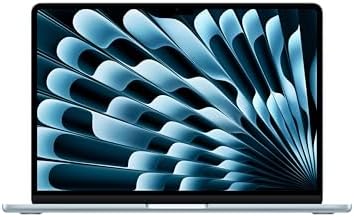
- BUILT FOR COLLEGE. AND BEYOND — MacBook Air with the M5 chip packs blazing speed and powerful AI capabilities into an in…
- TEAR THROUGH TOUGH ASSIGNMENTS — With its faster CPU and unified memory, the M5 chip delivers even more performance and …
- MAKE QUICK WORK OF YOUR TO-DO LIST — Apple Intelligence helps you write, express yourself, and get things done effortles…
The value entry into Apple Silicon and the machine most professionals should actually buy. 1,207 owners rate it 4.7. It handles documents, calls, browsers, light photo work and a surprising amount of code without ever spinning a fan, because there is not one to spin.
- Battery life no x86 laptop matches
- Silent under ordinary workloads
- 4.7 stars across 1,207 owners
- The cheapest way into Apple Silicon
- Nothing is upgradeable, ever — configure it correctly at purchase
- Weak for PC gaming
- macOS only, which is a workflow decision as much as a hardware one
Bottom line: if the machine leaves the desk regularly, this is the pick and the x86 options are not close.
5. On-device AI workflows
Running models locally rather than in the cloud has gone from a curiosity to a real requirement for anyone handling client data they cannot upload. The three platforms solve it differently.
Apple advantage is unified memory. Because the processor, graphics and Neural Engine share one pool, a Mac can load a large model into memory that a comparable PC would have to split or swap. On an M5 Max configuration that pool can reach 128GB, which decides what you can run rather than merely how fast it runs.
Intel and AMD go the other way, pairing an on-chip NPU for light always-on tasks with a discrete graphics card for the heavy lifting. At the top end that is more raw capability than any Mac, and it costs far more power and far more money to get there.
Best for: large local models, ProRes video, and doing both away from a desk.

- FAST RUNS IN THE FAMILY — The 16-inch MacBook Pro with the M5 Pro or M5 Max chip brings next-generation speed and powerf…
- BUCKLE UP — Along with a next-generation CPU, faster unified memory, and up to 2x faster SSD storage,* M5 Pro and M5 Max…
- BUILT FOR AI — Apple silicon, and every major component that powers it, is designed to run demanding on-device AI worklo…
The most capable portable machine we can link today. Its Media Engine handles ProRes without touching the main cores, and 48GB of unified memory is shared by the processor, the graphics and the Neural Engine rather than split between them, which is what lets a laptop hold a model this size at all.
Worth stating plainly: we link the M5 Pro rather than the M5 Max above it. The M5 Max configurations on sale today sit on very thin review samples — the deepest we found was 43 owners — and we will not put a buy button on a four-thousand-dollar machine that few people have reported back on yet.
- 48GB of unified memory, shared across processor, graphics and Neural Engine
- 18-core processor and 20-core graphics
- Dedicated Media Engine for ProRes
- Does all of it on battery
- Costs several times any processor on this page
- The M5 Max above it goes further, if you can accept a thinner review history
- Nothing upgradeable, so the configuration you buy is permanent
Bottom line: justified for professional video and local AI work. Excessive for anything else.
6. Budget builds and value
The most common mistake at this end is buying more processor than the rest of the machine can use. In most builds the graphics card runs out of headroom long before the processor does, so money moved from the chip to the card buys more real performance.
Best for: the sensible mid-range build where the graphics card should still get the bigger share of the money.

- This dominant gaming processor can deliver fast 100+ FPS performance in the world’s most popular games
- 8 Cores and 16 processing threads, based on AMD “Zen 5” architecture
- 5.5 GHz Max Boost, unlocked for overclocking, 40 MB cache, DDR5-5600 support
Eight Zen 5 cores and sixteen threads with 40MB of cache, and 2,718 owners rate it 4.8. It is the least expensive current-generation AM5 chip we can link today, which is a different claim from cheapest on the market — the cheaper Ryzen 5 parts are all sitting on marketplace listings this week.
It sits on AM5, so the board it goes into can take a far more powerful processor later. For a business buying several machines, a current-generation chip with a live upgrade path is the strongest value argument in this comparison.
- 4.8 from 2,718 owners
- Eight Zen 5 cores, not six
- AM5 socket keeps the upgrade path open
- Sold and shipped by Amazon
- Costs more than the Ryzen 5 parts it replaces here
- 40MB of cache against 96MB on the gaming chip
- No cooler included
Bottom line: the default recommendation for most builds, and the one we would buy in volume.
Intel vs AMD vs Apple M5 compared
Prices are live from each product page. Ratings and owner counts are read from the listing, not estimated.
| Product | Platform | Best for | Key spec | Rating |
|---|---|---|---|---|
| Ryzen 7 9850X3D | AMD AM5 | Gaming | 96MB L3, 8C/16T | 4.8 (493) |
| Ryzen 9 9900X3D | AMD AM5 | Game and create | 12C + 3D V-Cache | 4.6 (349) |
| Ryzen 9 7900X | AMD AM5 | Productivity | 12C/24T, 76MB | 4.8 (2,702) |
| Ryzen 7 9700X | AMD AM5 | Value on AM5 | 8C/16T, 40MB | 4.8 (2,718) |
| Core Ultra 9 285K | Intel LGA 1851 | Quick Sync exports | 24 cores, up to 5.7GHz | 4.6 (813) |
| Core i5-14600K | Intel LGA 1700 | Mid-range Intel | 14C/20T, up to 5.3GHz | 4.7 (515) |
| MacBook Air M5 | Apple Silicon | Battery and travel | Fanless, unified memory | 4.7 (1,207) |
| MacBook Pro M5 Pro | Apple Silicon | Local AI, ProRes | 48GB unified | 4.6 (111) |
The Intel vs AMD decision matrix
Intel vs AMD vs Apple, the same question answered six ways, because the honest answer changes completely with the job.
| Your job | Winner | Why |
|---|---|---|
| Gaming only | AMD | 3D V-Cache produces frame rates and frame consistency nothing else matches |
| Premiere Pro, H.264 / H.265 | Intel | Quick Sync accelerates those exports in dedicated hardware |
| Resolve, Blender, heavy renders | AMD | Core count decides throughput work, and the 7900X has twelve |
| ProRes video on the move | Apple | Dedicated Media Engine, running on battery |
| Email, docs, calls, travel | Apple | Performance per watt and battery life x86 does not reach |
| Large local AI models | Apple | Unified memory shared across the whole chip decides what will even load |
| Best value, own build | AMD | Current-generation AM5 with a live upgrade path |
Where Intel stands in this guide
Intel appears throughout the analysis above and wins one category outright, so which of its chips you can actually buy cleanly deserves an explanation rather than a silence.
The Core Ultra 9 285K and the Core i5-14600K are both sold by Amazon today, so both are linked. Each of them has sat on a marketplace listing at some point this year, which is exactly why we re-check every pick rather than trust a note from the last update.
A marketplace listing is not automatically bad. It is simply something we cannot stand behind the same way, because the price, the stock and the returns experience are set by a seller we have no relationship with, and because those listings are where inflated pricing and used stock most often appear.
The editorial position and the commercial position stay separate on purpose. If you edit H.264 and H.265 video in Premiere Pro, Intel Quick Sync is the fastest option on this page and we say so plainly. When the only listing for a chip we rate is a marketplace one, we say that too and withhold the link until it changes — which is what happened to both Intel chips above, and what has just happened to most of AMD’s range.
Intel vs AMD: what to check before you commit
Whether you are buying a chip or a machine. Intel and AMD sell loose processors that need a motherboard, memory, cooling and a case around them. Apple sells a finished laptop. Comparing a loose processor against a finished MacBook is only meaningful once you have added the rest of the build to the first number.
The socket, if you go x86. AM5 will take a future processor. Buying into an older platform saves money now and closes that door, and for a business replacing machines on a cycle that is a real cost rather than a theoretical one.
Your actual software. Quick Sync only matters if you export H.264 or H.265. Core count only matters if something you run scales across cores. Unified memory only matters if you load something large. Buying for a capability you never use is the most common way to overspend here.
Cooling, on the x86 side. None of the AMD processors in this guide ships with a cooler. That is a real line item people forget when comparing prices.
Configuration, on the Apple side. Nothing about a Mac is upgradeable after purchase. Memory and storage have to be right on the day you order, because there is no second chance.
What we would not worry about
Small clock speed differences. A couple of hundred megahertz between similar chips is not something you will notice in ordinary work.
Core counts above eight for general office work. Documents, browsers and calls do not use them. A high core count is a rendering feature that happens to be sold to everyone.
Benchmark scores in isolation. A synthetic number that does not match your workload tells you nothing useful. The task tables above are a better guide than any single score.
Which generation, if the price is right. Last generation silicon at a genuine discount is frequently the better buy, particularly on the AMD side where the platform stays current.
Buying for a team rather than yourself
Most Intel vs AMD comparisons answer for one enthusiast. Buying five or fifty machines changes the weighting, and usually in the same direction.
Standardize on one platform. A mixed fleet doubles the support surface: two sets of drivers, two imaging processes, two sets of quirks for whoever fixes things. The saving on a cheaper chip rarely covers that.
Weight the upgrade path heavily. AM5 lets you refresh processors without replacing boards, which across a fleet is a genuine multi-year saving. Apple offers no such path, and that is a real cost to price in rather than a footnote.
Buy the machine your staff actually use. A workstation processor for someone living in email and spreadsheets is money spent on nothing. The Ryzen 7 9700X or a MacBook Air covers the majority of office roles comfortably.
Reserve the expensive silicon for the people who need it. Editors, developers and anyone running local models justify the MacBook Pro or the 7900X. Nobody else in the building does.
The mistakes that cost the most money
Settling Intel vs AMD by buying a gaming processor for office work. 3D V-Cache does nothing for documents, browsers or video calls. It is a targeted feature and paying for it outside its target is pure waste.
Buying cores you will never use. A high core count is a rendering feature. If nothing you run scales across cores, you are paying for silicon that idles.
Under-configuring a Mac. Memory and storage are soldered. The upgrade you plan to do later is not possible, so the machine you order is the machine you keep for its whole life.
Forgetting the rest of the build. An x86 processor needs a board, memory, cooling, storage and a case. Comparing a loose chip price against a finished laptop price is comparing two different purchases.
Trusting a marketplace listing because the price looks good. This is the one that prompted this update. A processor at an attractive price from a seller you have never heard of is frequently attractive for a reason, and the returns experience is theirs to define rather than Amazon.
The verdict on Intel vs AMD vs Apple M5
There is no single winner in Intel vs AMD vs Apple M5, and any comparison claiming otherwise is answering a narrower question than the one you asked.
AMD is the default recommendation for a desktop, because it wins gaming outright, competes hard in rendering, and its AM5 socket keeps a future upgrade available. The Ryzen 7 9700X is the value answer and the Ryzen 7 9850X3D is the gaming one.
Apple is the default recommendation for a laptop, on battery life and performance per watt that x86 does not currently reach. The MacBook Air M5 covers most professional work and the M5 Pro exists for video and local AI.
Intel keeps one category and it is a real one: if you export H.264 or H.265 out of Premiere Pro, Quick Sync is the fastest path on this page. Both Intel chips on this page are sold by Amazon today, and a finished machine with one already inside remains the simpler buy.
SmartTechBuying participates in the Amazon Services LLC Associates Program. As an Amazon Associate we earn from qualifying purchases. Every product on this page was checked against its retailer listing on the day of writing: price, rating, review count, stock, and who holds the sale. Products that failed those checks were excluded and named.
Frequently asked questions
Is Intel or AMD better in 2026?
It depends entirely on the job. AMD wins gaming outright thanks to 3D V-Cache, and wins raw multi-threaded rendering with its twelve-core parts. Intel wins video export work in H.264 and H.265 because Quick Sync accelerates it in dedicated hardware. There is no single winner, which is why this guide answers task by task.
Can I buy an Apple M5 chip on its own?
No. Apple solders its silicon into the machine, so an M5 purchase is always a Mac purchase. That also means the configuration you choose at checkout is permanent, because neither memory nor storage can be changed afterwards.
Is there an M5 Mac desktop?
Apple Silicon desktops have lagged behind the laptop refresh, so in practice M5 today means a MacBook. If you specifically want a Mac desktop, check the current chip generation before ordering rather than assuming it matches the laptops.
Does AMD or Apple win for battery life?
Apple, and not narrowly. Performance per watt is the M5 core advantage and no x86 laptop currently reaches the same all-day figures. If the machine leaves a desk regularly, that is the single strongest argument in this comparison.
Is the Ryzen 7 9850X3D worth it over cheaper chips?
For gaming, yes, and the mechanism is cache rather than clock speed. AMD lists 96MB of L3 on it, more than its own twelve-core X3D part, and games reuse a small working set constantly. For office work or rendering, it is the wrong chip and the 9700X or 7900X make more sense.
Do I need a K-series or unlocked processor?
Only if you intend to overclock, which very few people should bother with now. Modern processors already boost close to their limits automatically, and the gains from manual tuning are small against the effort and the cooling required.
Which is best for video editing?
Check your codec first. H.264 and H.265 exports favor Intel Quick Sync. Resolve and Blender renders favor AMD core count. ProRes on the move favors the Apple Media Engine. Those are three different answers and the codec you actually use decides which applies.
I am buying a pre-built or a laptop. Does this still matter?
Yes, because the chip inside still decides what the machine is good at. The difference is that you are choosing a finished product rather than a socket, so use the task tables above to pick the platform and then choose a machine that carries it.
Which Intel processors does this guide link?
Both of them: the Core Ultra 9 285K for Quick Sync exports and the Core i5-14600K as the mid-range option. Each has sat on a third-party marketplace listing at some point this year, and when that happens we leave the chip in the analysis and withhold the buy link until Amazon is the seller again.
Why You Can Trust Smart Tech Buying
Every recommendation is based on extensive product research, manufacturer specifications, customer feedback, long-term reliability, value, and suitability for real-world use. When we have personal experience with a product, we include those insights. We regularly review our guides to keep recommendations current as new products are released.