

What Size UPS Do I Need? VA vs Watts, Made Simple
Stop guessing at the two big numbers on the box. Size a battery backup to your actual gear in three steps — and why the watt rating, not the VA, is the number that decides.
Almost every UPS on the shelf shows you two numbers, and almost nobody explains the difference. A unit labeled “1500VA / 900W” is telling you two separate limits, and if you only read the big one, you will buy the wrong size. Sometimes you overspend on capacity you will never touch. More often you buy something that looks big enough, overloads the first time the power actually blinks, and cuts out at the exact moment you needed it.
This guide fixes that. It is not another “here are the best UPS units” list — we have a separate guide for what a UPS even is and whether you need one at all. This one answers the question you hit next: what size UPS do I need, once you already know you want a battery backup? By the end you will be able to add up your own gear, read both numbers on any box correctly, and know roughly how long the lights will stay on.
What size UPS do I need? The 30-second answer
If you want the shortcut before the reasoning:
- Add up the real watts of everything you will plug into the battery side — your PC, one monitor, your router. Not the whole desk. Just the things that must survive a blackout.
- Add about 20–25% headroom so you are not running the UPS at its ceiling.
- Buy a UPS whose WATT rating clears that number. Ignore the VA figure for the buying decision — watts is the limit you will actually hit first.
- Then think about runtime. A UPS is designed to carry you through a flicker or give you a few clean minutes to save and shut down — not to run your office for an hour. If you want hours, you want a portable power station, not a UPS.
For most home offices, that math lands on a 1500VA / 900–1000W unit. For a router-and-modem setup or a single mini PC, something in the 850VA / 500W range is plenty. For a real workstation or a gaming rig that pulls serious power, you step up to a true 1500W UPS. The rest of this guide shows you how to land on your own number instead of taking ours.
VA vs watts: why there are two numbers at all
You cannot answer what size UPS do I need without knowing which of the two numbers on the box actually constrains you. This is that difference, in plain terms.
This is the part that trips everyone up, so here is the plain version. Watts (W) is real power — the actual work your electronics draw. Volt-amps (VA) is apparent power — a slightly larger, more theoretical number that accounts for the way alternating current and electronic power supplies interact. The two are related by a figure called the power factor:
Watts = VA × power factor. A UPS rated 1500VA / 900W has a power factor of 0.6. A better unit rated 1500VA / 1000W is at 0.67. The best modern units run near 0.9 or even 1.0, where the two numbers nearly match.
Here is why it matters for sizing: a UPS has both a VA limit and a watt limit, and you cannot exceed either one. Whichever you hit first is your real ceiling. In practice, for a desk full of computers, the watt limit is almost always the one you hit first — which is exactly why we told you to size on watts and treat VA as background noise.
The takeaway: two units can wear the same “1500VA” badge and differ by 600 real watts. That is a huge swing, and it is invisible if you only read the marketing number. When you compare units, line up the watt figures, not the VA figures.
Step 1 — Add up your load (in watts)
You are not sizing for your whole office. You are sizing for the specific things that must ride through an outage: usually the computer, one monitor, and your network gear so the internet stays up. A laser printer, space heater, or second 4K monitor does not belong on a UPS — they draw huge surges and will trip it. Plug those into the surge-only outlets most UPS units also provide.
Here are realistic wattages for common home-office gear. Use the “typical load” column for your math — peak numbers are brief and the headroom covers them.
| Device | Typical load | Peak / notes |
|---|---|---|
| Wi-Fi router + modem | 10–30W | Small, but this is what keeps you online |
| Laptop (via charger) | 30–90W | Already has its own battery — light load |
| Office desktop PC | 60–150W | Higher under load; idles low |
| Gaming / creator desktop | 250–500W | Can spike to 600W+ under GPU load |
| Monitor (24–27”) | 20–45W | Larger / high-refresh panels pull more |
| NAS / home server (2–4 bay) | 30–80W | Spins up higher; steady state is low |
| External drives / dock / hub | 10–40W | Bus-powered gear rides on the PC |
Add up the ones that apply to you. A common home-office desk — a modest desktop (120W), one monitor (35W), and a router-and-modem (25W) — comes to roughly 180W. A laptop-based setup with a dock and two monitors might be 150–200W. A gaming or creator rig with a big monitor can easily be 450–600W. Those three profiles need very different UPS sizes, and now you can see why.
Want to be exact? A plug-in power meter (a “Kill A Watt”-style device) costs about $25 and shows the actual watts your setup pulls in real time. If you are sizing for an expensive workstation, it is worth measuring rather than estimating.
Step 2 — Add headroom, then read the watt rating
Never buy a UPS whose watt rating exactly matches your load. Running any battery backup at 100% of its rating is asking for trouble: efficiency drops, the unit runs hot, runtime collapses, and any small future addition tips it into overload. Add 20–25% headroom and buy above that.
So our 180W desk needs a UPS rated for at least ~225W — which almost any 1500VA-class unit clears with room to spare. Our 500W gaming rig needs ~625W, which rules out the common “1500VA / 900W” units running near their ceiling and points toward a true 1000W or 1500W unit. The headroom is not wasted money; it is the difference between a UPS that shrugs off an outage and one that panics.
Step 3 — Decide how much runtime you actually need
This is where expectations need managing. A UPS is a bridge, not a generator. Its job is to keep you running through the brief flickers that make up the vast majority of power events, and — in a real outage — to give you enough clean minutes to save your work and shut everything down gracefully. That is a few minutes, not a few hours.
Runtime is also non-linear: the heavier your load, the faster the battery drains, and not in a straight line. The same battery that carries a 100W load for over an hour might only hold a 500W load for a handful of minutes. Doubling your load more than halves your runtime.
For nearly everyone, 5 to 15 minutes at your real load is plenty, because that covers 95% of outages (which are seconds long) and gives you time to shut down in the rare long one. If you genuinely need to keep working for an hour or more through outages — not just shut down safely — that is a different product category. A portable power station is built for hours; a UPS is not, and buying a huge UPS to chase runtime is the most expensive way to solve the wrong problem.
A worked example, start to finish
Here is the whole method on one real desk, so you can see how what size UPS do I need turns into an actual number rather than a guess.
Let us size a UPS for a real, common setup so you can watch the method work. Say you run a desktop PC that pulls about 130W in normal use, a single 27-inch monitor at 40W, and you want your router and modem — 25W together — on the battery so video calls survive a blackout.
- Step 1, add the load: 130 + 40 + 25 = 195W. That is your real draw.
- Step 2, add headroom: 195W × 1.25 ≈ 245W. Any 1500VA-class unit rated 900W clears that with enormous room, which is fine — headroom is cheap and you may add gear later.
- Step 3, check runtime: at ~195W, a 1500VA / 900W unit realistically holds on for roughly 20–30 minutes — far more than the few you need to save and shut down, and enough to simply work through the short outages that make up most events.
The answer: a 1500VA / 900W unit, and because it is a modern desktop, a pure sine wave one. That is the APC BX1500M for a straightforward buy, or the sine-wave BR1500MS2 if you want to be certain your power supply never so much as hiccups. Notice we never once needed the VA number to make the decision — watts and headroom did all the work.
What size UPS do I need for my setup? Find it in one step
If you would rather not do the arithmetic, this answers what size UPS do I need in a single tap. Put the three steps together and pick the setup that looks like yours. Tap it to see the size we would target and why.
Which UPS size fits your setup?
Choose the description closest to what must stay on during an outage.
Keep the internet alive
Your load is tiny — 15 to 40W — but the payoff is big: your Wi-Fi and modem ride through outages so calls and smart-home gear stay connected. An 850VA / ~500W unit is overkill on paper and will run this for a very long time.
A laptop desk is easy to power
The laptop already carries its own battery, so you are really backing up the dock, monitors, and network gear — typically 150–200W. A 1500VA / 900W unit gives generous headroom and comfortable runtime to finish a thought and shut down.
The home-office sweet spot
A desktop with a modern power supply (active PFC) really wants pure sine wave output — cheaper simulated-sine units can make those supplies stutter. Size around 180–250W of real load and choose a sine-wave 1500VA unit for clean, worry-free power.
Serious power needs a serious watt rating
A gaming or creator rig can pull 400–600W under load, which blows past the 900W-class units once you add headroom. Step up to a true 1500W pure-sine UPS so the unit is not gasping at its ceiling the moment your GPU spins up.
A NAS wants graceful shutdown, not just battery
The load is low (30–80W), so runtime is easy. What matters more is a UPS whose USB signalling your NAS recognizes, so it can shut itself down cleanly before the battery dies. A 1000–1500VA unit with good software support is the move — and lithium models add years of maintenance-free life.
One more decision: standby, line-interactive, or online
Size gets you most of the way, but there is a second axis worth thirty seconds, because it affects both price and what you should size for: how the UPS delivers power.
- Standby (offline) — the cheapest type. It passes wall power straight through and only flips to battery when the power fails. Fine for a router or a very basic setup, but the brief switchover gap and lack of voltage smoothing make it a poor match for a real computer.
- Line-interactive — the right default for a home office, and what every unit in our picks is. It adds AVR (automatic voltage regulation), which corrects the sags and surges that are far more common than full blackouts — and does it without draining the battery. This is the type most people should size and buy.
- Online (double-conversion) — the premium tier. It runs everything through the battery continuously, delivering perfectly clean power with zero switchover time. Overkill and pricey for a desk, but the correct choice for a server rack or lab gear that cannot tolerate even a millisecond of interruption. If that is you, size generously and expect to pay for it.
For nearly every reader of this guide, line-interactive is the answer — which is why AVR appears on the spec sheet of every unit we recommend. You mainly need to know the word so a salesperson cannot upsell you to an online unit you do not need, or leave you with a standby unit too basic for your PC. Most brownouts never become blackouts, and AVR is what quietly rides them out.
All five UPS units compared at a glance
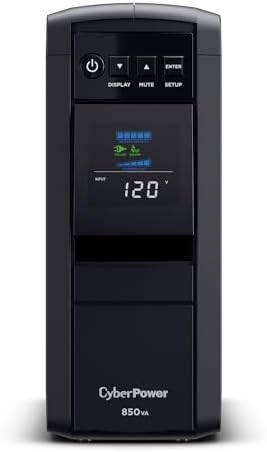
| Capacity | 850VA / 510W |
| Waveform | Pure sine |
| Outlets | 10 |

| Capacity | 1000VA / 600W |
| Battery | LiFePO4 lithium |
| Energy | 153.6 Wh |

| Capacity | 1500VA / 900W |
| Waveform | Simulated sine |
| Owner ratings | 12,998 |

| Capacity | 1500VA / 900W |
| Waveform | Pure sine |
| Charging | USB-C |

| Capacity | 1500VA / 1500W |
| Waveform | Pure sine |
| Power factor | 1.0 |
What size UPS do I need for each setup? The picks
These are the answers to what size UPS do I need at five common load levels. Every unit below is chosen to sit at a different point on the sizing curve, so you can match one to the number you just worked out. Prices and availability update live. We have deliberately not repeated the picks from our UPS-versus-surge-protector guide — these are a fresh lineup organized by size, not by category.
Small setups — CyberPower CP850PFCLCD (850VA / 510W)
The right answer for a router-and-modem closet or a single small desktop. It is a pure sine wave unit — unusual and welcome at this size — so it plays nicely with modern power supplies, and at a ~500W ceiling it will run a light 15–40W network load for a very long time. Do not overthink small loads; this is enough and then some.
- 850VA/510W PFC Sine Wave Battery Backup Uninterruptible Power Supply (UPS) System designed to support active PFC and con…
- 10 NEMA 5-15R OUTLETS: Five battery backup & surge protected outlets; Five surge protected outlets; INPUT: NEMA 5-15P ri…
- MULTIFUNCTION, COLOR LCD PANEL: Displays immediate, detailed information on battery and power conditions; Color display …
Delivery note: this one currently ships from a marketplace seller rather than from Amazon. The listing is genuine and the price is live, but delivery and returns run through that seller rather than through Amazon.
The home-office workhorse — APC Back-UPS Pro BX1500M (1500VA / 900W)
If your desk is a normal computer, a monitor and network gear, this is the size that fits without drama. 900 real watts clears a 200W load with enormous headroom, the LCD shows you load and estimated runtime at a glance, and AVR smooths out the brownouts that are more common than full blackouts. For most readers, this is the pick on the page.

- 1500VA / 900W RELIABLE BACKUP POWER: The highest VA capacity available for home use; delivers short-term battery power t…
- TEN PROTECTED OUTLETS: Power your entire setup with 5 battery backup outlets for essential devices, and 5 surge-only out…
- AUTOMATIC VOLTAGE REGULATION (AVR): Corrects low voltage brownouts (88V+) and surges (+/-13%) without draining battery. …
Longest life, least maintenance — GOLDENMATE 1000VA / 600W Lithium
Traditional UPS units use lead-acid batteries that fade in 3–5 years and need replacing. This one uses LiFePO4 lithium cells rated for roughly a decade and thousands of cycles — so it costs more up front but you are not buying a replacement battery halfway through its life. Pure sine output and 600W of real capacity make it a genuinely smart mid-size choice, especially for a set-and-forget NAS or a desk you would rather not fuss over.
- [LiFePO4 Battery, Ultra-long Endurance]: This lithium UPS features a cutting-edge Lithium Iron Phosphate Battery, offeri…
- [Multi-Outlets & Efficient Cooling System]: This plug-and-play device includes eight NEMA 5-15P outlets with surge prote…
- [Trustworthy Protections]: The 1000VA/600W Pure Sine Wave UPS ensures high efficiency by continuously monitoring battery…
Clean power for sensitive gear — APC Back-UPS Pro BR1500MS2 (1500VA / 900W, sine wave)
If you have a desktop with a modern active-PFC power supply, pure sine wave output stops being a nice-to-have and becomes the reason your PC does not stutter or shut off when the UPS kicks in. This one pairs true sine output with a USB-C charging port and the same 900W capacity as the workhorse above — the pick when your gear is a little more particular about the shape of its power.
- 1500VA/900W – POWERS YOUR FULL SETUP: Handles demanding systems with real headroom. Up to 73 minutes of runtime at 100W …
- PURE SINE WAVE UPS – SAFE FOR SENSITIVE ELECTRONICS: Unlike basic UPS units that output simulated sine wave, this delive…
- AVR PROTECTS AGAINST BROWNOUTS & SPIKES: Automatically corrects voltage that’s too high or too low without switching to …
Serious workstations and gaming rigs — CyberPower PR1500LCD Smart App Sinewave (1500VA / 1500W)
This is the step up you make when your load is real. A true 1500W rating — not the 900W hiding behind a 1500VA badge — means a 400–600W gaming or creator rig sits comfortably below the ceiling with headroom to spare. Pure sine, deep management software, and the capacity to actually back up a machine that draws power. It costs more because it does more; do not buy it for a 200W desk.

- 1500VA/1500W Sinewave Uninterruptible Power Supply (UPS): Uses sine wave output to provide battery backup power for Acti…
- EIGHT NEMA 5-15R OUTLETS: Provide battery backup and surge protection to safeguard corporate servers, department servers…
- EXTENDABLE MULTIFUNCTION LCD PANEL: Can be removed and relocated when installed in hard to reach places using attached 4…
Delivery note: this one currently ships from a marketplace seller rather than from Amazon. The listing is genuine and the price is live, but delivery and returns run through that seller rather than through Amazon.
What the 5 cost, side by side
Live Amazon prices — cheapest to dearest. Tap any row for the current price.
Prices fluctuate — tap any row for the live price on Amazon. Bars run from zero, so they show what these actually cost. The pattern worth remembering: you are paying for watts, not for the VA number on the box — the watt rating is the limit you hit first, and it is the figure that should decide your budget. The cheapest here is 24% of the price of the dearest.
The cost you do not see on the price tag: batteries
A UPS is one of the few gadgets with a built-in expiry date. The battery inside a traditional unit is sealed lead-acid, and it fades whether you use it or not — typically good for 3 to 5 years before it can no longer hold a useful charge. When it goes, runtime quietly collapses, often with no obvious warning until the next outage catches you out. The saving grace: most units let you swap the battery cartridge for roughly $30–$60, far cheaper than a whole new UPS, so replacing the cells rather than the unit is almost always the right call.
This is where lithium (LiFePO4) units like the GOLDENMATE change the math. Their cells are rated for roughly ten years and thousands of cycles, so over the life of the unit you likely never touch the battery at all. You pay more up front, but you skip one or two lead-acid replacements and the runtime stays consistent for far longer. For a set-and-forget install — a NAS in a closet, a UPS you would rather never think about again — the lithium premium often pays for itself.
Either way, build this into your thinking: the true cost of a UPS is the purchase price plus the batteries you will feed it over its life. Sizing sensibly helps here too — a unit run at a comfortable load rather than its ceiling is easier on its battery and lasts longer.
Where it lives: how big and how heavy
One practical detail that catches people off guard: a 1500VA UPS is heavy — often 20 to 30 pounds, most of it battery — and it runs warm, so it wants a spot on the floor with a little airflow, not sealed inside a closed cabinet. The units in this guide are tower-style, meant to sit upright beside or under a desk. Rack-mount UPS units exist for server cabinets, but for a home office a tower is simpler, cheaper, and easier to live with. Before yours arrives, make sure you have a floor spot near an outlet — and not one where a hot, humming brick will annoy you.
Five mistakes people make sizing a UPS
Most wrong answers to what size UPS do I need come from one of these five, and the first is by far the most common.
1. Buying by VA and ignoring watts
The whole point of this guide. Two “1500VA” units can differ by 600 real watts. Always compare the watt rating — it is the limit you hit first.
2. Sizing for the whole desk instead of the essentials
You do not need to back up your laser printer, your desk lamp, or a second monitor you can live without for ten minutes. Backing up only what matters means a smaller, cheaper, longer-running UPS. Put the rest on the surge-only outlets.
3. Chasing hours of runtime from a UPS
A UPS is a bridge to a clean shutdown, not an off-grid power source. If you want to keep working for an hour through an outage, you are shopping for a power station, and buying an oversized UPS to fake it is the most expensive wrong turn on this page.
4. Running the unit at its ceiling
Skipping the 20–25% headroom means the first real outage — when everything is drawing peak — can overload the UPS and shut it down instead of saving you. Headroom is the whole insurance policy.
5. Ignoring pure sine wave for a modern PC
Cheaper units output a “simulated” sine wave. Basic electronics do not care, but desktops with active-PFC power supplies can stutter, buzz, or refuse to switch to battery on simulated sine. If you have a real desktop, budget for a pure sine unit.
Frequently asked questions
What size UPS do I need for a home office?
For a typical desk — one computer, one monitor and your network gear — add up the real watts, add 20–25% headroom, and buy a unit whose watt rating clears that figure. In practice most home offices land between 500W and 900W of usable capacity, which is the 850VA to 1500VA shelf. If a gaming or creator desktop is on the battery side, size up: those pull 250–500W on their own before the monitor is counted.
Is a bigger UPS always better?
No. An oversized UPS costs more, weighs more, and gives you runtime you will never use, while its battery still ages on the same 3–5 year clock. Size to your load plus 20–25% headroom and stop there. The right size is the cheapest one that clears your watts with margin.
What happens if my load exceeds the UPS rating?
The UPS overloads. Most will alarm loudly and, if you push past the limit during an actual outage, simply cut power — the opposite of what you bought it for. That is why headroom matters and why you size on watts, the limit you reach first.
How long will a UPS run my computer?
At a light 100W load, a 1500VA-class unit can run 45 minutes to over an hour. At 500W, the same unit may last only 5–10 minutes. Runtime drops sharply as load rises, so always estimate runtime at your real load, not the best-case number on the box.
Do I need pure sine wave?
If you are backing up a modern desktop PC, a NAS, or other gear with an active-PFC power supply — yes, strongly. If it is just a router, modem, or a laptop charger, a simulated-sine unit is fine. When in doubt, pure sine is the safe choice and increasingly the default at the 1500VA size.
VA or watts — which number do I actually buy on?
Watts. VA is the headline, but the watt rating is the real capacity limit for computer loads and it is almost always the one you hit first. Add up your watts, add headroom, and buy a unit whose watt rating clears it.
Should I get a UPS or a portable power station?
Get a UPS if the goal is to ride through flickers and shut down cleanly — it switches over instantly and lives under your desk. Get a power station if the goal is hours of runtime or portable power. They solve different problems; our power station guide covers that side.
Can I plug a power strip into a UPS?
A basic power strip to split one battery outlet into a few, yes — as long as the total load still fits inside the UPS’s watt rating. What you should not do is daisy-chain a second surge protector or another UPS into it, or hang a space heater, laser printer, or anything with a motor off the battery side. Those draw large startup surges that can trip the unit at the worst moment.
Will a UPS protect against surges and lightning?
Every UPS in this guide includes surge protection, and the AVR in a line-interactive unit handles everyday sags and spikes well. But no consumer UPS is a substitute for proper protection against a direct lightning strike — for that, unplug during severe storms or add whole-home surge protection at the panel. Think of the UPS as everyday insurance, not a lightning rod.
How do I know when to replace the battery?
Watch two things: most units have a self-test and will flash a “replace battery” indicator, and your runtime will drop noticeably — a unit that used to hold 20 minutes suddenly managing two is telling you the cells are done. Once a lead-acid UPS is past the 3–5 year mark, test it deliberately rather than waiting for the next outage to reveal a dead battery.
Related guides
Once you have settled what size UPS do I need for your desk, these cover what to buy and what sits either side of it.
- Best UPS Battery Backup for Gaming PCs, Desktops & Home Offices (2026) — eight picks compared, so you can buy at the size you just calculated.
- UPS vs Surge Protector vs Power Strip: What You Actually Need — start here if you are not sure you need a UPS at all.
- Best Portable Power Stations (2026) — for hours of runtime and off-grid power, not just shutdown.
- Best NAS Devices for Home Office & Small Business — the one setup where UPS shutdown signalling really earns its keep.
Sizing figures and wattages here are realistic estimates to guide your decision, not lab-measured benchmarks — your exact numbers depend on your specific gear. When in doubt, measure your real load with a plug-in power meter before you buy.
Why You Can Trust Smart Tech Buying
Every recommendation is based on extensive product research, manufacturer specifications, customer feedback, long-term reliability, value, and suitability for real-world use. When we have personal experience with a product, we include those insights. We regularly review our guides to keep recommendations current as new products are released.