2026 Buyer's GuideBest Headsets for Remote Work
Eight headsets we'd actually take a client call on – matched to how you really work, from $19 to flagship.
7Picks compared
3Boom mic
5Active noise cancel
If you spend your day on Zoom, Microsoft Teams, or back-to-back client calls, your headset is the single most important piece of gear in your home office — more than your monitor, more than your chair, arguably more than your laptop. It is the thing standing between you and being misunderstood, talked over, or asked to repeat yourself for the third time in a meeting.
After researching the most current 2026 models and weighing them against what remote professionals actually need, this guide narrows the field to eight headsets worth your money. Each one is widely available on Amazon and at major retailers, and each is matched to a specific kind of remote worker — from the consultant who lives on calls to the budget-conscious freelancer who just needs to sound clear.
Below you’ll find a quick comparison table, detailed reviews with pros, cons, and key specs, a practical buyer’s guide, and recommendations broken down by user type. Let’s get into it.
A great headset makes sure you’re heard; capturing the call is the next step. If you want automatic transcripts and summaries of your meetings, see our guide to the best AI voice recorders.
Disclosure: Smart Tech Buying is reader-supported. As an Amazon Associate we earn from qualifying purchases. This does not affect our recommendations or the price you pay.
The best headsets for remote work are not the ones that sound best to you — they are the ones that make you sound clear to everyone else on the call. That distinction decides this entire guide.
Why Audio Quality Matters for Remote Work
Before the picks, the case for caring at all — because the best headsets for remote work earn their price on how you sound to other people, not how music sounds to you.
When you work remotely, your voice is your presence. In an office, people read your body language, your posture, the fact that you showed up. On a video call, all of that compresses down to a small rectangle and a stream of audio. If that audio is muffled, echoey, or fighting against a barking dog, your ideas land softer — no matter how good they are.
There’s a real professional cost to bad audio. Colleagues subconsciously rate hard-to-hear speakers as less competent and less credible, even when the content is identical. Misheard numbers on a sales call, a missed instruction in a stand-up, a client who tunes out because your voice keeps cutting in and out — these are small frictions that compound over months into missed opportunities.
Good audio also protects you. A headset with strong noise cancellation lets you focus in a noisy house. A comfortable one lets you take a three-hour workshop without a headache. And a reliable connection means you’re not the person frantically rejoining the call while everyone waits.
Common Problems with Poor Headsets
Most people don’t realize their headset is the problem until someone tells them. Here are the usual culprits:
- Tinny, distant microphone audio. Laptop mics and cheap earbuds pick up the whole room. You sound like you’re at the bottom of a well.
- Background noise bleed. Keyboard clatter, a passing truck, a partner on their own call — all of it reaches the people you’re talking to.
- Connection dropouts. Flaky Bluetooth that disconnects mid-sentence, or laggy audio that throws off the rhythm of conversation.
- Discomfort over long sessions. Clamping force that gives you a headache, ear cups that trap heat, headbands that press on the top of your skull.
- Battery anxiety. A wireless headset that dies halfway through the afternoon, forcing you onto a call tethered to a wall.
What Professionals Should Look For
A genuinely good remote-work headset gets five things right: a clear, noise-rejecting microphone so you’re always understood; effective noise cancellation so you can focus; all-day comfort so you forget you’re wearing it; a stable connection (a USB dongle helps enormously here); and enough battery to outlast your workday. The reviews below are built around exactly those priorities.
Quick Comparison Table
All seven of the best headsets for remote work side by side, so you can narrow it down before reading the full reviews.
| Headset | Best For | Type | ANC | Mic | Battery (talk) | Teams/Zoom Certified | Approx. Price* |
|---|
| Yealink BH70 | Best Overall | Wireless + USB dongle | Yes (adjustable) | 8-mic boom | Up to 36 hrs | Yes | $$$ |
| Yealink BH74 | Best Call Quality | Wireless + USB dongle | Yes (3-level) | Boom + Acoustic Fence | Up to 19 hrs (ANC on) | Yes | $$$ |
| Logitech H390 | Best Budget | Wired USB-A | No (passive) | Noise-canceling boom | N/A (wired) | No (works w/ all) | $ |
| Sony WH-1000XM6 | Best Premium / Best ANC | Wireless Bluetooth | Yes (best-in-class) | 6-mic beamforming | Up to 30 hrs | No (works w/ all) | $$$$ |
| Sony WH-1000XM5 | Best Value ANC | Wireless Bluetooth | Yes (excellent) | 4-mic beamforming | Up to 30 hrs | No (works w/ all) | $$$ |
| Bose QuietComfort Ultra (2nd Gen) | Best Comfort / Focus | Wireless Bluetooth | Yes (world-class) | Noise-rejecting mics | Up to 30 hrs | No (works w/ all) | $$$$ |
| Logitech Zone 750 Wired | Best Plug-and-Play Wired | Wired USB-C/A | No (passive) | Noise-canceling mic | N/A (wired) | Yes | $$ |
*Price tiers are approximate and shift frequently. Confirm the live price on the product page. $ = under ~$60, $$ = ~$60–130, $$$ = ~$150–280, $$$$ = ~$330–450.
Relative strengths at a glance
The trade-off this whole guide turns on: how good you sound to them, versus how quiet it is for you.
Mic clarity (how you sound)Noise cancellation (your focus)
Yealink BH70 · AI 3-mic · Teams certified
Yealink BH74 · 6 AI mics · ANC
Logitech H390 · noise-canceling boom · no ANC · wired
Sony WH-1000XM6 · 6-mic beamforming · 12-mic ANC, QN3
Sony WH-1000XM5 · 4-mic beamforming · 8-mic ANC
Bose QuietComfort Ultra 2nd Gen · noise-rejecting mics · world-class ANC
Logitech Zone 750 Wired · noise-canceling mic · no ANC · wired
Relative and directional – our editorial read based on each headset's microphone design and stated noise cancellation. Boom mics sit near your mouth and score highest for how you sound; consumer flagships score highest for silencing the world but rely on beamforming mics further from your voice. The two wired picks have no active noise cancellation at all, which is exactly why they cost less. Not lab-measured audio tests.
Best Headsets for Remote Work in 2026
Seven picks, every one sold by Amazon or the manufacturer’s own store, Prime eligible, in stock and rated 4.0 or better. Anything held by a third-party reseller was cut, however good the headset itself is.
1. Yealink BH70 — Best Overall
The Yealink BH70 is the headset we would put on most remote desks. It is built for calls first rather than music first, which is the right priority when your day is back-to-back meetings, and it is one of the very few genuine business headsets still sold from a clean listing.
An AI three-microphone array keeps your voice forward and the room behind it, so the person on the other end hears you rather than your kitchen. The 35-hour talk battery survives a full week of calls between charges, and at 147g it is light enough that you stop noticing it by mid-afternoon — the thing that actually decides whether a headset gets worn all day.
- Teams Certification ▶ Yealink has always maintained close cooperation with Microsoft. This BH70 headset has been certifi…
- NOW Compatible with Cisco ▶ Following the latest release, Yealink headsets now work seamlessly with Cisco Webex & Jabber…
- AI-Powered Noise Isolation Mics for Open Office ▶ With the support of Yealink’s advanced Acoustic Shielding Technology a…
Key Features
- AI three-microphone array for voice isolation
- 35-hour talk battery
- 147g, the lightest in its class
- Microsoft Teams certified; works with Zoom, Google Meet and Cisco
- USB dongle rather than laptop Bluetooth
Best For: Consultants, managers, salespeople, and anyone whose day is built around calls and wants the most dependable all-rounder.
One caveat stated plainly: it is a newer listing with a modest owner sample, so there is less long-run feedback than on a Sony or a Logitech. Everything about how it is sold is clean — sold by Yealink, Prime eligible, in stock, 4.0 stars.
2. Yealink BH74 — Best for Call Quality
If your entire job is talking — support agent, account manager, recruiter, anyone running a phone-based desk — the BH74 is the step up. It carries six AI microphones against the BH70’s three, and that extra array is what pulls your voice cleanly out of an open-plan room or a house with everything else going on in it.
- 6 AI-powered Mic for Hybrid ANC: BH74 AI enhanced noise cancellation microphones for crystal-clear calls combines both f…
- Brilliant Audio Quality: Certified for Microsoft Teams Premium Open Office, the noise canceling headset for work powered…
- 32 H Long Battery Life for All-Day Use: Yealink’s battery performance has always maintained an industry advantage, the w…
It adds active noise cancellation for your own ears, a 32-hour talk battery, a physical mute button you can find without looking, and a charging stand so it lives on the desk ready rather than flat in a drawer. It is certified for Microsoft Teams Premium open-office use — the certification that exists specifically for noisy rooms.
Key Features
- Six AI microphones for noisy, shared spaces
- Active noise cancellation
- 32-hour talk battery
- Charging stand included
- Teams Premium open-office certified
Best For: Customer support, sales floors, and anyone taking calls in a room they do not control.
Same caveat as the BH70 — a smaller owner sample than the consumer headphones further down this list — and the same clean sourcing: sold by Yealink, Prime eligible, in stock, 4.2 stars.
3. Logitech H390 — Best Budget
Not everyone needs to spend $250 to sound professional. The Logitech H390 has been a quiet workhorse for years because it does the essentials well at a fraction of the cost: plug the USB-A connector into your computer and you have clear stereo audio and a noise-canceling boom mic with zero setup, zero pairing, and zero battery to manage.
- Digital Stereo Sound: Fine-tuned drivers provide enhanced digital audio for music, calls, meetings and more
- Rotating Noise Canceling Mic: Minimizes unwanted background noise for clear conversations; the rotating boom arm can be …
- Handy In-line Controls: Simple in-line controls on the headset cable let you adjust the volume or mute calls without dis…
It won’t block out a noisy room for you — there’s no active noise cancellation — but the rotating boom mic sits close to your mouth and rejects background noise reasonably well for the people you’re talking to. In-line controls handle volume and mute. For freelancers, students, occasional-call workers, or anyone outfitting a second machine, it’s hard to argue with the value.
Key Features
- Plug-and-play USB-A, no software or pairing required
- Rotating noise-canceling boom microphone
- In-line volume and mute controls with LED indicator
- Padded, adjustable headband and leatherette ear cushions
- Certified to work with Chromebook; compatible with all platforms
Key Specs: Connectivity: Wired USB-A | Drivers: 30mm | ANC: None (passive only) | Cable: ~1.9m
Pros
- Excellent value; one of the cheapest credible work headsets
- Zero connectivity or battery hassle
- Clear mic for the price
- Light and easy to wear
Cons
- No active noise cancellation for the wearer
- USB-A only (you may need an adapter on newer laptops)
- Build is functional, not premium
Best For: Freelancers, students, light-call workers, and anyone who wants reliable call audio on a tight budget.
4. Sony WH-1000XM6 — Best Premium / Best Noise Cancellation
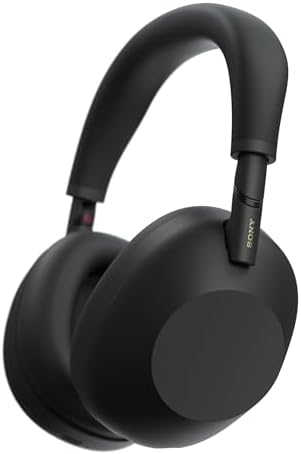
The Sony WH-1000XM6 is not a dedicated “work headset” — it’s a flagship consumer noise-canceller — but for remote workers who also want world-class focus audio and great music, it’s a compelling do-everything pick. Released in 2025, the XM6 builds on Sony’s legendary line with a faster QN3 processor and a 12-microphone system that delivers the strongest noise cancellation in this guide. If you’re trying to concentrate in a chaotic house or a busy café, nothing here silences the world more completely.
- THE BEST NOISE CANCELLATION: Powered by advanced processors and an adaptive microphone system, the WH-1000XM6 headphones…
- CO-CREATED WITH MASTERING AUDIO ENGINEERS: Developed in collaboration with world-renowned mastering audio engineers, the…
- HD NOISE CANCELING PROCESSOR QN3: The HD Noise Canceling Processor QN3 is 7x faster than the QN1 (found in our WH-1000XM…
For calls, the six-mic AI beamforming system is genuinely good — your voice comes through full and clear — though it’s worth being honest: a dedicated business headset like the Yealink’s still edges it out for absolute broadcast clarity, because Sony’s priority is music first, calls second. Multipoint Bluetooth, a foldable travel-friendly design, and roughly 30 hours of battery round out a headset that works as hard off the clock as on it.
Key Features
- 12-microphone adaptive ANC with QN3 processor (best-in-class silence)
- 6-mic AI beamforming for clear calls
- High-resolution audio with LDAC, plus spatial audio modes
- Multipoint Bluetooth (laptop + phone)
- Foldable design with magnetic-close case
- Up to 30-hour battery; 3-min charge ≈ 3 hrs playback
Key Specs: Connectivity: Bluetooth 5.3 (+ wired/USB) | Drivers: 30mm | ANC: Yes (class-leading) | Battery: up to 30 hrs (ANC on)
Pros
- The best noise cancellation for deep focus, period
- Superb music and media quality
- Doubles as travel and personal headphones
- Comfortable for long wear
Cons
- Premium flagship price
- Call mic, while very good, trails dedicated boom-mic headsets
- No USB dongle in the box — relies on Bluetooth for PCs
Best For: Hybrid professionals and deep-focus workers who want one premium headset for calls, concentration, music, and travel.
5. Sony WH-1000XM5 — Best Value Noise Cancellation
Here’s a smart-shopper move: the previous-generation Sony WH-1000XM5 delivers most of the XM6 experience for noticeably less money, especially when it goes on sale. Its eight-microphone ANC system is still excellent, the sound is rich and refined, and the four-mic beamforming call system handles video meetings well. For remote workers who want premium noise cancellation without paying the latest-flagship premium, this is the value play.
- PREMIUM NOISE CANCELLATION: Two processors control 8 microphones for unprecedented noise cancellation. With Auto NC Opti…
- MAGNIFICENT SOUND: Engineered to perfection with the new Integrated Processor V1.
- CRYSTAL CLEAR HANDS-FREE CALLING: 4 beamforming microphones, precise voice pickup, and advanced audio signal processing.
You give up the XM6’s newest processor, the very latest mic tuning, and the foldable hinge — but in day-to-day remote work, the gap is smaller than the price difference suggests. Comfort, battery life, and the core “shut out the world” magic are all here.
Key Features
- 8-microphone ANC with Integrated Processor V1
- 4-mic beamforming with Precise Voice Pickup for calls
- Hi-Res Audio support and customizable EQ
- Multipoint Bluetooth and wear detection
- Up to 30-hour battery; 3-min charge ≈ 3 hrs playback
Key Specs: Connectivity: Bluetooth (+ wired) | Drivers: 30mm | ANC: Yes (excellent) | Battery: up to 30 hrs
Pros
- Premium ANC and sound at a friendlier price
- Frequently discounted — strong value
- Comfortable, lightweight design
- Great for focus and music as well as calls
Cons
- Older generation (non-foldable design)
- Call mic is good, not boom-mic great
- No USB dongle included
Best For: Value-focused remote workers who want flagship-tier noise cancellation and sound without the newest-model price tag.
6. Bose QuietComfort Ultra Headphones (2nd Gen) — Best Comfort & Focus
Bose has a decades-long reputation for two things: world-class noise cancellation and unmatched physical comfort. The 2nd-generation QuietComfort Ultra Headphones deliver both, and if you’re prone to clamping headaches or just want a headset you genuinely forget you’re wearing, this is the most comfortable pick in the guide. The plush cushions and evenly-distributing headband make marathon focus sessions painless.
- BREAKTHROUGH SPATIALIZED AUDIO: Super immersive sound spatializes everything, taking the music out of your head and plac…
- NOISE CANCELING HEADPHONES: Enjoy Bose’s best noise cancellation for headphones with Quiet Mode, turn on Aware Mode to h…
- NEW CINEMA MODE: Bring video content to life like never before with Cinema Mode; spatialize and balance background sound…
The 2nd Gen refresh added meaningful upgrades for remote work: up to 30 hours of battery, a new Cinema Mode, and — importantly — lossless USB-C audio with high-quality two-way communication for calls and video conferencing over a wired connection. Bose’s immersive spatial audio makes media feel bigger, and the noise-rejecting mics handle calls cleanly, though like the Sony pair this is a music-first design rather than a boom-mic call machine.
Key Features
- Bose’s best-in-class active noise cancellation
- Exceptional comfort with plush cushions and even pressure
- Immersive spatial audio plus new Cinema Mode
- USB-C lossless audio and two-way mic communication
- CustomTune personalizes sound to your ears
- Up to 30-hour battery life
Key Specs: Connectivity: Bluetooth 5.4 (+ USB-C audio) | ANC: Yes (world-class) | Battery: up to 30 hrs (23 with Immersive Audio)
Pros
- The most comfortable headset here for all-day wear
- Superb noise cancellation for focus
- USB-C audio is a real plus for desk-bound calls
- Premium build and materials
Cons
- Flagship price
- No dedicated boom mic for absolute call clarity
- Immersive Audio noticeably shortens battery life
Best For: Deep-focus knowledge workers and anyone who prioritizes physical comfort and silence for long, heads-down workdays.
7. Logitech Zone 750 Wired — Best Plug-and-Play Wired
There’s a strong case for going wired in 2026: zero battery anxiety, zero dropouts, zero latency, and a lower price. The Logitech Zone 750 Wired is the best premium USB headset for remote workers who value simplicity and reliability over cutting the cord. It plugs in over USB-C (with an included USB-A adapter), and you’re working — no pairing, no charging, no firmware dance before a meeting.
- Advanced noise-canceling mic makes sure that you sound clear in calls and video conferences, even in a busy work environ…
- Featuring 40mm drivers and immersive audio for full bass and crisp high frequencies so you can enjoy music, hear calls a…
- Multiple connections: Simple USB-C and included USB-A adapter** ensure plug-and-play compatibility for all your devices;…
Its advanced noise-canceling microphone is built to keep you intelligible in a busy room, and the Logi Tune app lets you set sidetone and your own voice level so you are not shouting over yourself. The 40mm drivers handle meetings and music equally well, the on-ear fit stays light through long call days, and the in-line controls cover volume, mute, answer, end and reject, plus play and pause. Worth knowing: this is a newer listing with only 138 ratings behind its 4.1-star average, so treat that score as a much smaller sample than the tens of thousands behind the H390 further down this page.
Key Features
- Plug-and-play USB-C with included USB-A adapter
- Advanced noise-canceling microphone for clear calls
- 40mm drivers for full-bodied audio
- In-line controls: volume, mute, answer, end, reject, play and pause
- Sidetone and voice-level tuning via the Logi Tune app
- On-ear fit designed for long wear
Key Specs: Connectivity: Wired USB-C (+ USB-A adapter) | Drivers: 40mm | ANC: None (passive) | Fit: On-ear
Pros
- Total reliability — no battery, no dropouts, no latency
- Clear call mic with adjustable sidetone
- Light on-ear fit for long call days
- Simple in-line controls, nothing to pair
Cons
- No active noise cancellation
- Tethered to your machine — no roaming
- Only 138 ratings so far, a thin track record
- Higher price than basic wired headsets like the H390
Best For: Desk-based remote workers, IT-managed teams, and anyone who wants flawless plug-and-play reliability without managing a battery.
How to Choose Among the Best Headsets for Remote Work
Picking the right headset comes down to matching features to how you actually work. Here’s what each spec really means for your day.
Noise Cancellation
There are two different things people call “noise cancellation,” and the distinction matters. Active noise cancellation (ANC) uses microphones and counter-sound to quiet the world for you — great for focusing in a noisy home. Microphone noise cancellation (sometimes called noise rejection or Acoustic Fence) cleans up what the other person hears, filtering background sound out of your transmitted voice. If you share your space, you want both: ANC to concentrate, and a strong noise-rejecting mic so callers only hear you. If you have a quiet, dedicated office, you can save money by prioritizing the mic and skipping ANC.
Microphone Quality
This is the spec that affects how professional you sound, and it’s where dedicated work headsets pull ahead of consumer headphones. A boom microphone that sits near your mouth (like on the Yealink BH70 or BH74) almost always beats the built-in mics on premium headphones like the Sony or Bose, simply because it’s closer to the source. If calls are central to your job, prioritize a boom mic. If calls are occasional and music/focus matter more, a great beamforming mic on a flagship headphone is plenty.
Comfort
You’ll wear this thing for hours, so comfort isn’t a luxury — it’s productivity. Look for breathable ear cushions (memory foam or dual-foam), an even-pressure headband, and reasonable clamping force. Heavier over-ear designs distribute weight better but can trap heat; lighter on-ear or flex designs are cooler and more portable but may seal out less noise. If you wear glasses, prioritize plush cushions that seal gently around the arms.
Wireless vs Wired
Wireless gives you freedom to pace, grab coffee, or step away mid-call — and modern dongle-equipped headsets are extremely reliable. Wired gives you zero battery management, zero latency, and usually a lower price, at the cost of being tethered. There’s a full section on this below, but the short version: most remote workers are happiest wireless in 2026, while desk-bound and IT-managed users often prefer wired.
Battery Life
For a wireless headset, aim for at least 15 hours of talk time so it comfortably clears a full workday with buffer. Many modern headsets hit 20–36 hours, which means weekly rather than daily charging. Quick-charge is the underrated hero feature — something like “15 minutes for 4 hours” saves you on the mornings you forgot to plug in overnight.
Teams and Zoom Compatibility
Almost every headset works with every platform, but certification matters for the smoothest experience. A Microsoft Teams–certified or Zoom-certified headset gives you reliable in-line controls (mute, answer, hang up) and often a dedicated button. Note that consumer headphones like the Sony and Bose work perfectly well on calls — they just aren’t formally “certified,” so a physical mute button on the app side is your friend.
Wired vs Wireless Headsets: Which Should You Buy?
This is the fork most people get stuck on when shortlisting the best headsets for remote work, and the honest answer depends on one thing: whether you move.
This is the question I get most, so let’s settle it.
Choose wireless if you like to move during calls, you switch between a laptop and phone, you value a clean desk, or you take calls in different rooms. The key tip: for work, favor a wireless headset that ships with a USB dongle (both Yealink models ship with one) rather than relying on your computer’s built-in Bluetooth. The dongle delivers a more stable, lower-latency connection and avoids the pairing headaches that plague laptop Bluetooth. Battery technology has matured to the point that charge anxiety is largely solved, especially with quick-charge features.
Choose wired if you have a fixed desk setup and want absolute, boring reliability — no battery, no dropouts, no latency, ever. Wired USB headsets like the Logitech Zone 750 Wired or the budget H390 also tend to cost less and set up instantly with no pairing. They’re popular with IT departments for exactly this reason: fewer variables, fewer support tickets.
The honest bottom line: for most remote workers in 2026, wireless with a dongle is the better daily-driver experience. But if you never leave your desk and just want something that always works, a quality wired headset is a perfectly smart, often cheaper choice.
The Best Headsets for Remote Work, by Role
Different roles stress different features. Here’s the quickest path to the right pick for your situation.
Small Business Owners
You wear every hat — sales calls, vendor negotiations, team check-ins, the occasional focus block. You want one versatile, dependable headset that sounds professional in every context. Pick: Yealink BH70. It’s the best all-rounder, with the mic clarity to close deals and the comfort to grind through a long day. If you also crave premium focus audio and music, the Sony WH-1000XM6 is a worthy splurge.
Remote Employees
You’re on Teams or Zoom several times a day and need to sound clear and look professional without overthinking it. Pick: Yealink BH70 for the best balance, or the Logitech Zone 750 Wired if your company prefers a simple, reliable, plug-and-play wired option. On a budget, the Logitech H390 punches well above its price.
Customer Support Agents
Your job is talking, often in a shared or noisy space, for hours. Mic clarity and comfort are everything. Pick: Yealink BH74. Its six-microphone array is built precisely for this — callers hear you and nothing else. The BH70 is an excellent alternative if you want a lighter headset and a longer battery.
Hybrid Workers
You split time between home, office, and elsewhere, and you want one headset that does it all and travels well. Pick: Yealink BH70 for its 147g frame and 35-hour battery, or the Sony WH-1000XM6 if you want premium ANC that doubles as your commute and travel headphones.
Frequent Travelers
You take calls from airports, hotels, and cafés, and you need professional audio that survives a chaotic day in a bag. Pick: Yealink BH70 for the lightest pro design, or the Bose QuietComfort Ultra (2nd Gen) if all-day comfort and the best noise cancellation for blocking out a plane cabin top your list.
Frequently Asked Questions
The questions that come up most often when people shop for the best headsets for remote work.
What is the best headset for remote work in 2026?
For most people, the Yealink BH70 is the best overall headset for remote work in 2026. It combines a clear AI three-microphone array, a 35-hour talk battery, a 147g frame you stop noticing, and a reliable USB-dongle connection. If you want premium noise cancellation that also handles music and travel, the Sony WH-1000XM6 is the top premium alternative.
Do I really need a dedicated headset, or are my earbuds fine?
Earbuds can work for occasional calls, but a dedicated headset — especially one with a boom microphone — sounds dramatically more professional to the people you’re talking to. If calls are a regular part of your job, a proper headset is one of the highest-value upgrades you can make.
Is wired or wireless better for working from home?
Wireless with a USB dongle is the best daily experience for most remote workers, offering freedom to move with a stable connection. Wired is better if you have a fixed desk and want zero battery management and the lowest price. Both are excellent in 2026 — it comes down to your workflow.
Which headset has the best microphone for Zoom and Teams calls?
Dedicated boom-mic business headsets lead here. The Yealink BH74 (six AI microphones) and the Yealink BH70 (three) deliver the clearest voice pickup, especially in noisy or shared spaces.
Do I need active noise cancellation (ANC)?
It depends on your environment. If you share your space with family, roommates, pets, or live near street noise, ANC dramatically improves focus and call quality. If you have a quiet, dedicated office, you can save money and prioritize microphone quality instead.
How much should I spend on a remote work headset?
For most remote workers, the $150–$280 range offers the best balance of features and value. Budget options around $40–$60 (like the Logitech H390) work well for moderate call volume. Premium models ($330+) are justified if you’re on calls many hours a day or need best-in-class noise cancellation.
Are gaming or music headphones good for work calls?
Premium music headphones like the Sony WH-1000XM6 and Bose QuietComfort Ultra are excellent for focus and sound great on calls, but their built-in mics, while very good, don’t quite match a dedicated boom mic for absolute clarity. If calls dominate your day, choose a business headset; if focus and music matter more, a flagship headphone is a great pick.
Will these headsets work with my laptop and phone at the same time?
Most of the wireless models here — including the Yealink BH70 and BH74 — support multipoint connection, letting you pair to your computer and phone simultaneously and switch between them seamlessly.
Final Verdict: the Best Headsets for Remote Work
If you take one recommendation from this guide, make it the Yealink BH70 — it’s the best all-around headset for remote work in 2026, balancing professional call quality, comfort, battery life, and reliable connectivity better than anything else at its price.
From there, match the headset to your priorities. The Yealink BH74 is the call-clarity champion for support agents and phone-heavy roles. The Sony WH-1000XM6 is the premium do-everything pick with the best noise cancellation for deep focus, while the Sony WH-1000XM5 delivers most of that experience for less. The Bose QuietComfort Ultra (2nd Gen) is the comfort and focus king. The Logitech Zone 750 Wired is the no-nonsense, plug-and-play reliability choice, and the Logitech H390 proves you can sound professional on a tight budget.
Whichever you choose, upgrading your headset is the single most effective way to improve how you show up in every meeting. Your future calls will thank you.
Build Out Your Home Office
A headset is one piece. Once you have picked from the best headsets for remote work above, these cover the rest of the desk.
A great headset is one piece of the puzzle. Round out your remote setup with these companion guides from Smart Tech Buying:
Why You Can Trust Smart Tech Buying
Every recommendation is based on extensive product research, manufacturer specifications, customer feedback, long-term reliability, value, and suitability for real-world use. When we have personal experience with a product, we include those insights. We regularly review our guides to keep recommendations current as new products are released.
Read how we choose our picks →