
The best tablet for business in 2026 is the Apple iPad Pro (M5). Its tandem-OLED display, M5 chip and mature iPadOS app library make it the most capable all-round work tablet. For Android, the Samsung Galaxy Tab S11 Ultra leads; for Windows users, the Surface Pro is the natural pick.
By Arthur C. Art, Founder & Lead Reviewer — Smart Tech Buying. Last updated June 2026.
Disclosure: Smart Tech Buying is reader-supported. As an Amazon Associate we earn from qualifying purchases. This does not affect our recommendations or the price you pay.
A decade ago, calling a tablet a “work device” got you a raised eyebrow. In 2026 it gets you a nod. The tablet you slide into a bag now runs a desktop-class chip, drives an external monitor, signs contracts with a pen that feels like ink, and survives a transatlantic flight on one charge. For a huge slice of professionals — consultants who live in meetings, founders who answer email from a departure lounge, field reps who fill forms on a client’s loading dock, students who annotate 300-page PDFs — the tablet has quietly become the primary screen, not the spare one.
That shift is real, but it is not universal, and the marketing around it is relentless. Every brand will tell you its slate “replaces your laptop.” Some genuinely can. Several cannot, no matter how the box reads. The gap between a tablet that looks productive in an ad and one that actually carries your workday comes down to unglamorous things: how the keyboard hinge behaves on your lap, whether your accounting software has a real app or only a cramped browser tab, how many apps the memory can juggle before something reloads, and how long the battery lasts when you are three time zones from a charger.
We have spent years putting business tablets through exactly those conditions, and this guide reflects that. Below you will find one clear pick per category, full specifications, honest performance notes, and — just as important — a plain account of who each device is wrong for. We would rather lose a sale than send you home with the wrong tablet. Prices and live availability change often, so use the buttons throughout to check the current price before you buy.
Quick Comparison: Best Business Tablets 2026 at a Glance
| Tablet | Display | OS | Battery (rated) | Best For | Rating |
|---|---|---|---|---|---|
| Apple iPad Pro (M5) | 11″ / 13″ Tandem OLED, 120Hz | iPadOS 26 | Up to 10 hrs | Best overall | 4.9 |
| Apple iPad Air (M4) | 11″ / 13″ Liquid Retina LCD | iPadOS 26 | Up to 10 hrs | Best iPad value | 4.7 |
| Samsung Galaxy Tab S11 Ultra | 14.6″ AMOLED, 120Hz | Android 16 / One UI 8 | Up to 23 hrs video | Best Android | 4.8 |
| Microsoft Surface Pro (12″) | 12″ PixelSense LCD, 90Hz | Windows 11 | Up to 16 hrs | Best Windows | 4.4 |
| OnePlus Pad 3 | 13.2″ LCD, 144Hz | Android 15 / OxygenOS | ~15 hrs browsing | Best for remote work | 4.6 |
| Samsung Galaxy Tab S11 | 11″ AMOLED, 120Hz | Android 16 / One UI 8 | Up to 18 hrs video | Best for students & pros | 4.6 |
| Amazon Fire Max 11 | 11″ LCD, 60Hz | Fire OS | Up to 14 hrs | Best budget | 4.0 |
How We Picked These Tablets
Our shortlist starts with how the device is actually used at work, not with a spec sheet. We weigh five things in roughly this order: real-world performance under multitasking, the quality and maturity of the app ecosystem (a brilliant chip is wasted if your software only runs in a browser tab), keyboard and stylus experience, battery endurance away from power, and total cost once you add the accessories you will inevitably need. We cross-check our hands-on impressions against manufacturer specifications and independent lab measurements, and we flag the compromises every device makes — because every device makes them. Where we name a “best,” it is the clearest pick for that job, not a tie diplomatically broken.
Best Overall Tablet for Business 2026: Apple iPad Pro (M5)
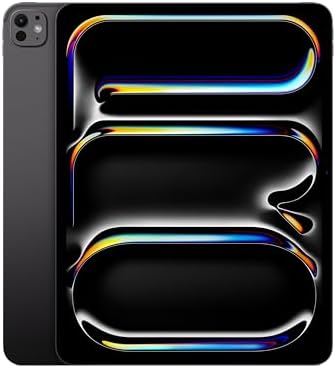
- WHY IPAD PRO — iPad Pro with the Apple M5 chip delivers extraordinary performance for effortless productivity on a stunn…
- PERFORMANCE AND STORAGE — iPad Pro with M5 brings next-generation speed and the power of on-device AI to all your tasks….
- IPADOS — Run pro apps and get more done with iPadOS 26 with Liquid Glass design and game-changing capabilities.* With an…
If you want the single tablet most likely to handle whatever your job throws at it, this is the one. The iPad Pro (M5) pairs a genuinely desktop-class processor with the best-supported tablet app library in the world, and that combination — not any single spec — is why it tops the list. The hardware has been ahead of the software for a couple of generations; with iPadOS 26’s reworked windowing and multitasking, the software has finally started to catch up to what the silicon can do.
Key specifications:
- Display: 11″ (2420×1668) or 13″ (2752×2064) tandem-OLED Ultra Retina XDR, 120Hz ProMotion (10–120Hz adaptive)
- Chip: Apple M5 (9- or 10-core CPU, 10-core GPU, 16-core Neural Engine)
- Memory: 12GB (256GB/512GB) or 16GB (1TB/2TB)
- Battery: 38.99Wh (13″), rated up to 10 hours; fast charge to ~50% in ~30 min
- Connectivity: Wi-Fi 7, optional 5G, USB-C / Thunderbolt
- Software: iPadOS 26 with Apple Intelligence
- Starting price: $999 (11″), $1,299 (13″)
Performance analysis. The M5 is overkill for email and spreadsheets, and that is the point — it means the iPad Pro will still feel fast in three years. It chews through multi-track video, large RAW libraries, 3D and on-device AI without warming up. For mainstream business work — dozens of browser tabs, Office, Slack, a video call, and a reference PDF open at once — you will rarely find its ceiling. The honest caveat is that most buyers will never use the full chip; if your day is documents and meetings, you are paying for headroom.
Battery life. Apple rates roughly 10 hours of web or video, and real mixed-use business days land close to that. The new fast-charge support is the more meaningful upgrade for travelers: a half-hour at a gate gets you back to about half a tank.
Display quality. The tandem-OLED panel is the best screen on any tablet, full stop — deep blacks, very high brightness, and 120Hz that makes scrolling documents feel effortless. The optional nano-texture glass (1TB/2TB only) is worth considering if you work near windows.
Productivity features. iPadOS 26 finally offers proper overlapping windows and a more desktop-like multitasking model, plus Stage Manager for external displays. Center Stage video and a four-mic array make it a strong meeting device.
Keyboard compatibility. The Magic Keyboard adds a laptop-grade typing deck and trackpad, but it is heavy and expensive — budget for it, because the Pro is a half-product without a keyboard for real work.
Stylus support. Apple Pencil Pro, with hover, squeeze and barrel-roll, is the gold standard for markup and signatures.
Business use cases. Client presentations, contract markup and e-signature, design and creative review, executives who want one premium device for everything.
Pros
- The most capable tablet processor you can buy, with years of headroom
- Best-in-class display and the most mature business app library
- Excellent resale value and long software support
Cons
- Expensive once you add the keyboard and pencil
- iPadOS still imposes limits power users will occasionally hit
- More power than most office workloads need
Who should buy it: professionals who want one do-everything device, creatives, and anyone already invested in the Apple ecosystem. Who should skip it: spreadsheet-and-email users who would be just as happy saving several hundred dollars on the iPad Air.
Best iPad for Business: Apple iPad Air (M4)
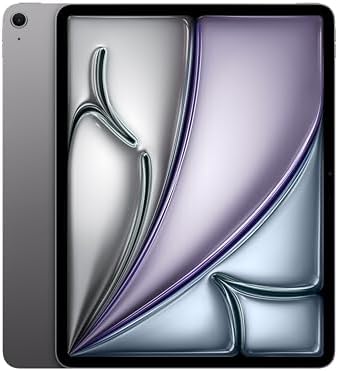
- WHY IPAD AIR — iPad Air with the Apple M4 chip packs even more performance into a beautiful design, and it comes in two …
- PERFORMANCE AND STORAGE — The M4 chip delivers advanced graphics and incredible performance for smooth multitasking and …
- IPADOS + APPS — Run apps and get more done with the game-changing capabilities and intuitive design of iPadOS. The flexi…
For the overwhelming majority of business buyers, the iPad Air is the smarter iPad. The 2026 M4 refresh keeps the same sensible design and adds the one thing the Air really needed — more memory — while holding the price steady. You give up the Pro’s OLED screen and a slice of raw power; you keep almost everything that matters for work, for hundreds of dollars less.
Key specifications:
- Display: 11″ (2360×1640) or 13″ (2732×2048) Liquid Retina LCD, 60Hz, P3 wide colour
- Chip: Apple M4 (8-core CPU, 9-core GPU)
- Memory: 12GB (up from 8GB on the M3 model)
- Battery: rated up to 10 hours; 30W wired charging
- Connectivity: Wi-Fi 7, optional 5G, USB-C
- Software: iPadOS 26 with Apple Intelligence
- Starting price: $599 (11″), $799 (13″)
Performance analysis. The M4 is plenty for any normal office workload and most creative tasks, and the jump to 12GB of memory is the real story — it keeps more apps resident, so Stage Manager and external-display multitasking feel steadier than on the old 8GB Air. You will only feel the gap to the Pro in sustained heavy exports.
Battery life. The same dependable ~10-hour rating as the Pro. Charging tops out at a modest 30W, so it is slower to refill than the latest flagships.
Display quality. A very good 60Hz LCD with accurate colour. It is sharp and bright enough for any document or call; it simply is not OLED, and side-by-side with the Pro the 60Hz scrolling is the giveaway.
Productivity features. Identical iPadOS 26 multitasking to the Pro, the same Magic Keyboard and Apple Pencil Pro support, and the same strong app catalogue — this is where the Air earns its keep.
Keyboard compatibility. Works with the Magic Keyboard for iPad Air; a near-laptop typing experience at lower cost than the Pro’s.
Stylus support. Full Apple Pencil Pro support — the same excellent note-taking and markup as the Pro.
Business use cases. The default company-issued tablet: email, Office, video calls, light design, and note-taking, at a price that scales across a team.
Pros
- Outstanding value; the same apps and accessories as the Pro
- 12GB memory makes multitasking noticeably more reliable
- Two sizes, including a 13″ for desk work
Cons
- 60Hz LCD instead of the Pro’s OLED/ProMotion
- Slow 30W charging
- Storage starts at 128GB
Who should buy it: almost any professional or team that wants iPad capability without paying flagship money. Who should skip it: creatives and power users who genuinely need the OLED screen and the M5’s extra horsepower.
Best Android Tablet 2026: Samsung Galaxy Tab S11 Ultra
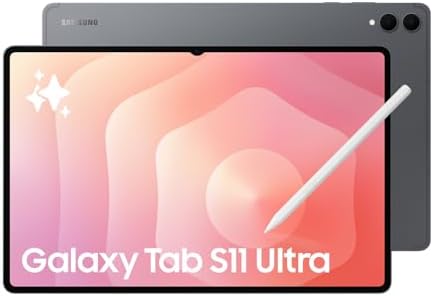
- Brighter Dynamic AMOLED 2X Display: Breakthrough Dynamic AMOLED 2X display technology delivers brighter visuals than eve…
- Powerful 3nm MediaTek Chipset: Upgraded 3nm MediaTek chipset handles day-to-day multitasking seamlessly. Faster performa…
- Desktop Productivity with DeX: Enter Samsung DeX mode for a full multitasking desktop experience on your Galaxy Tab S11 …
The Galaxy Tab S11 Ultra is the Android tablet to beat for serious work. A vast 14.6-inch AMOLED, the S Pen included in the box, Samsung DeX for a desktop-style workspace, and a seven-year software commitment add up to the most laptop-like Android slate you can buy. It is big — genuinely a two-hands-and-a-desk device — but for anyone whose day is multitasking and note-taking, that screen is a feature, not a flaw.
Key specifications:
- Display: 14.6″ Dynamic AMOLED 2X, 2960×1848, 120Hz, up to 1,600 nits, anti-reflective
- Chip: MediaTek Dimensity 9400+ (3nm)
- Memory/storage: 12GB or 16GB RAM; 256GB–1TB, microSD expandable
- Battery: 11,600mAh, rated up to 23 hours video; 45W charging
- Durability: IP68 water/dust resistance, Armor Aluminum
- Software: Android 16 / One UI 8, seven years of OS and security updates
- Starting price: ~$1,200; S Pen included, Book Cover Keyboard sold separately
Performance analysis. The Dimensity 9400+ is a flagship-class chip that handles heavy multitasking, photo and video apps, and demanding games without complaint. In DeX, you can run several resizable windows across the tablet and an external monitor — the closest Android gets to a real desktop.
Battery life. The 11,600mAh cell is enormous; Samsung quotes up to 23 hours of video, and in independent testing it comfortably outlasts a full workday. 45W charging refills it in roughly an hour and a half.
Display quality. This is the headline. A 14.6-inch AMOLED at 120Hz with an anti-reflective coating is spectacular for split-screen work, document review and media, and the matte-style finish tames glare better than any glossy iPad.
Productivity features. Samsung DeX, true multi-window multitasking, Galaxy AI note and writing assists, and IP68 durability that no iPad matches.
Keyboard compatibility. The Book Cover Keyboard turns it into a credible laptop replacement, though it is a separate purchase and adds meaningful weight.
Stylus support. The redesigned S Pen is included — a real cost advantage over Apple — and excellent for notes, markup and sketching.
Business use cases. Heavy multitaskers, note-takers, field and creative professionals, and anyone who wants one big screen for work and media. The seven-year update promise also makes it a sound fleet purchase.
Pros
- Gorgeous, huge anti-reflective AMOLED — the best work-and-media screen here
- S Pen in the box; DeX is the best desktop mode on a tablet
- IP68 durability and seven years of updates
Cons
- Large and heavy; not a one-handed device
- Keyboard costs extra and adds bulk
- Android still trails iPadOS for a few specialist business apps
Who should buy it: Android-first professionals and multitaskers who want the biggest, best screen and an included pen. Who should skip it: anyone who values portability above all, or whose must-have software is iPad-only.
Best Windows Tablet 2026: Microsoft Surface Pro (12-inch)

- [This is a Copilot+ PC] — The fastest, most intelligent Windows PC ever, with built-in AI tools that help you write, sum…
- [The Power of a Laptop, the Flexibility of a Tablet] — Surface Pro 12” is a 2-in-1 device that adapts to you. Use it as …
- [Incredibly Fast and Intelligent] — Powered by the latest Snapdragon X Plus processor and an AI engine that delivers up …
If your work lives in full desktop Windows — legacy line-of-business apps, the proper versions of Office, a VPN client your IT team mandates — no iPad or Android tablet truly replaces it, and the 12-inch Surface Pro does. This is the most portable, affordable Surface Pro yet: a fanless Copilot+ PC that is a real Windows 11 computer in a tablet shell. (Note there is also a larger 13-inch “12th Edition” Surface Pro with the newer Snapdragon X2 for buyers who want more power; the 12-inch is the lighter, lower-cost pick.)
Key specifications:
- Display: 12″ PixelSense LCD (2196×1464), up to 90Hz, anti-reflective
- Chip: Qualcomm Snapdragon X Plus (8-core), 45 TOPS NPU (Copilot+ PC)
- Memory/storage: 16GB RAM; 256GB or 512GB UFS
- Battery: rated up to 16 hours local video
- Ports: 2× USB-C; Wi-Fi, Bluetooth 5.4
- Software: full Windows 11
- Starting price: $799.99 (tablet only — keyboard and Slim Pen sold separately)
Performance analysis. The Snapdragon X Plus is comfortable with mainstream productivity — Office, browser, Teams, light editing — and the ARM build of Windows 11 now runs the vast majority of business apps well. The fanless design means sustained heavy loads will throttle, so this is a productivity machine, not a workstation. Confirm any niche or older x86 software runs under emulation before committing a team to it.
Battery life. Microsoft rates up to 16 hours; expect a genuine all-day result for office work thanks to the efficient ARM chip.
Display quality. A crisp, anti-reflective 12-inch LCD with a 90Hz option. It is a clear step below the OLED panels here, but perfectly pleasant for documents and calls.
Productivity features. It runs real Windows — the single biggest advantage in this roundup for many businesses — plus Copilot+ on-device AI, Windows Hello, and the flexible kickstand that defines the Surface line.
Keyboard compatibility. The Surface Pro 12-inch Keyboard is excellent and the device is built around it, but it is a separate purchase, as is the Slim Pen. Factor both into the price.
Stylus support. The Surface Slim Pen offers tilt and low latency, with magnetic storage and charging on the back of the tablet.
Business use cases. Any Windows-dependent role — finance, ERP and legacy software, IT-managed fleets — that wants a tablet without leaving the Windows ecosystem.
Pros
- Runs full Windows 11 and your real business software
- Light, portable, all-day battery; Copilot+ NPU and Windows Hello
- Manageable like any company PC
Cons
- Keyboard and pen cost extra; no charger in some configs
- Fanless chip throttles under sustained heavy loads
- Display and UFS storage trail premium rivals; confirm x86 app support
Who should buy it: Windows-first professionals and IT-managed teams who need desktop apps in a tablet. Who should skip it: anyone whose work is web- and app-based, who will get a nicer screen and smoother experience from an iPad or Galaxy Tab.
Best Tablet for Remote Work: OnePlus Pad 3

- Elite Performance: Powered by the Snapdragon 8 Elite chipset and up to 12GB of RAM, the OnePlus Pad 3 delivers blazing-f…
- Power That Lasts: A high-capacity 12,140 mAh battery keeps you going longer, while 80W SUPERVOOC fast charging ensures y…
- Immersive 13.2″ 3.4K Display: The ultra-clear 13.2-inch LCD display with 3.4K resolution and a 144Hz refresh rate offers…
The OnePlus Pad 3 is the value champion of this list and a near-ideal remote-work companion. It packs a top-tier Snapdragon 8 Elite, a huge sharp 13.2-inch screen, and a battery so large OnePlus jokes it could jump-start a car — all for $699, less than the keyboard-and-pen tab on some rivals. For a home-office second screen, a travel work device, or a developer’s couch terminal, the value is hard to argue with.
Key specifications:
- Display: 13.2″ LTPS LCD, 3392×2400, 144Hz, up to 900 nits, 7:5 aspect ratio
- Chip: Qualcomm Snapdragon 8 Elite (3nm)
- Memory/storage: 12GB/256GB or 16GB/512GB, UFS 4.0
- Battery: 12,140mAh; 80W charging (charger included)
- Audio: eight speakers; Wi-Fi 7
- Software: Android 15 / OxygenOS 15; 3 years OS, 6 years security updates
- Price: $699 (Wi-Fi only; no cellular)
Performance analysis. The Snapdragon 8 Elite is among the fastest mobile chips made, and it makes the Pad 3 feel effortless across browsing, documents, video and even coding workflows. Multitasking with OnePlus’s Open Canvas split-screen system is genuinely good.
Battery life. The standout. Independent testing clocked around 15 hours of browsing, and casual users report multi-day standby. The included 80W charger refills the giant cell in about 90 minutes — far faster than Apple or Samsung.
Display quality. A big, sharp 144Hz LCD that measured among the brightest non-OLED tablet panels tested. It is excellent for productivity and reading; the 7:5 ratio gives useful extra vertical space. It is LCD, not OLED, so blacks are not flagship-deep.
Productivity features. Strong split-screen multitasking, an AI toolbox for writing and summarising, and useful Mac/PC file-sharing and remote-control integration. The eight-speaker array is excellent for calls and media.
Keyboard compatibility. The optional Smart Keyboard turns it into a capable laptop stand-in, though it is not backlit.
Stylus support. Works with the OnePlus Stylo 2 (often included free at launch) for notes and markup.
Business use cases. Remote and hybrid workers, developers wanting a lightweight second machine, and budget-conscious teams that want flagship hardware without flagship prices.
Pros
- Flagship Snapdragon 8 Elite at a mid-range price
- Enormous battery and the fastest charging here, charger included
- Big, bright 144Hz screen and superb speakers
Cons
- Wi-Fi only — no cellular option
- OxygenOS software polish and update length trail Samsung/Apple
- No fingerprint sensor; weak cameras
Who should buy it: remote workers and value seekers who want flagship power and battery for the price of a mid-ranger. Who should skip it: anyone who needs cellular connectivity or the longest possible software support.
Best Tablet for Students and Professionals: Samsung Galaxy Tab S11
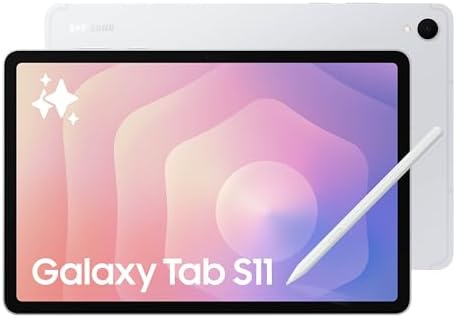
- BRILLIANCE ON DISPLAY: A large 11” Dynamic AMOLED 2X display¹ with Vision Booster provides clear text and rich colors fo…
- MULTITASKING CAPABILITY: This fast tablet with 12GB RAM quickly opens and switches between the wide range of Android app…
- SUMMARIZE IN A SNAP: Quickly capture ideas with the pen-on-paper precision of the included Galaxy Tab S Pen and let Note…
The standard Galaxy Tab S11 is the sweet spot of Samsung’s flagship line — the same chip, S Pen, durability and seven-year update promise as the Ultra, in an 11-inch body that is far easier to carry to a lecture, a client site or a coffee shop. (This is the model that replaces the discontinued “Plus” tier; Samsung now ships only the base S11 and the Ultra.) For students who annotate and professionals who want a flagship that fits one hand, it is the most sensible Galaxy Tab.
Key specifications:
- Display: 11″ Dynamic AMOLED 2X, ~2560×1600, 120Hz, up to 1,600 nits
- Chip: MediaTek Dimensity 9400+ (3nm)
- Memory/storage: 12GB RAM; 128GB–512GB, microSD expandable
- Battery: 8,400mAh, rated up to 18 hours video; 45W charging
- Durability: IP68, Armor Aluminum; weighs ~469g
- Software: Android 16 / One UI 8, seven years of updates
- Starting price: $799 (128GB)
Performance analysis. Identical flagship Dimensity 9400+ silicon to the Ultra, so performance for note-taking, research, multitasking and media is excellent. The smaller screen limits how much you can usefully tile at once, but for one or two apps side by side it is smooth.
Battery life. The 8,400mAh cell is rated up to 18 hours of video and easily clears a day of classes or meetings, with the same 45W charging as its bigger sibling.
Display quality. A bright, vivid 11-inch 120Hz AMOLED — superb for reading, annotation and media, and far more portable than the Ultra’s panel.
Productivity features. Samsung DeX, multi-window multitasking, Galaxy AI note and writing tools, and the same generous bundle of creative and note apps.
Keyboard compatibility. Works with Samsung’s Book Cover Keyboard for typing sessions; the smaller deck suits short bursts more than all-day writing.
Stylus support. S Pen included — ideal for lecture notes, PDF markup and quick diagrams.
Business use cases. Students balancing notes and reading, mobile professionals who want flagship features in a bag-friendly size, and anyone who wants an S Pen without paying Ultra money.
Pros
- Flagship chip, S Pen and seven-year support at a lower price than the Ultra
- Genuinely portable and light, with IP68 durability
- Excellent 120Hz AMOLED for notes and reading
Cons
- 11-inch screen limits heavy split-screen multitasking
- Keyboard sold separately
- Pricier than the OnePlus Pad 3 for less screen and battery
Who should buy it: students and professionals who want a portable flagship with an included pen and long support. Who should skip it: heavy multitaskers who would benefit from the Ultra’s much larger canvas.
Best Budget Tablet for Business: Amazon Fire Max 11

- BIGGER, BRILLIANT, BEAUTIFUL — Vivid 11“ screen with 2.4 million pixels (2000 x 1200 resolution) lets you see every deta…
- MAX PERFORMANCE — Built with a powerful octa-core processor, 4 GB memory, and Wi-Fi 6 for fast streaming, responsive gam…
- THIN AND LIGHT — Sleek aluminum design is also durable. It has strengthened glass and is 3 times as durable as the iPad …
If your budget is tight and your needs are simple, the Fire Max 11 delivers a remarkable amount of tablet for the money. An aluminium 11-inch slate with a sharp screen, 14-hour battery, fingerprint unlock, and optional keyboard and stylus, often for under a third the price of a flagship. The catch is software — and for some businesses it is a dealbreaker, so read the cons carefully.
Key specifications:
- Display: 11″ LCD, 2000×1200, 60Hz
- Chip: MediaTek octa-core (MTK8188J); 4GB RAM
- Storage: 64GB or 128GB, microSD expandable to 1TB
- Battery: 7,500mAh, rated up to 14 hours
- Connectivity: Wi-Fi 6; USB-C; fingerprint sensor
- Software: Fire OS (Amazon Appstore — no Google Play)
- Price: from ~$229.99 (tablet); ~$330 productivity bundle with keyboard and stylus
Performance analysis. With 4GB of RAM and a modest chip, the Fire Max 11 is fine for the basics — email, web apps, documents, video calls and reading — and beats most budget Android tablets in benchmarks, but it stutters under heavy multitasking or demanding games. Set expectations to “light productivity,” not “laptop replacement.”
Battery life. A genuine strength: testing confirmed close to the rated 14 hours. The downside is slow charging — the bundled 9W brick takes hours, so a faster USB-C charger is a worthwhile add.
Display quality. A bright, sharp 2K LCD at 60Hz. No OLED or high refresh, but plenty good for documents, web and streaming.
Productivity features. A magnetic keyboard case and stylus are available, plus a three-month Microsoft 365 trial. Office and Google services largely run as web apps in the Silk browser, which is the core limitation.
Keyboard compatibility. The official Fire Max 11 Keyboard Case attaches magnetically with a trackpad and shortcut row — fine for email and documents, though cramped for long writing.
Stylus support. The Made for Amazon Stylus Pen handles notes and markup well and attaches magnetically.
Business use cases. Bulk deployments for simple tasks — kiosks, check-ins, basic field entry, reading and email — and budget buyers who live in Amazon and web apps.
Pros
- Excellent value; premium-feeling aluminium build
- Strong 14-hour battery and expandable storage
- Optional keyboard and stylus for genuine light productivity
Cons
- Fire OS has no Google Play; many business apps are web-only
- Only 4GB RAM; struggles with heavy multitasking
- Slow charging; 60Hz screen
Who should buy it: budget buyers and bulk deployments with simple, web-based needs. Who should skip it: anyone who relies on specific native business apps or needs real multitasking — spend more on an iPad Air or Galaxy Tab.
Tablet Buying Guide: How to Choose a Business Tablet in 2026
The right tablet is the one that matches your software, your workload and the way you work away from a desk. Here is how to weigh the decisions that actually matter.
How to Choose a Tablet for Business
Start with software, not specs. List the three or four applications you cannot work without and check whether each has a proper native app on the platform you are considering, or only a browser version. A tablet that runs your real tools beats a faster one that does not. Then weigh portability against screen size, decide whether you need cellular, and — crucially — add the cost of the keyboard and pen, which are usually extra and can add hundreds to the sticker price.
iPad vs Android vs Windows Tablets
iPad (iPadOS) has the deepest, most polished business and creative app library and the best resale value, but it is a mobile OS with limits and Apple-priced accessories. Android (Galaxy Tab, OnePlus) offers the best big screens, the most flexible multitasking via DeX-style desktop modes, included pens on Samsung, and often better value — at the cost of a few specialist apps. Windows (Surface) is the only option that runs full desktop software and is managed exactly like a company PC, but the tablet experience and app touch-optimisation lag the other two. Choose iPad for the app ecosystem, Android for screen and value, Windows for desktop-software compatibility.
RAM Requirements
For light use — email, web, documents — 4GB works but will feel tight when multitasking. For comfortable business multitasking, target 8GB; the move to 12GB on the latest iPad Air and Galaxy Tabs is why they handle many open apps and external displays more gracefully. Power users editing media or running many windows should look for 12–16GB.
Storage Requirements
128GB is a sensible floor for a work tablet; 256GB is the comfortable default once you add offline files, apps and media. iPads cannot expand storage, so buy more than you think you need up front. Most Android tablets (Galaxy Tab, OnePlus, Fire) take a microSD card, which is a cheap way to add capacity for documents and media later.
Battery Life Considerations
Manufacturer ratings are best-case video figures; real mixed-use days run shorter. The iPads are rated around 10 hours and last a typical office day; the big-battery Android tablets (Galaxy Tab S11 Ultra and OnePlus Pad 3) and the Surface push well beyond that. If you travel or work unplugged, also weigh charging speed — OnePlus’s included 80W charger and the Galaxy Tabs’ 45W refill far faster than Apple’s, which matters more than a couple of rated hours.
Keyboard Accessories
A keyboard is what turns a tablet into a work device, and it is almost always sold separately. The best of them — Apple’s Magic Keyboard, Samsung’s Book Cover Keyboard, Microsoft’s Surface Pro Keyboard — add a trackpad and a near-laptop typing feel, but also weight and cost. Budget for one from the start, and if you type all day, prioritise a model with a sturdy hinge that works on a lap, not just a desk.
Stylus and Note-Taking Features
For note-taking and markup, pen quality and latency matter more than the tablet’s chip. Samsung includes the excellent S Pen in the box (a real saving), and OnePlus bundles a pen, while Apple and Microsoft charge extra for the Apple Pencil Pro and Surface Slim Pen. Pair any of them with an app like Goodnotes, Samsung Notes or OneNote, and an OLED or high-refresh screen makes handwriting feel markedly more natural.
Security Features for Professionals
For business use, look for biometric unlock (fingerprint or face), device encryption, and — for managed fleets — mobile device management support. iPads and Surface devices integrate cleanly with enterprise MDM; Samsung adds its Knox security platform; the Surface is a “secured-core PC” managed like any Windows machine. Note that the OnePlus Pad 3 lacks a fingerprint sensor, a fair point against it for security-conscious buyers.
Best Tablets for Travel
For frequent travellers, weight, battery and charging speed trump raw screen size. The 11-inch iPad Air and the Galaxy Tab S11 are easy to carry and last a full travel day; the OnePlus Pad 3’s huge battery and 80W charging make it a strong unplugged companion. If you need to work in transit without Wi-Fi, choose a cellular-capable model — which rules out the Wi-Fi-only OnePlus Pad 3.
Best Tablets for Remote Workers
Remote and hybrid workers benefit most from a big, comfortable screen, dependable video-call hardware and a real keyboard. The OnePlus Pad 3 is our value pick for exactly this, with its large 144Hz screen and marathon battery; the Galaxy Tab S11 Ultra is the premium choice for a near-desktop experience via DeX and an external monitor; and the Surface Pro is the answer for anyone tied to desktop Windows apps. Pair any of them with a dock and monitor and you have a genuine home-office setup.
Frequently Asked Questions
What is the best tablet for business in 2026?
The Apple iPad Pro (M5) is the best overall business tablet in 2026, thanks to its desktop-class M5 chip, superb tandem-OLED display and the most mature business app library. The Samsung Galaxy Tab S11 Ultra is the best Android alternative, and the Surface Pro is best if you need full Windows software.
Can a tablet replace a laptop?
For many roles, yes — with a keyboard attached and the right apps. Email, documents, web work, video calls and note-taking are well covered by an iPad Pro, Galaxy Tab or Surface. A tablet struggles to fully replace a laptop only when you depend on specialist desktop software, heavy multi-window workflows, or sustained heavy processing. The Surface Pro comes closest because it runs full Windows.
What tablet works best with Microsoft Office?
The Surface Pro runs the full desktop versions of Word, Excel and PowerPoint natively, so it is the most capable for power Office users. iPads and Galaxy Tabs run excellent touch-optimised mobile Office apps that cover the vast majority of everyday document work, and both can use Microsoft 365 in the cloud.
Are Android tablets good for productivity?
Yes. Modern Android tablets like the Galaxy Tab S11 Ultra and OnePlus Pad 3 are very capable, with strong multitasking, included or optional pens, big screens and desktop modes like Samsung DeX. The main gap versus iPad is a handful of specialist business and creative apps; for general office productivity, Android is excellent and often better value.
Which tablet has the best battery life?
Among our picks, the Samsung Galaxy Tab S11 Ultra leads with an 11,600mAh battery rated up to 23 hours of video. The OnePlus Pad 3 (12,140mAh) also delivers exceptional endurance, and the OnePlus charges fastest thanks to its included 80W charger.
What is the best tablet for remote work?
The OnePlus Pad 3 is our best value pick for remote work, with a large 144Hz screen, huge battery and flagship performance for $699. For a premium near-desktop experience, the Galaxy Tab S11 Ultra with Samsung DeX is excellent, and the Surface Pro is best for anyone tied to desktop Windows applications.
What is the best tablet for note-taking?
The Galaxy Tab S11 Ultra and iPad Pro (M5) are the best note-taking tablets, combining excellent pens (the S Pen is included with Samsung) with high-refresh OLED screens that make handwriting feel natural. Pair either with Goodnotes, Samsung Notes or OneNote for the best experience. If pure writing feel matters more to you than apps, a dedicated E-Ink writing tablet like the reMarkable Paper Pro is worth a look — see our reMarkable Paper Pro review.
How much RAM does a business tablet need?
8GB is the comfortable minimum for business multitasking; 12GB (now standard on the iPad Air M4 and Galaxy Tab S11 series) keeps more apps open and makes external-display use steadier. Choose 16GB if you edit media or run many windows at once. 4GB tablets like the Fire Max 11 suit only light, single-task use.
Do I need a cellular tablet for business?
Only if you regularly work where Wi-Fi is unavailable or unreliable — on the road, at client sites or while commuting. Cellular adds cost and a data plan, but means you are always connected. If you mostly work where Wi-Fi exists, a Wi-Fi-only model saves money. Note the OnePlus Pad 3 is Wi-Fi only.
Is an iPad or a Surface better for business?
Choose an iPad for the best app ecosystem, display and battery in a true tablet, ideal if your work is app- and web-based. Choose a Surface if you need full desktop Windows software, your IT team manages Windows devices, or you want one machine that is unambiguously a laptop replacement. They suit different workflows rather than one being universally better.
What is the best budget business tablet?
The Amazon Fire Max 11 offers the most hardware for the money for simple, web-based work, often under $250. If you need access to native business apps and the Google Play Store, the better budget choice is to stretch to an iPad Air or base Galaxy Tab, which are far more capable for productivity.
How long will a business tablet stay supported with updates?
Software support varies widely and matters for security. Samsung’s Galaxy Tab S11 series leads with seven years of OS and security updates; Apple typically supports iPads for many years; and the OnePlus Pad 3 offers three years of OS and six of security updates. For a long-term fleet purchase, prioritise the longest support window.
Which tablet is best for students and professionals?
The Samsung Galaxy Tab S11 is our pick for students and professionals: a portable 11-inch flagship with an included S Pen, flagship chip, IP68 durability and seven years of updates. The iPad Air (M4) is the equivalent best-value choice for those in the Apple ecosystem.
Key Takeaways
- Best overall: Apple iPad Pro (M5) — the most capable all-round business tablet, with the best screen and app library.
- Best value iPad: Apple iPad Air (M4) — almost all of the Pro’s usefulness for hundreds less.
- Best Android: Samsung Galaxy Tab S11 Ultra — biggest screen, S Pen included, seven years of updates.
- Best Windows: Microsoft Surface Pro (12″) — the only pick that runs full desktop software.
- Best for remote work / value: OnePlus Pad 3 — flagship power and huge battery for $699.
- Best for students & pros: Galaxy Tab S11 — a portable flagship with a pen in the box.
- Decide on software first, then size and battery, and always budget for the keyboard and pen.
Final Verdict
For most professionals in 2026, the Apple iPad Pro (M5) is the safest “buy once, use for years” choice, and the iPad Air (M4) is the value play that suits the majority of office workers just as well. If you live in the Android world, the Galaxy Tab S11 Ultra is the do-everything flagship and the OnePlus Pad 3 is the value standout; if your work is anchored in desktop Windows software, the Surface Pro is the only one of these that truly replaces a laptop. Whichever you choose, prices and stock move constantly — and the difference between full retail and a good sale can be substantial. Use the buttons throughout this guide to compare the current price and availability on each tablet before you buy, so you lock in the best deal at the moment you are ready.
Keep Building Your Mobile Office
Pairing your new tablet with the right desk gear turns it into a complete workstation. Read our companion guides next:
- Best Tablets for Remote Work & Home Offices 2026
- Best Business Laptops 2026
- Best Home Office Monitors 2026
- Best Docking Stations 2026
- Best Wi-Fi Routers 2026
Why You Can Trust Smart Tech Buying
Every recommendation is based on extensive product research, manufacturer specifications, customer feedback, long-term reliability, value, and suitability for real-world use. When we have personal experience with a product, we include those insights. We regularly review our guides to keep recommendations current as new products are released.