

Deciding between ink tank vs ink cartridge printers is the single most important printer choice you will make this year — and it is the one almost everyone gets wrong. The mistake is simple: shoppers compare the price on the box. But a printer’s sticker price is a fraction of what you actually pay over its lifetime. The real cost is ink, and the two technologies handle ink so differently that the “cheaper” printer at checkout is very often the far more expensive printer to own.
This guide breaks down exactly how ink tank and ink cartridge printers differ, what each one really costs per page, where each one wins, and which type makes sense for your specific printing habits. By the end you will know precisely which side of this decision you belong on — and we have picked three verified, in-stock models to match each answer. If you just want the shortlist, our full best home office printers guide has the complete lineup.
Ink Tank vs Ink Cartridge Printers: The Quick Answer
If you print more than about 30–50 pages a month, buy an ink tank printer. The higher upfront price pays for itself within the first year through dramatically cheaper ink, and everything after that is close to free. If you print only occasionally — a boarding pass here, a school form there — a traditional ink cartridge printer costs less to get started, and you will not print enough to feel the punishing per-page ink cost.
The 30-second version: Ink tank = high upfront cost, tiny running cost, best for volume. Ink cartridge = low upfront cost, high running cost, best for light use. The break-even point usually lands somewhere between the first and second year of typical home-office printing. Print often? Tank. Print rarely? Cartridge. Print mostly black text and want zero ink hassle? Consider a laser instead.
What Is an Ink Cartridge Printer?
An ink cartridge printer is the traditional inkjet design that has dominated homes for three decades. Ink is stored in small, sealed plastic cartridges — usually one black and one or more color cartridges — that snap into the printer. When a cartridge runs dry, you throw it away and buy a replacement. Most of these printers are inexpensive to buy, which is exactly why manufacturers sell them so cheaply: the profit is in the ink, not the hardware.
The case for ink cartridge printers
The appeal is real and worth taking seriously. Upfront cost is low — you can find a capable all-in-one for $149.00, and basic models sell for far less. Cartridges are sold everywhere, so you are never stranded. Swapping a cartridge takes seconds and requires no skill. And because the print head is often built into the cartridge itself, a fresh cartridge effectively gives you a fresh print head, which means these printers rarely suffer the clogging problems that plague idle inkjets. For someone who prints a handful of pages a month, an ink cartridge printer is genuinely the sensible, lower-total-cost choice.
The case against ink cartridge printers
The problem is the ink math. Cartridge ink is, ounce for ounce, one of the most expensive liquids you can buy — frequently more costly than premium perfume or vintage champagne when measured by volume. Standard cartridges also hold surprisingly little ink and are engineered to be replaced often. Many models use chipped cartridges that reject third-party refills and even lock you out when a single color runs low, forcing a purchase before you can print in plain black. Over a couple of years of steady printing, you can easily spend several times the printer’s original price on ink alone. That is the cartridge trap, and it is the entire reason ink tank printers exist. Full disclosure: we have bought and binned a well-reviewed cartridge all-in-one ourselves once its ink costs stopped justifying themselves — an experience that shaped this guide.
What Is an Ink Tank Printer?
An ink tank printer — sold under names like Epson EcoTank, Canon MegaTank, and HP Smart Tank — replaces disposable cartridges with large, refillable reservoirs built into the printer. Instead of buying cartridges, you buy inexpensive bottles of ink and pour them into the tanks. A single set of bottles typically prints thousands of pages, and many ink tank printers now ship with enough ink in the box to last most households a year or two before the first refill.
The case for ink tank printers
This is where ink tank printers demolish the competition: running cost. Because bottled ink is cheap and the tanks are enormous, the cost per printed page drops to a small fraction of what cartridges charge. A bottle that costs a few dollars can print thousands of pages, which means the more you print, the more you save — and the savings compound month after month. For a busy home office, a household with kids in school, or anyone who prints reports, shipping labels, worksheets, or photos regularly, an ink tank printer usually pays back its higher purchase price within the first year and then keeps saving money for the life of the machine. If you are budgeting a full workspace, our home office budget breakdown shows where a printer should sit in your overall spend.
The case against ink tank printers
Ink tank printers are not perfect. The upfront price is higher — often two to four times the cost of a bargain cartridge model — which stings at checkout and simply does not pay off if you barely print. Filling the tanks the first time is a small, occasionally messy ritual compared to snapping in a cartridge. And like all inkjets, ink tank printers can suffer clogged print heads if they sit unused for long stretches, since the print head is permanent rather than replaced with each cartridge. Printing something in color every week or two keeps the nozzles healthy and avoids the problem entirely.
Ink Tank vs Ink Cartridge Printers: Head-to-Head Comparison
Here is how the two technologies stack up across the factors that actually affect your wallet and your workflow.
| Factor | Ink Tank Printer | Ink Cartridge Printer |
|---|---|---|
| Upfront price | Higher (~$200–$700) | Lower (~$50–$200) |
| Ink cost per page | Very low (fractions of a cent) | High (5–20+ cents) |
| Pages per ink set | Thousands to tens of thousands | A few hundred |
| Best for volume | High-volume printing | Light, occasional printing |
| Break-even point | Usually within year one | Cheaper only at very low volume |
| Print head | Permanent (needs regular use) | Often replaced with cartridge |
| Idle reliability | Can clog if unused | More forgiving of long gaps |
| Waste | Minimal (bottles) | High (dozens of dead cartridges) |
The Real Cost: Cost Per Page Over Time
This is where ink tank vs ink cartridge printers stops being a preference and becomes arithmetic.
This is the section that should decide your purchase, because it is the number manufacturers hope you never calculate. Cost per page is exactly what it sounds like: the total you spend on ink divided by the number of pages that ink produces. It is where ink tank vs ink cartridge printers stops being close.
A typical ink cartridge model prints somewhere between 5 and 20 cents per page once you factor in real-world cartridge yields, and color pages run higher. An ink tank printer, by contrast, often prints black pages for well under a cent and color pages for just a few cents, because a cheap bottle of ink lasts thousands of pages. The gap sounds abstract until you put volume behind it.
Consider a modest home office printing 40 pages a week — roughly 2,000 pages a year. At a cartridge cost of 10 cents per page, that is about $200 a year in ink. On an ink tank printer at half a cent per page, the same 2,000 pages cost around $10 a year. That is a $190 annual difference in ink alone. Even if the ink tank printer costs $300 more to buy, it has erased that premium before the end of year two — and every year after that, it quietly saves you the better part of $200. Print more than 40 pages a week and the payback arrives even faster.
The lesson is blunt: at anything above light use, the cheap cartridge printer is the expensive choice, and the expensive tank printer is the cheap choice. The break-even line is what separates the two, and for most households that print with any regularity, it falls comfortably inside the first year of ownership.
How to Calculate Your Own Cost Per Page
You do not have to trust anyone’s estimates — the math is simple, and running it on the exact printer you are considering is the smartest five minutes you can spend before buying. Here is the formula and how to use it, whichever technology you are weighing.
Start with the ink. For a cartridge printer, find the price of a replacement cartridge (or a full color set) and its rated page yield, which manufacturers publish in pages. Divide the cost by the yield to get cost per page. A $25 black cartridge rated for 250 pages works out to 10 cents per page — and real-world yields often come in lower than the rating, so treat the published number as a best case. For a color set, add each color’s cost per page together to get a true color-page figure, since a color document draws from every tank at once.
For an ink tank printer, do the same with a bottle of ink: divide the bottle price by its rated page yield. Because bottles are cheap and yields run into the thousands, the result is usually a fraction of a cent for black and a few cents for full color. Now multiply each printer’s cost per page by how many pages you actually print in a year, add the printer’s purchase price, and compare the two totals over two or three years. The winner is almost always obvious once real volume is in the equation — and it is frequently the opposite of what the checkout price suggested.
One honest caveat worth knowing: manufacturers quote page yields at roughly 5% page coverage, which is a light text document. If you print dense pages, spreadsheets with shading, graphics, or photos, your real-world yields will be lower and your true cost per page higher. That does not change the conclusion — it widens the gap in the ink tank printer’s favor, because the heavier you print, the more the cheap bottled ink saves you.
Print Quality: Do Ink Tank Printers Sacrifice Anything?
The oldest objection in the ink tank vs ink cartridge printers debate, and largely a hangover from the first generation of tank machines.
A common worry is that cheaper-to-run ink must mean lower quality. It does not. Ink tank and ink cartridge printers use the same fundamental inkjet technology and produce comparable results for everyday documents — crisp black text, clean charts, readable spreadsheets. For standard home-office work, you will not see a meaningful difference between them.
Photos are where nuance appears. Entry-level ink tank printers use pigment black plus dye colors, which is excellent for documents and perfectly good for casual photo prints, but dedicated photo enthusiasts may want a specialized six-color photo model — ink tank or otherwise — for gallery-grade output. The good news is that photo-focused ink tank printers now exist and pair pro-level color with the same cheap-refill economics, so you no longer have to choose between quality and running cost.
Reliability and Maintenance: What to Expect
The most common worry about ink tank vs ink cartridge printers is durability, so here is what actually goes wrong with each.
The maintenance story is the strongest argument in favor of cartridge printers and the one legitimate knock against ink tanks. Because many cartridge printers put the print head inside the cartridge, installing a fresh one effectively resets the most failure-prone part. That makes cartridge printers unusually forgiving if the machine sits untouched for a month or two — ideal for a household that prints only a few times a year.
Ink tank printers use a permanent print head, so the responsibility for keeping it healthy shifts to you. In practice that responsibility is tiny: printing a color page every week or two keeps ink flowing through the nozzles and prevents the dried-ink clogs that cause faded or streaky output. Most ink tank printers also include an automated cleaning cycle for the rare occasion you need it. If your printer will genuinely go dark for long stretches, a cartridge model or a laser printer sidesteps the issue — but for anyone printing regularly, permanent print heads are a non-problem. A reliable connection matters too; see our take on wired vs wireless home office setups if your printer keeps dropping off Wi-Fi.
Ink Tank vs Cartridge vs Laser: The Three-Way Breakdown
Laser is the option most people forget when weighing ink tank vs ink cartridge printers, and for some households it beats both.
Ink tank and ink cartridge printers are both inkjets, but there is a third technology that belongs in this conversation: the laser printer. Lasers use toner — a fine powder fused to the page with heat — instead of liquid ink, and understanding where each of the three wins keeps you from buying the wrong tool for your habits. Most buyers never seriously compare all three, and that is exactly how people end up with a printer that fights their workflow.
Inkjet cartridge printers are the cheapest to buy and the most expensive to feed. Ink tank inkjets flip that equation: pricier to buy, dirt cheap to feed, and equally capable of vivid color and photos. Laser printers occupy a different lane entirely — they are unbeatable for high-speed black-and-white text, their toner never dries out, and they shrug off months of disuse, but color laser models cost more and photo output is not their strength. The right pick depends less on which is “best” and more on what and how much you print.
| Factor | Ink Tank | Ink Cartridge | Laser |
|---|---|---|---|
| Consumable | Bottled ink | Ink cartridges | Toner powder |
| Best at | Cheap color & volume | Low upfront cost | Fast B&W text |
| Cost per page | Lowest | Highest | Low (mono) |
| Idle tolerance | Moderate | Good | Excellent |
| Photo quality | Very good | Good | Weak |
The quick rule: choose an ink tank inkjet for color and volume, a cartridge inkjet only for genuinely light use on a tight upfront budget, and a laser for high-volume black-and-white text or a printer that will sit idle for long stretches. Many home offices actually end up happiest with two machines — an ink tank for color and a small mono laser for everyday text — but if you are buying one printer to do everything, an ink tank inkjet is the most flexible choice.
Ink Tank vs Ink Cartridge Printers: Which Type Is Right for You?
The decision comes down to how much you print and what you print. Here is how the two technologies map onto the most common households.
Best for high-volume home offices
If printing is part of your work — invoices, contracts, shipping labels, marketing materials — an ink tank printer is not a close call. The running-cost savings at volume are enormous, and the higher purchase price is trivial next to the ink you would otherwise burn through. This is the single clearest win for ink tank technology.
Best for families and students
Households with school-age kids print more than they realize: worksheets, projects, permission slips, study guides, the occasional 30-page reading packet. That volume adds up fast, and it adds up right into ink tank territory. A single tank refill can cover an entire school year, which is exactly the kind of set-it-and-forget-it economics a busy family wants.
Best for occasional and low-volume printing
If you print a few pages a month and go weeks without touching the machine, do not overspend on an ink tank. A cartridge all-in-one — or better yet, a monochrome laser if you mostly print text — will cost less overall and shrug off long idle periods. This is the one scenario where the “cheaper” printer really is cheaper.
Best for photo printing
For casual snapshots, any modern ink tank printer does a fine job at a fraction of the per-print cost of cartridges. For serious, frequent photo printing, look to a dedicated multi-color photo printer — and prefer an ink tank photo model if you print in any real quantity, since the ink savings on glossy pages are even more dramatic than on plain paper.
What to Look for When Buying a Printer in 2026
Once you have settled ink tank vs ink cartridge printers, these are the specs that separate a good machine from a frustrating one.
Once you have settled the ink tank vs ink cartridge question, a handful of features separate a printer you will love from one you will fight with every week. Keep this short checklist in mind whichever technology you choose.
Automatic duplex printing. A printer that prints on both sides of the page automatically halves your paper use and makes reports and documents look far more professional. For a working home office it is close to essential, and it is easy to overlook on a spec sheet.
An automatic document feeder (ADF). If you scan or copy multi-page documents, an ADF lets you load a stack and walk away instead of feeding pages one at a time. It is one of the most underrated conveniences in an all-in-one and a genuine time-saver on paperwork-heavy days.
Reliable wireless and app support. Wi-Fi is standard, but check for solid mobile printing (AirPrint and Mopria) and a well-reviewed companion app. Flaky wireless is the number-one printer complaint, so a wired Ethernet port is a welcome backup for a printer that lives in one spot and needs to just work.
Real page yields, not box claims. Look up the rated yield of the ink or toner and sanity-check it against your printing volume. A tempting sticker price paired with tiny, pricey cartridges is the classic trap — and it is precisely the trap ink tank printers were designed to escape.
The right size and speed. Match pages-per-minute and paper-tray capacity to your workload, and measure your space before you buy — ink tank all-in-ones can be physically larger than the compact cartridge models they replace. A printer that crowds your desk gets used less, no matter how cheap its ink is.
Our Top Picks: Ink Tank vs Ink Cartridge Printers
Whichever direction the math points you, here are three verified, in-stock models — one flagship ink tank, one budget ink tank, and one laser alternative for the low-volume crowd. For the full lineup across every category, see our best home office printers guide.
Best Ink Tank Printer Overall: Epson EcoTank ET-2800
The EcoTank ET-2800 is the printer we point most home offices toward. It is a wireless color all-in-one that prints, scans, and copies, and it ships cartridge-free with enough bottled ink to print thousands of pages before your first refill. It is the cleanest, most affordable expression of the ink tank advantage: buy it once, refill it rarely, and stop thinking about ink cost entirely.
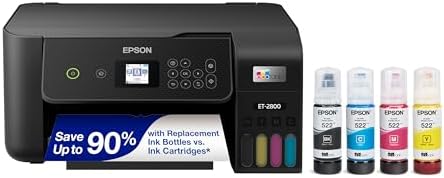
- ECOTANK TECHNOLOGY — This Epson EcoTank ET-2800 wireless all-in-one printer features cartridge-free printing with refill…
- WIRELESS CONNECTIVITY — Connect seamlessly to your home network with Wi-Fi capability; Allowing you to print, scan and c…
- ALL-IN-ONE FUNCTIONALITY — Combines color printing, flatbed scanning and copying in one compact inkjet printer, making i…
Best Budget Ink Tank Printer: Canon MegaTank G3270
If the EcoTank’s price gives you pause, the Canon MegaTank G3270 delivers the same core benefit — cheap, refillable ink — for a lot less money, which is why it has racked up thousands of positive reviews. It is a wireless print-scan-copy all-in-one built for home use, and it is the most affordable honest on-ramp into ink tank ownership we can recommend.

- Wireless Print/Copy/Scan
- Up to 2 years of ink included (2)
- Print up to 6,000 black & white / 7,700 color pages using a single set of inks! (1)
Best for Low-Volume Printing: Brother HL-L2405W (Laser Alternative)
If you print rarely and mostly in black and white, skip inkjet entirely. The Brother HL-L2405W is a compact monochrome laser printer that uses toner, not ink — toner does not dry out, so this printer will still fire up perfectly after sitting untouched for months. For light text printing, it is cheaper to buy than an ink tank and more reliable than a cartridge inkjet left idle. It is the honest answer for anyone whose printer spends most of its life asleep.

- BEST FOR HOMES & HOME OFFICES – Engineered for consistent, premium print quality, the Brother HL-L2405W Monochrome (Blac…
- COMPACT, CONNECTED PRINTER – Flexible connection options make this an ideal printer for home use and at-home offices. Se…
- BROTHER MOBILE CONNECT APP – Manage your printer remotely and print from your mobile device anytime, from almost anywher…
Common Myths About Ink Tank Printers
Ink tank printers have been mainstream for years, yet a few outdated beliefs still steer shoppers toward the wrong purchase. Here are the ones worth clearing up before you decide.
“They are only worth it for businesses.” Not anymore. Prices have fallen and capable models now start well under $250, so any household that prints even semi-regularly — families, students, remote workers — comes out ahead. The break-even math favors far more people than it did when ink tanks first arrived.
“Refilling the tanks is messy and complicated.” Modern ink tank printers use keyed, spill-resistant bottles that fit only their matching tank and stop flowing automatically when the tank is full. The first fill takes a couple of minutes; refills are infrequent and just as clean.
“The ink dries out and you waste money.” Bottled ink has a long shelf life, and because the tanks hold so much, ink is used steadily rather than sitting in a tiny cartridge for a year. Printing the occasional color page keeps everything flowing and the nozzles clear.
“Print quality is worse to save you money.” The underlying technology is identical to cartridge inkjets. You are saving on the delivery method of the ink — bottles instead of chipped cartridges — not on the quality of the print itself.
Ink Tank vs Ink Cartridge Printers: Final Verdict
Strip away the marketing and the decision is refreshingly clear. Ink tank printers win for almost everyone who prints regularly. The higher purchase price is not a cost, it is a prepayment — you are buying years of near-free ink up front, and for any household printing more than a page or two a day, that prepayment returns itself inside the first year and keeps paying for the life of the printer.
Ink cartridge printers still have a place, but a narrow one: genuinely light users who print a few pages a month, go long stretches without printing, and do not want to spend more up front. For them, the low sticker price and forgiving maintenance win. And if you print mostly black text and want to forget your printer exists for months at a time, a monochrome laser quietly beats both. Match the technology to your actual habits, not the price on the box, and you will not overpay — whichever way you go. When you are ready to choose a specific model, our best home office printers guide and the rest of our explainer library will take you the rest of the way.
The Environmental Cost of Cartridges
There is a quieter reason ink tank printers have taken over: waste. A cartridge printer that prints steadily can burn through dozens of plastic cartridges a year, and the vast majority are never recycled — they go to landfill, each one a small block of plastic, metal, and residual ink. Over a printer’s lifetime that adds up to a startling pile of disposable hardware for something as ordinary as printing.
Ink tank printers cut that waste dramatically. Instead of dozens of cartridges, you buy a few small bottles that print thousands of pages each, so the plastic-per-page footprint is a tiny fraction of the cartridge equivalent. If lowering your household’s consumable waste matters to you — and it increasingly matters to a lot of buyers — the ink tank advantage is not only financial. It is one more column in which the refillable design simply wins, and it pairs naturally with the other efficiency choices in a well-planned home office setup.
Frequently Asked Questions
Are ink tank printers really cheaper than cartridge printers?
Over their lifetime, yes — for anyone who prints with any regularity. Ink tank printers cost more up front but a fraction as much per page, so they typically erase their higher price within the first year and save money every year after. Only very light users who print a handful of pages a month come out ahead with a cartridge printer.
How many pages can an ink tank printer print before refilling?
It varies by model, but most ink tank printers print several thousand pages on a single set of ink bottles, and many ship with enough ink in the box to last one to two years of typical home use. Refills are inexpensive and take only a minute.
Do ink tank printers clog if you do not use them?
They can, because they use a permanent print head. Printing a color page every week or two keeps the nozzles clear and prevents clogs. Most models also include an automatic cleaning cycle. If your printer will sit unused for months, a laser or a cartridge printer is more forgiving.
Is print quality worse on an ink tank printer?
No. Ink tank and cartridge printers use the same inkjet technology and produce comparable quality for everyday documents. For serious photo printing, choose a dedicated multi-color photo model — available in ink tank versions that keep the low running cost.
Can I use third-party ink in a cartridge printer?
Sometimes, but many cartridge printers use chips that reject or discourage third-party cartridges, and off-brand ink can void warranties or cause reliability issues. Ink tank printers sidestep this entirely, since you refill from inexpensive first-party bottles designed for the machine.
Are ink tank printers good for occasional use?
Not really. If you print only a few pages a month, the higher upfront cost of an ink tank printer will not pay off, and the permanent print head is more prone to clogging when left idle. Light users are better served by a budget cartridge printer or a monochrome laser.
What is cost per page and why does it matter?
Cost per page is the total you spend on ink divided by the pages it prints. It matters because it, not the printer’s sticker price, determines what you actually pay to own a printer. Cartridge printers often run 5–20+ cents per page; ink tank printers frequently run under a cent for black pages.
Should I buy a laser printer instead of either?
If you print mostly black-and-white text and value low maintenance, a monochrome laser is an excellent third option. Toner does not dry out, so laser printers handle long idle periods effortlessly and deliver crisp text cheaply. For color and photos, an ink tank inkjet remains the better all-rounder.
Why You Can Trust Smart Tech Buying
Every recommendation is based on extensive product research, manufacturer specifications, customer feedback, long-term reliability, value, and suitability for real-world use. When we have personal experience with a product, we include those insights. We regularly review our guides to keep recommendations current as new products are released.