

The best all-in-one desktops put a whole computer behind the screen — no tower, no cable nest, no wasted desk space. Every machine below is sold and shipped by Amazon itself and backed by real owner reviews, from a capable everyday Windows workhorse to a 4.5K Retina flagship.
- Best overall: Apple iMac M4 (24GB/512GB) — the fastest, best-looking AIO you can buy on macOS.
- Best value: Apple iMac M4 (16GB/256GB) — the same machine for several hundred dollars less, and the best-reviewed desktop here.
- Best Windows: Dell 27-inch All-in-One (Core 7) — Intel Core 7, 16GB, 1TB, the same chassis as the value pick below.
- Best Windows value: Dell 27-inch All-in-One — the same screen size with far more owner feedback.
An all-in-one desktop is the simplest full-size computer you can own. Everything — processor, memory, storage, speakers, webcam — lives inside the display, so setup is a single power cable and you’re working. That clean-desk appeal is why AIOs remain the default pick for home offices, reception desks, kitchens, dorms, and any space where a tower would just be clutter. If you’re still deciding between an all-in-one and a traditional tower, read our companion guide, Desktop vs. All-in-One, first — it covers the trade-offs in depth.
The catch is that all-in-ones ask you to buy right the first time. Most seal their components in, so the RAM and storage you choose at checkout are usually the RAM and storage you keep for the life of the machine. That makes picking the correct model more important than with a tower you can upgrade later — and it’s exactly what this guide is built to get right: finding the best all-in-one desktop for the way you actually work.
Every machine here is sold and shipped by Amazon.com itself, in stock, brand new, and carries genuine owner ratings. That single rule eliminated most of the all-in-one category. A great many AIO listings on Amazon — including nearly every big-screen 4K model and most business machines from the Lenovo ThinkCentre and Dell OptiPlex lines — are third-party reseller inventory with no owner reviews at all, and some are used or open-box offers dressed up to look new. We would rather name four machines we can stand behind than pad the list to ten, so every pick below is a genuine candidate for the best all-in-one desktop you can buy today.
The best all-in-one desktops at a glance

| Display | 24″ 4.5K |
| Chip | M4 10-core |
| Rating | 4.7★ (209) |

| Display | 24″ 4.5K |
| Chip | M4 8-core |
| Rating | 4.6★ (709) |
| Display | 27″ FHD |
| Chip | Intel Core 7 150U |
| Rating | 4.6★ (95) |

| Display | 27″ FHD |
| Chip | Core 5 120U |
| Rating | 4.5★ (141) |
The best all-in-one desktops of 2026 — full reviews
1. Apple iMac M4 (24″, 24GB/512GB) — Best Overall All-in-One
- BRILLLLLLIANT — iMac is the ultimate all-in-one desktop computer, powered by the M4 chip and built for Apple Intelligenc…
- FITS PERFECTLY IN YOUR SPACE — The all-in-one desktop design is strikingly thin, comes in seven vibrant colors, and elev…
- BUILT FOR APPLE INTELLIGENCE — Apple Intelligence is the personal intelligence system that helps you write, express your…
The iMac M4 is the machine every other all-in-one is measured against, and it earns that status. Apple’s M4 chip pairs a 10-core CPU with a 10-core GPU and glides through everything a mainstream desktop is asked to do — dozens of browser tabs, 4K video edits, big spreadsheets — while running cool and close to silent. It’s wrapped in the thinnest, most striking chassis in the category, available in seven colors, behind a 24-inch 4.5K Retina display that is still the best-looking screen you can get on an AIO. The six-speaker system with Spatial Audio and the 12MP Center Stage webcam round out a package that simply feels a tier above the Windows field in fit and finish. It is also sold directly by Amazon, with a rating built on 209 owner reviews.
The compromises are the familiar Apple ones. You get Thunderbolt 4 ports and nothing else — no USB-A, no HDMI — so older peripherals need a hub. The stand offers no height adjustment, and unlike some Windows rivals the iMac can’t double as an external monitor for a laptop or console. This is also the priciest machine in the guide by a wide margin; if the 24GB of memory and 512GB of storage are more than you need, the 16GB configuration reviewed next is the same computer for several hundred dollars less.
- Class-leading M4 performance, cool and silent
- Gorgeous, accurate 4.5K Retina display
- 24GB memory and 512GB storage as standard
- Best-in-class speakers and webcam
- By far the most expensive pick here
- Thunderbolt-only ports, no USB-A/HDMI
- No stand height adjustment
- Can’t be used as an external display
2. Apple iMac M4 (24″, 16GB/256GB) — Best Value
- BRILLLLLLIANT — iMac is the ultimate all-in-one desktop computer, powered by the M4 chip and built for Apple Intelligenc…
- FITS PERFECTLY IN YOUR SPACE — The all-in-one desktop design is strikingly thin, comes in seven vibrant colors, and elev…
- BUILT FOR APPLE INTELLIGENCE — Apple Intelligence is the personal intelligence system that helps you write, express your…
This is the iMac most people should actually buy. It is the same chassis, the same 24-inch 4.5K Retina display at 500 nits, the same 12MP Center Stage camera and six-speaker Spatial Audio system as the flagship above — the differences are an 8-core rather than 10-core M4, 16GB of unified memory instead of 24GB, and 256GB of storage instead of 512GB. For browsing, office work, photo editing, video calls and everyday creative tasks, that gap is close to invisible in daily use, and the saving runs to several hundred dollars.
It is also, by a wide margin, the most thoroughly reviewed machine in this guide: 709 owner ratings at 4.6 stars, against 209 for the flagship and 129 for the best-reviewed Windows pick. When we say a recommendation is backed by evidence, this is what that looks like. The one real caveat is storage — 256GB fills up quickly if you keep large photo or video libraries locally, and you cannot add to it later, so budget for external or cloud storage or step up to the 512GB model.
- 709 owner ratings at 4.6★ — the best evidence here
- Identical display, camera and speakers to the flagship
- Several hundred dollars less than the 24GB model
- Sold and shipped by Amazon
- 256GB storage is tight and not upgradable
- 8-core GPU is a step down for heavy creative work
- Thunderbolt-only ports
- No stand height adjustment
3. Dell 27″ All-in-One (Core 7 150U) — Best Windows All-in-One

- Immersive visuals: The FHD IPS display features 99% sRGB and 50% higher contrast* within a narrow border so you can enjo…
- Eye comfort: Keep your eyes comfortable during long screen sessions with Dell ComfortView Plus, designed to reduce harmf…
- Keep your area clutter-free with an innovative stand that provides the perfect space to house your keyboard underneath t…
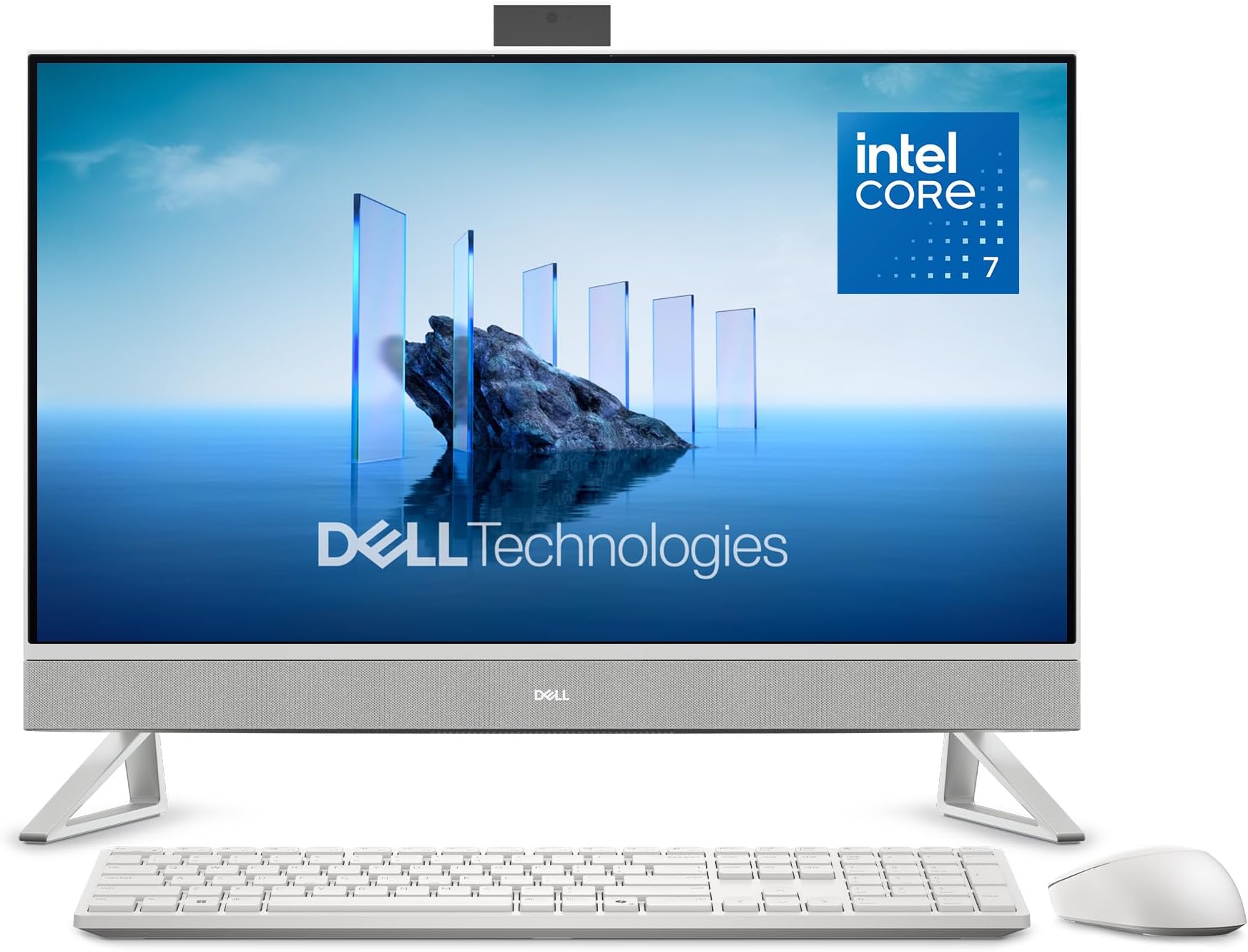
If you want Windows rather than macOS, this is the machine to buy. The Dell 27-inch All-in-One pairs Intel’s Core 7 150U with 16GB of DDR5, a 1TB PCIe NVMe SSD and Intel integrated graphics, behind a 27-inch Full HD display. Dell has aimed it squarely at desk work: a 5MP infrared camera with HDR for backlit rooms and a pop-up shutter you push down when you want the lens physically covered, a stand built so the keyboard parks underneath it, and dual Bluetooth speakers with Dolby Atmos. A keyboard and mouse are in the box, and the listing carries one year of onsite service — if it fails, an engineer comes to you rather than you shipping it away. At 4.6 stars from 95 ratings, it has a real track record behind it.
Same machine, two specs. This and the Core 5 model below are the same Dell EC27250 chassis — identical 27-inch Full HD screen, identical 16GB of DDR5, the same camera, stand, speakers and ports, the same 13.6 lb. What separates them is the processor and the drive: Core 7 150U with 1TB here, Core 5 120U with 512GB below for about $320 less. Take this one if you want the faster chip and twice the storage; take the one below if you would rather keep the money.
Be clear-eyed about two things. The panel is 1080p, not QHD or 4K — across 27 inches that is noticeably less sharp than the iMac’s Retina screen, and it is a large part of why it costs less. And the graphics are Intel integrated, so this is a casual-gaming machine at best.
- Sold and shipped by Amazon
- Intel Core 7 150U with 16GB DDR5 and a 1TB SSD
- 5MP IR camera with a pop-up privacy shutter
- Keyboard and mouse included, plus 1-year onsite service
- 1080p across 27″ is not sharp
- No NPU, so no Copilot+ features
- Integrated graphics, not for serious gaming
- 16GB is the stated memory maximum
- No touchscreen
4. Dell 27″ All-in-One (Core 5 120U) — Best Windows Value
- Immersive visuals: The FHD IPS display features 99% sRGB and 50% higher contrast* within a narrow border so you can enjo…
- Eye comfort: Keep your eyes comfortable during long screen sessions with Dell ComfortView Plus, designed to reduce harmf…
- Keep your area clutter-free with an innovative stand that provides the perfect space to house your keyboard underneath t…
This is the same 27-inch screen size as the HP above, with the same 16GB of DDR5 and the same 512GB SSD, from a different maker at a lower price. Dell pairs an Intel Core 5 120U with Wi-Fi 6E, a 5MP infrared camera for Windows Hello, and dual Bluetooth speakers tuned for Dolby Atmos. The stand is the neat touch: it lifts the display high enough to park the keyboard underneath, which buys back desk space a fixed-height all-in-one never gives you. For email, documents, spreadsheets, streaming and video calls, you would struggle to feel the processor difference.
Its 4.5-star average across 141 ratings is the deepest owner evidence behind any Windows machine in this guide. If you want a big Windows screen and would rather trust a track record than a spec sheet, this is the safest pick on the page. If you want the faster processor and twice the storage, the Core 7 version above is the one to stretch for.
- Same 27″ screen size at a lower price
- 16GB DDR5 and 512GB SSD as standard
- Wi-Fi 6E and a 5MP Windows Hello camera
- Sold and shipped by Amazon
- No NPU, so no Copilot+ features
- Core 5 120U is mainstream, not fast
- 1080p across 27″
- Integrated graphics, not for gaming
The best all-in-one desktops compared
| Model | Price | Display | Processor | RAM / Storage | Rating | Best for |
|---|---|---|---|---|---|---|
| Apple iMac M4 (24GB) | $2,021.99 | 24″ 4.5K Retina | M4 10-core | 24GB / 512GB | 4.7★ (209) | Overall / macOS |
| Apple iMac M4 (16GB) | $1,455.99 | 24″ 4.5K Retina | M4 8-core | 16GB / 256GB | 4.6★ (709) | Value / best evidence |
| Dell 27″ All-in-One (Core 7) | $1,348.86 | 27″ FHD | Intel Core 7 150U | 16GB / 1TB | 4.6★ (95) | Windows flagship |
| Dell 27″ All-in-One (Core 5) | $1,014.98 | 27″ FHD | Intel Core 5 120U | 16GB / 512GB | 4.5★ (141) | Windows value |
This is how the best all-in-one desktop options here stack up side by side. Prices and ratings are pulled live from each product’s Amazon listing and can change. Every machine listed was sold and shipped by Amazon.com and in stock at the time of writing. Check the current price and seller via each link before buying.
How to choose the best all-in-one desktop in 2026
Pick your operating system first
The single biggest decision is macOS versus Windows, because it shapes everything else. The iMac gives you a polished, tightly integrated experience, a class-leading display and speakers, and excellent bundled peripherals — but only in Apple’s world. Windows all-in-ones like the Dell 27-inch models give you a familiar desktop, conventional ports and a lower entry price. Decide which ecosystem your software and habits live in, then shop within it.
Check who is actually selling the machine
This matters more in the all-in-one category than almost anywhere else on Amazon, and it is the check most buying guides skip. A large share of AIO listings are third-party reseller inventory rather than stock sold by Amazon itself, and some are used or open-box offers where the buy box price looks like a new-machine price. Before you buy, look at the “Ships from / Sold by” box on the right of the Amazon listing. If it does not say Amazon.com, you are buying from a reseller — which is not automatically bad, but it changes your returns, warranty and support experience. Every machine in this guide said Amazon.com when we checked.
Display size and resolution matter most
You’ll stare at this screen for years, so don’t skimp. A 24-inch 1080p panel is fine for browsing, email, and everyday tasks, and a good one — like a 100% sRGB, 100Hz panel — can beat a mediocre larger one. Stepping up to 27 inches buys you room for windows side by side, though both 27-inch machines here are still 1080p. If you want genuine high-resolution sharpness for detailed creative work, the iMac’s 4.5K Retina panel is the only display in this guide that delivers it, and that is a large part of what you are paying for.
Buy the RAM and storage you’ll need for years
This is the rule that separates a good AIO purchase from a regretful one. Buy the memory you want up front: the iMacs are configured at purchase, and both Dell listings state a 16GB maximum, so none of these machines takes more memory later. Treat 16GB as the sensible floor if you multitask hard or expect to keep the machine five years. Storage is the same story — 256GB on the value iMac fills faster than people expect, so plan for external or cloud storage if you keep large photo and video libraries.
Check the ports before you commit
All-in-ones often trim ports to stay thin. Make sure your pick has enough USB-A for existing peripherals and at least one USB-C or Thunderbolt port for the future. Both iMac configurations are Thunderbolt-only, so plan on a hub if you have older keyboards, printers or drives. The Dell machines are more conventionally connected, with five USB ports and two HDMI outputs, which is one practical advantage of the Windows side of this list.
Factor in the peripherals and the webcam
Bundled keyboards and mice vary wildly — Apple’s Magic Keyboard and Mouse are excellent and genuinely part of the value; budget Windows accessories are often the first thing owners replace, so build that into your total cost. If you take a lot of video calls, weigh the camera seriously: the iMac’s 12MP Center Stage camera is the best here, while both Dell models include a 5MP infrared camera with HDR and a pop-up privacy shutter, which is a strong showing at their prices.
Frequently asked questions
What is the best all-in-one desktop in 2026?
The Apple iMac M4 is the best all-in-one for most people, thanks to its fast M4 chip, stunning 4.5K Retina display, and premium build. The 16GB configuration is the better buy for most budgets and is the best-reviewed machine in this guide. For Windows users, the Dell 27-inch All-in-One with the Core 7 is the top alternative, with the Core 5 version as the value route.
Why are there so few Windows all-in-ones on this list?
Because most of them fail our rule of being sold and shipped by Amazon itself, in stock and new, with genuine owner reviews behind it. A great many Windows all-in-one listings on Amazon — including business lines such as the OptiPlex and ThinkCentre — are third-party reseller inventory, and many carry no customer ratings at all. Some are used or open-box offers. Those are not necessarily bad machines, but we cannot verify them to the same standard. The Dell 27-inch model above is one of the few that cleared the bar. We dropped both HP OmniStudio models from this guide for the opposite reason: their listings are clean, but the 23.8-inch is rated 3.9 from 19 owners, below our 4.0 minimum, and the 27-inch has only 24 ratings, too thin a sample to recommend, and no Windows all-in-one with a real review history cleared our checks to replace it.
Are all-in-one desktops good for gaming?
Most all-in-ones aren’t built for serious gaming, and every machine in this guide uses integrated graphics. They can handle light or older titles, but if gaming is a priority, a traditional desktop with a dedicated GPU or a gaming laptop will serve you far better.
Can I upgrade an all-in-one desktop later?
Rarely, and not on any of the machines recommended here — all four seal in their memory. Buy the configuration you need up front. If post-purchase upgradability is essential to you, a traditional tower is the better category.
Is the iMac worth the premium over Windows all-in-ones?
If you prefer macOS and value a genuinely high-resolution display, excellent peripherals, and quiet operation, yes — the iMac M4 delivers a more polished experience out of the box, and its 4.5K Retina panel is far sharper than the 1080p screens on the Windows machines here. But the Dell 27-inch All-in-One offers a larger screen, a 1TB drive and a keyboard and mouse in the box for several hundred dollars less.
What screen size should an all-in-one be?
For most people, 24 to 27 inches is the sweet spot. A 24-inch screen suits smaller spaces and home offices; 27 inches gives more room for multiple windows. Note that panel quality matters as much as size — a 100% sRGB, 100Hz panel can be a better screen on paper than a larger 1080p one.
How long does an all-in-one desktop last?
A well-built all-in-one should last five to seven years for typical home and office use. The iMac tends to hold performance and value especially well. Because memory is sealed in on these machines, the amount of RAM you buy today is usually what decides how long the computer stays comfortable to use.
All-in-one vs. traditional desktop tower — which is better?
An all-in-one wins on space, simplicity, and looks; a tower wins on upgradability, repairability, and raw performance per dollar. If a clean setup matters most, choose an AIO. If you want to swap parts over time, choose a tower. Our full Desktop vs. All-in-One guide breaks down every trade-off.
How much should you spend on an all-in-one in 2026?
Around $1,000 buys a capable everyday Windows machine like the Dell 27-inch All-in-One. Expect roughly $1,150 to $1,450 for a higher-specified Windows model or the value iMac configuration, and about $2,000 for the top iMac. Match the spend to the work — don’t overpay for power you won’t use.
Related buying guides
- Best AI PCs 2026: Real Copilot+ Laptops & Desktops
- Desktop vs. All-in-One: Which Should You Buy?
- Desktop vs. Mini PC
- Desktop vs. Laptop for Home Office
- Best Desktop Computers of 2026
- Best Mini PCs of 2026
- What Is an NPU? AI PCs Explained
Arthur runs Smart Tech Buying, covering home-office and small-business tech from laptops and monitors to power protection and networking gear. Every pick on Smart Tech Buying is chosen against currently available, in-stock listings — checked for seller, condition and owner reviews before it is recommended. Independently screened. Honest about how we know.
Smart Tech Buying is reader-supported. When you buy through links on our site we may earn an affiliate commission at no extra cost to you. Prices and availability are accurate as of publication and subject to change.
Why You Can Trust Smart Tech Buying
Every recommendation is based on extensive product research, manufacturer specifications, customer feedback, long-term reliability, value, and suitability for real-world use. When we have personal experience with a product, we include those insights. We regularly review our guides to keep recommendations current as new products are released.