

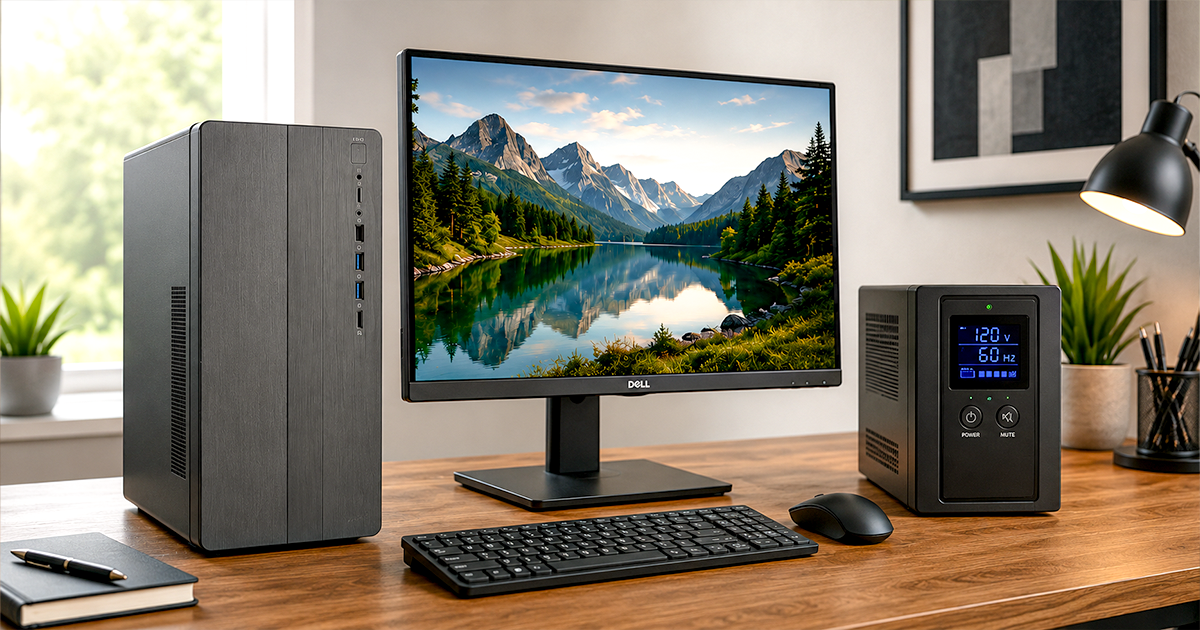
Best Desktop Computers of 2026
Five towers and all-in-ones we'd actually buy – for office work, creator rigs, tight budgets, and the Apple desktop.
If you want a full-size desktop in 2026 – a proper tower or a big all-in-one – this guide is for you. These are the machines with the performance, screen size, and upgrade room that mini PCs cannot match, and we focused on models you can actually buy new on Amazon right now. We narrowed the field to five winners across towers and all-in-ones, for every budget and workload.
Towers still give you the most power per dollar and the freedom to add memory, storage, or a graphics card down the road. All-in-ones fold a large, sharp screen and the whole computer into one tidy unit. Whether you need a workhorse for the office, a creator rig with a real GPU, or a clean all-in-one for the home, there is a pick here for you. This guide is built around work, productivity, and creative use. And since the processor is the heart of any build, see our Intel vs AMD vs Apple M5 guide to pick the right chip for gaming, video, productivity, or budget.
Already sorting out the rest of your setup? Pair any desktop here with our picks in the Best Home Office Monitors for 2026 and Best Home Office Printers for 2026 guides – and if you also need a portable machine, see the Best Business Laptops for 2026. Want something smaller? See our Best Mini PCs for 2026. And give your tower a cleaner desk by floating the display on one of our best monitor arms and mounts.
QUICK PICKS – BEST DESKTOP COMPUTERS 2026
- Best overall and best for business: Dell Tower ECT1250 – Core Ultra 7-265, 1TB SSD, Win 11 Pro
- Best for power & creators: Alienware Aurora – GeForce RTX 5070 graphics
- Best value gaming: CyberPowerPC Gamer Master – GeForce RTX 5060 Ti for far less
- Best all-in-one: Dell 27-inch All-in-One – 27-inch screen, Wi-Fi 6E
- Best Mac: Apple iMac M4 24-inch – 24-inch 4.5K Retina display
Which is the best desktop computer for you?
| If you are… | Get this | Form factor |
|---|---|---|
| Buying one current full-size tower with room to grow | Dell Tower ECT1250 | Tower |
| Editing video, creating, or gaming | Alienware Aurora | Tower |
| Wanting a real graphics card without flagship pricing | CyberPowerPC Gamer Master | Tower |
| Wanting a clean all-in-one with a big screen | Dell 27-inch All-in-One | All-in-one |
| In the Apple ecosystem and want a great screen | Apple iMac M4 24-inch | All-in-one |
All five best desktop computers compared
Star ratings reflect our editorial assessment for work, productivity, and creative use. Prices change often, so tap through to Amazon to confirm the current price and configuration before you buy.
| # | Photo | Desktop | Key specs | Our rating | Price |
|---|---|---|---|---|---|
| 1 |  | Dell Tower ECT1250Best Overall & Business | Tower · Core Ultra 7-265 · 16GB DDR5 · 1TB SSD · Win 11 Pro | ★★★★★ | Check price ↗ |
| 2 |  | Alienware AuroraPower & Creators | Tower · Core Ultra 7 265F · RTX 5070 · 32GB DDR5 · 1TB SSD | ★★★★★ | Check price ↗ |
| 3 |  | CyberPowerPC Gamer MasterBest Value Gaming | Tower · Ryzen 7 8700F · RTX 5060 Ti 8GB · 16GB DDR5 · 1TB SSD | ★★★★★ | Check price ↗ |
| 4 |  | Dell 27-inch All-in-OneBest All-in-One | All-in-one · 27-inch FHD · Core 5 120U · 16GB DDR5 · 512GB SSD | ★★★★★ | Check price ↗ |
| 5 |  | Apple iMac M4 24-inchBest Mac | All-in-one · 24-inch 4.5K · Apple M4 · 16GB · 256GB · macOS | ★★★★★ | Check price ↗ |
Best desktop computers of 2026 – full reviews
1. Dell Tower ECT1250 – Best Overall and Best for Business
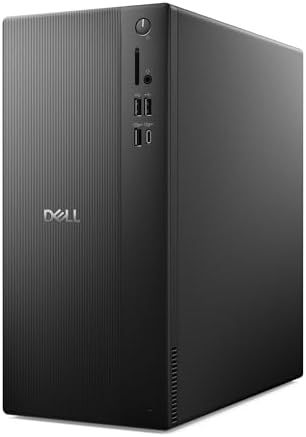
- Speed up your tasks with AI: Unlock new levels of productivity and creativity by upgrading to Intel Core Ultra processor…
- Supports multiple monitors: Connect up to four FHD monitors using DisplayPort and Daisy Chaining*. Or connect two 4K dis…
- Effortless upgrades: The tool-less entry and removable side panel let you quickly access the internal components, making…
Who should buy it: most people who want the best desktop computer they can buy once and still use in five years – a Core Ultra 7, a full terabyte of NVMe storage and Windows 11 Pro, in a case you can open and upgrade. Who should skip it: anyone who needs a discrete graphics card for gaming or heavy creative work – see the Alienware and CyberPowerPC below.
Key strengths: Intel Core Ultra 7-265, 16GB DDR5, a 1TB PCIe NVMe SSD, Wi-Fi 6 and gigabit Ethernet, and Windows 11 Pro rather than Home. Key weaknesses: Integrated Intel graphics only, and no monitor in the box.
✓ Pros
- Core Ultra 7-265, the strongest CPU on this list outside the gaming towers
- Full 1TB NVMe SSD, double the usual 512GB
- Windows 11 Pro, so BitLocker and Remote Desktop are included
- Wired gigabit Ethernet alongside Wi-Fi 6
- Standard tower you can open and upgrade
✗ Cons
- Integrated graphics, no discrete GPU
- No monitor included
- Plain, functional styling
2. Alienware Aurora – Best for Power & Creators

- Legend perfected: Modern design with a matte basalt black finish in an optimized chassis with customizable AlienFX light…
- Game changing graphics: Step into the future of gaming and creation with the NVIDIA GeForce RTX 5070 graphics, powered b…
- Marathon gaming unlocked: This high-performance technology ensures clean energy is consistently available, unleashing th…
Who should buy it: creators, video editors, and anyone who needs real graphics power for demanding work or gaming. Who should skip it: light office users who do not need a graphics card, and anyone who wants the most storage per dollar.
Key strengths: A dedicated GeForce RTX 5070 on NVIDIA Blackwell architecture, an Intel Core Ultra 7 265F, 32GB DDR5, a 1TB SSD, Wi-Fi 7 and a year of Dell onsite service. Key weaknesses: Overkill for basic office work, a larger footprint, and 1TB of storage where some rivals fit 2TB.
✓ Pros
- Dedicated GeForce RTX 5070 graphics on NVIDIA Blackwell architecture
- Intel Core Ultra 7 265F processor
- 32GB DDR5 and a 1TB SSD
- Wi-Fi 7 and Killer 2.5Gb Ethernet
- One year of Dell onsite service included
✗ Cons
- More power than light office work needs
- Larger than an all-in-one
- No monitor included
- 1TB of storage, where some rivals at this price fit 2TB
3. CyberPowerPC Gamer Master – Best Value Gaming PC
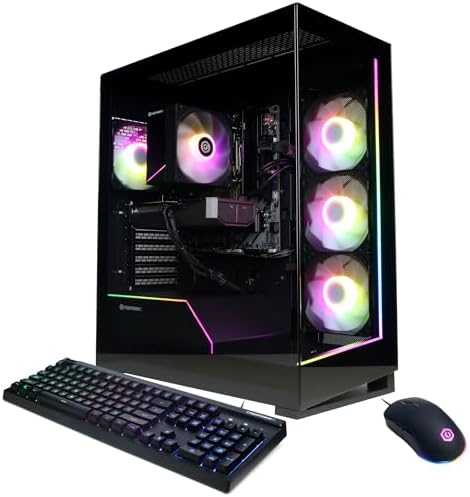
- System: AMD Ryzen 7 8700F 4.1GHz 8 Cores | AMD B850 Chipset | 16GB DDR5 | 1TB PCIe 4.0 NVMe SSD | Windows 11 Home
- Graphics: NVIDIA GeForce RTX 5060 Ti 8GB Graphics | 1x HDMI | 2x DisplayPort
- Connectivity: 2 x USB-C 3.2 | 4 x USB-A 3.2 | 2 x USB-A 2.0 | 1 x LAN | WiFi 6 | Bluetooth 5.3 | 7.1 Channel Audio
Who should buy it: anyone who wants a real graphics card without paying flagship money – it plays modern games at 1080p and 1440p and doubles as a capable video-editing machine. Who should skip it: people doing purely office work, who are paying for a GPU they will never use, and anyone chasing top-tier frame rates – the Alienware above is the faster machine.
Key strengths: AMD Ryzen 7 8700F with a GeForce RTX 5060 Ti 8GB GPU, 16GB DDR5 and a 1TB PCIe 4.0 NVMe SSD, Wi-Fi ready out of the box. Key weaknesses: Only 16GB of memory for a gaming build, and 8GB of video memory on the RTX 5060 Ti.
✓ Pros
- Discrete GeForce RTX 5060 Ti with 8GB of video memory
- Ryzen 7 8700F, eight cores
- 1TB PCIe 4.0 NVMe SSD as standard
- Five hundred less than the Alienware
- Wi-Fi ready out of the box
✗ Cons
- 8GB of video memory on the RTX 5060 Ti
- 16GB of RAM is the floor for a gaming machine
- No monitor included
4. Dell 27-inch All-in-One – Best All-in-One

- Immersive visuals: The FHD IPS display features 99% sRGB and 50% higher contrast* within a narrow border so you can enjo…
- Eye comfort: Keep your eyes comfortable during long screen sessions with Dell ComfortView Plus, designed to reduce harmf…
- Keep your area clutter-free with an innovative stand that provides the perfect space to house your keyboard underneath t…
Who should buy it: anyone who wants one object on the desk instead of a tower, a monitor and a nest of cables – it is the cleanest setup here and it arrives ready to use. Who should skip it: anyone who expects to upgrade parts later, or who needs serious graphics power.
Key strengths: A 27-inch FHD screen, Intel Core 5 120U, 16GB DDR5, a 512GB SSD and Wi-Fi 6E, with keyboard and mouse included. Key weaknesses: All-in-ones are effectively sealed – what you buy is what you keep – and the panel is FHD rather than higher resolution.
✓ Pros
- 27-inch screen and computer in one unit
- 16GB DDR5 and a 512GB SSD
- Wi-Fi 6E, the newest wireless standard here
- Keyboard and mouse included
- No cable clutter
✗ Cons
- FHD resolution across 27 inches
- Essentially no upgrade path
- Integrated graphics only
5. Apple iMac M4 24-inch – Best Mac Desktop

- BRILLLLLLIANT — iMac is the ultimate all-in-one desktop computer, powered by the M4 chip and built for Apple Intelligenc…
- FITS PERFECTLY IN YOUR SPACE — The all-in-one desktop design is strikingly thin, comes in seven vibrant colors, and elev…
- BUILT FOR APPLE INTELLIGENCE — Apple Intelligence is the personal intelligence system that helps you write, express your…
Who should buy it: anyone who wants macOS on a desk, or who already lives in the Apple ecosystem – the 24-inch Retina panel is the best screen on this page by a wide margin. Who should skip it: anyone who needs Windows-only software, or who stores large files locally – 256GB fills fast and cannot be changed later.
Key strengths: Apple M4 with an 8-core CPU and 8-core GPU, 16GB of unified memory, a 24-inch 4.5K Retina display, and near-silent operation. Key weaknesses: A 256GB SSD, and unified memory that is fixed at purchase.
✓ Pros
- 4.5K Retina display, far sharper than any FHD panel here
- M4 silicon, fast and close to silent
- 16GB unified memory as standard
- 709 owner ratings, the deepest track record on this list
- Sold and shipped by Amazon
✗ Cons
- 256GB of storage, and it cannot be upgraded
- Memory is fixed at purchase
- macOS will not run Windows-only business software
How to choose the best desktop computer in 2026
A few things matter more than raw specs when you are choosing the best desktop computer for work. Here is how to choose.
Tower or all-in-one
Full-size towers give you the most performance per dollar and the most room to upgrade memory, storage, and graphics. All-in-ones build the computer into a large screen for the cleanest desk and a great display in a single purchase. Small-form-factor desktops sit in between – compact but still a real desktop. Pick the shape that fits your space and your upgrade plans.
Processor and graphics
For 2026, a current mid-range chip – Intel Core Ultra 5, Core i7, or Apple M4 – is the sweet spot for productivity. You only need a discrete graphics card like a GeForce RTX for video editing, 3D, or gaming; for office work, integrated graphics are fine. AI PC chips add an NPU that accelerates Copilot+ and on-device AI For the plain-English version, see What is an NPU? AI PCs explained..
Memory and storage
Get 16GB of RAM. It is the realistic floor for a machine you will keep a few years, and it is what every pick here includes. For storage, a 512GB SSD suits most people; choose 1TB if you keep lots of local files, photos, or video. A tower lets you add more drives later.
Screen and ports
All-in-ones include the display, so check the size and whether it is a touchscreen. Towers need a separate monitor, which lets you choose your own. Either way, confirm the machine has enough USB ports, the video outputs your monitors need, and modern Wi-Fi.
Windows or macOS
Choose Windows 11 (Pro if you need business management and security) for the widest software and hardware compatibility. Choose macOS if you are in the Apple ecosystem or want the quiet efficiency of Apple silicon. Both handle Microsoft 365, Zoom, Slack, and the web equally well.
Budget
A capable full-size tower with 16GB and an SSD starts around the price of our budget pick. Spend more for a faster chip, a discrete GPU, a premium all-in-one screen, or extra storage – not for things you will not use.
Frequently asked questions
Tower or all-in-one – which should I buy?
Choose a tower if you want the most performance per dollar and the ability to upgrade later. Choose an all-in-one if you want a clean desk and a great screen built in. Both handle office and home work easily; only creative and gaming workloads really push you toward a tower with a graphics card.
Do I need a graphics card?
Only for demanding work. Video editing, 3D, AI workloads, and gaming benefit from a discrete GPU like a GeForce RTX. For documents, email, browsing, and video calls, the integrated graphics in every pick here are plenty.
How much RAM do I need?
16GB is the right baseline for a desktop you will keep for years. 8GB feels tight quickly in 2026; 32GB or more helps for heavy multitasking, large media projects, or demanding creative work.
Mac or Windows for business?
Windows 11 Pro is the safe choice for compatibility and IT management. macOS is excellent if you are in the Apple ecosystem and do not rely on Windows-only software. Everyday business apps run well on both.
Do these desktops come with a monitor?
The all-in-ones (the Dell 27 and the iMac) include the screen. The towers do not, which lets you choose your own monitor and reuse what you have. Most towers here include a keyboard and mouse.
Do I need a battery backup for a desktop?
It is worth considering. Unlike a laptop, a desktop has no internal battery, so a power cut shuts it off instantly – unsaved work is gone, and an outage during a disk write can corrupt files. A small UPS (uninterruptible power supply) sits between the wall and your tower and gives you a few minutes to save and shut down properly. Our UPS battery backup guide covers sizing and what to buy.
How we select products
We research current desktops across every major form factor and brand, and prioritize models that are genuinely in stock as new listings on Amazon so the links you click lead to the product you read about. We focus on the needs of real buyers – home offices, remote workers, small businesses, creators, and IT teams. We do not accept payment for placement; we may earn a commission when you buy through our Amazon links, at no extra cost to you.
Related SmartTechBuying guides
- Best All-in-One Desktops for 2026
- Desktop PC vs All-in-One: Which Is Better?
- Best Mini PCs for 2026
- Best Business Laptops for 2026
- Best Home Office Monitors for 2026
- Best Home Office Printers for 2026
- Best UPS Battery Backup for 2026
Coming soon: our Best Home Office Setups of 2026 guide.
Why You Can Trust Smart Tech Buying
Every recommendation is based on extensive product research, manufacturer specifications, customer feedback, long-term reliability, value, and suitability for real-world use. When we have personal experience with a product, we include those insights. We regularly review our guides to keep recommendations current as new products are released.