

The best AI PC for most people is not the one with the biggest number on the box — it is the one that actually meets Microsoft’s Copilot+ standard. We checked every pick on its own Amazon page so you are not sent to a mislabeled listing.
The best AI PC for most people in 2026 is not the one with the biggest number on the box. It is the one that actually meets Microsoft’s Copilot+ specification — and a startling number of laptops sold as “AI PCs” on Amazon right now do not meet it at all. Some do not even contain a neural processing unit.
We checked. Sorting Amazon’s own search results for “Copilot+ PC” by best sellers, only three of the top ten were genuine Copilot+ machines. The other seven were ordinary budget laptops with an AI sticker on the listing — several of them shipping with 4GB of memory and a 64GB or 128GB drive, at prices between $270 and $500. One carried the phrase “Microsoft Copilot Key” in its title and ran a processor with no NPU whatsoever.
This guide fixes that. Below are six machines that genuinely qualify, every one verified on its own Amazon product page rather than from a search card, plus the exact test you can run yourself in about ten seconds to tell a real AI PC from a sticker.
Best AI PCs 2026: The 30-Second Answer
If you want the short version:
- Best overall — Microsoft Surface Laptop (2024), around $1,139.00. Sold and shipped by Amazon, Snapdragon X Plus, 16GB, 512GB, a 13.8-inch touchscreen, and the highest customer review count of any Copilot+ laptop we found.
- Best value — Acer Aspire 14 AI (Core Ultra 5 226V), around $668.99. Currently shipped by a marketplace seller rather than by Amazon, 40 TOPS, 16GB, 512GB — the cheapest clean Copilot+ listing we could find.
- Best premium 2-in-1 — Microsoft Surface Pro (2026), around $1,600. Snapdragon X2 Plus, 512GB, sold and shipped by Amazon — new enough that reviews are still coming in.
- Best desktop — HP OmniStudio 27 All-in-One, around $1,310. Ryzen AI 7, 50 TOPS, Amazon-sold — the cleanest Copilot+ all-in-one listing.
- Best mini PC — GEEKOM A9 Max, around $1,300. Ryzen AI 9 HX 370, 50 TOPS, 32GB — a true compact Copilot+ desktop with 500+ reviews.
And the honest caveat, which we will spend most of this guide earning: most people reading this do not need an AI PC yet. If your current laptop works, the NPU is not a reason to replace it. It is a reason to make sure your next laptop has one.
NPU throughput · the Copilot+ threshold
Where the 40-TOPS line falls
Only silicon that clears 40 TOPS on its NPU can qualify as a Copilot+ PC. Here is how the main processor families stack up against the line.
Relative and directional, not lab benchmarks. TOPS figures are manufacturer-stated NPU throughput and are useful for classification, not for predicting real-world speed.
The 6 best AI PCs at a glance

| NPU | Copilot+ certified |
| RAM | 16GB |
| Storage | 512GB |
| Screen | 13.8in touch |
| Chip | Snapdragon X Plus |

| NPU | 40 TOPS |
| RAM | 16GB |
| Storage | 512GB |
| Screen | 14in WUXGA |
| Chip | Core Ultra 5 226V |

| NPU | 45 TOPS |
| RAM | 16GB |
| Storage | 512GB |
| Screen | 13in touch |
| Chip | Snapdragon X2 Plus |

| NPU | 50 TOPS |
| RAM | 16GB |
| Storage | 512GB |
| Screen | 27in AiO |
| Seller | Amazon, Prime |

| NPU | 50 TOPS |
| RAM | 32GB |
| Storage | 1TB |
| Chip | Ryzen AI 9 HX 370 |
| Seller | GEEKOM US Store, ships from Amazon |
What Actually Makes a PC an “AI PC”
“AI PC” is a marketing term with no legal definition. Anyone can print it on a box. “Copilot+ PC” is different — it is a Microsoft certification with published hardware minimums, and a machine either meets them or it does not.
Straight from Microsoft’s Windows 11 specifications page, a Copilot+ PC requires:
Three things about that table matter more than they look.
First, the memory requirement is a requirement. A machine with a qualifying chip but 8GB of RAM is not a Copilot+ PC. We found several all-in-ones on Amazon at around $980 built on Ryzen AI silicon with 8GB fitted — they carry the right processor family and still fall outside the specification.
Second, the processor family is the tell, not the processor name. “Ryzen AI 7 445” qualifies. “Ryzen 5 220” does not, despite sitting one letter away in a product listing. The words “Ryzen AI” are the marker; plain “Ryzen” is not. The same trap exists on the Intel side, and it is worse, which brings us to the third point.
Third, “Core Ultra” alone means nothing. Intel’s Core Ultra 200V series clears 40 TOPS comfortably. Intel’s Core Ultra 200H, 200U and 200S chips — the 225H, 255H, 255U, 235T, 285K and their siblings — carry NPUs in the region of 11 to 13 TOPS. They are perfectly good processors. They are not Copilot+ processors, and no firmware update will make them so. If you want the deeper explanation of why an NPU is a separate piece of silicon rather than a faster CPU, we wrote a full breakdown in what is an NPU, and do you actually need one.
The Number on the Box Is Often the Wrong Number
There is a second trap sitting on top of the first, and it catches careful shoppers rather than careless ones.
Several listings — particularly mini PCs built on the Ryzen AI 9 HX 370 — advertise “80 TOPS” in the product title. That figure is real, but it is the combined throughput of the CPU, GPU and NPU together. The NPU on its own is 50 TOPS. Microsoft’s certification counts the NPU alone.
The practical consequence: a reader comparing an “80 TOPS” machine against a “48 TOPS” machine is not comparing like with like, and the 80 is not twice as capable at the AI features Windows actually offloads to the NPU. Whenever a spec sheet quotes a TOPS number, check whether it says NPU next to it. If it does not, treat it as a platform total and look for the NPU figure separately.
What a Copilot+ PC Actually Does That Your Current Laptop Cannot
It is worth being concrete here, because “AI features” is doing a lot of vague work in most coverage of this category. The NPU is not making Windows smarter in the abstract. It is running a specific and currently fairly short list of jobs on the machine itself instead of sending them to a server.
The features Microsoft ties to the 40-TOPS requirement include Recall, which builds a searchable timeline of what you have had on screen; Click to Do, which lets you act on text and images anywhere in the interface; Cocreator, which generates and edits images inside Paint and Photos; Live Captions with translation, which captions and translates any audio playing on the machine in real time; and Windows Studio Effects, which handles background blur, eye contact correction and automatic framing on video calls at the system level rather than inside one app.
Three things follow from that list, and they are the practical case for and against the whole category.
The value is concentrated in a few jobs. If you are on video calls all day, Studio Effects running system-wide — so it works identically in Teams, Zoom, Meet and anything else — is a genuine daily improvement over per-application background blur. If you work across languages, live translation of any audio on the machine is a real capability that previously needed a subscription service. If you do neither, the honest answer is that you may go weeks without touching an NPU feature.
Running locally is the actual point. These features work with no internet connection, no per-seat subscription and no audio or video leaving the machine. For anyone handling confidential calls or working under data-handling rules, that is not a convenience feature — it is the difference between being allowed to use it and not.
The list is still growing, and that cuts both ways. Several of these features shipped in preview and expanded over time, and some rolled out on different schedules in different regions. Buying an NPU today is a bet that the list gets longer, and so far it has. But it is a bet, and anyone telling you the NPU is already essential is overselling a feature set you can read in full in a couple of minutes.
How We Chose These Six
Every machine below had to clear four bars, and the fourth is the one that eliminated most of the field.
- It meets the published Copilot+ specification. 40+ TOPS on the NPU, at least 16GB of memory, at least 256GB of storage.
- It has a real customer review history. We do not headline products with no ratings. A perfect score on two reviews is not evidence.
- It rates 4.0 stars or better, or it does not appear.
- The listing is the manufacturer’s own. This is where the category falls apart, and it deserves its own section.
Why the fourth bar removed so many machines
A large share of AI PC listings on Amazon are not posted by the manufacturer. They are posted by resellers who buy stock, sometimes reconfigure the memory or drive, and list the result under their own brand name. You can spot them because the listing’s Brand field is a company you have never heard of, and the title carries bundle language — an extra hub, a mouse and keyboard, a “customized” configuration.
These are not necessarily scams. Many ship exactly what they promise. But they carry three real disadvantages for a buyer: no manufacturer warranty relationship, a thin or non-existent review history because the listing is new, and a specification that may differ from anything the manufacturer ever shipped.
One example makes the point. We looked hard at an HP 24-inch Copilot+ all-in-one at around $1,090 — correct silicon, 50 TOPS, 16GB, 1TB, Prime delivery, everything right on paper. Its listing brand was not HP. It was the reseller’s own trading name, and the product had zero customer reviews. It is not in this guide for that reason alone.
A manufacturer listing where the buy box happens to be held by a third-party seller is a different and much smaller problem — the product is genuine and the listing is the brand’s own; only the current best offer belongs to a marketplace seller. Two of our picks are in exactly that position, and we say so in each case.
The Picks
Best overall: Microsoft Surface Laptop (2024)
This is the machine we would buy with our own money, and the reason is not the specification — it is that everything around the specification is clean. It is sold and shipped by Amazon rather than a marketplace seller, it carries free 30-day returns, and it has accumulated close to 350 customer ratings at 4.4 stars, which is the largest genuine review base of any Copilot+ laptop we found.
The hardware is a Snapdragon X Plus (10-core) with a Copilot+ certified NPU, 16GB of memory, a 512GB SSD and a 13.8-inch touchscreen. It is the most complete Copilot+ package here: a proper metal chassis, the touch display the cheaper machines skip, and the battery life Snapdragon laptops are known for.
Being an Arm-based machine, sanity-check that any niche software you depend on runs on Windows on Arm before you commit. Mainstream applications are fine; specialized professional tools sometimes are not.
Expect to pay around $1,139.00. See the card for the live price.
- [This is a Copilot+ PC] — A new AI era begins. Experience enhanced performance and AI capabilities with Copilot+ PC, boo…
- [Introducing Surface Laptop] — Power, speed, and touchscreen versatility with AI features. Transform your work, play, an…
- [Exceptional Performance] — Surface Laptop delivers faster performance than the MacBook Air M3[1], with blazing NPU spee…
Best value: Acer Aspire 14 AI (Core Ultra 5 226V)
The Acer Aspire 14 AI is the cheapest genuine Copilot+ machine we are comfortable recommending, and it earns its place on review volume as much as on price — more than two hundred ratings at 4.4 stars, which for this category is a lot. It is sold and shipped by Amazon.
The hardware is an Intel Core Ultra 5 226V with a 40-TOPS NPU, 16GB of LPDDR5X, a 512GB SSD, a 14-inch WUXGA display and Wi-Fi 6E. It sits exactly on the Copilot+ line rather than comfortably above it, and that is worth being honest about: 40 TOPS is the minimum, not a cushion. In practice the certified feature set is identical either way — Windows either offloads a task to the NPU or it does not.
See the card for the live price. It is several hundred less than anything else here that clears the Copilot+ bar.

- It’s possible on your Intel AI PC – Equipped with an Intel Core Ultra 5 processor (Series 2), the Aspire 14 Al brings ne…
- New AI Superpowers – Discover the power of Recall (preview), improved Windows search, and Click to Do (preview) on Copil…
- Indulge Your Eyes – Immerse yourself in a world of vibrant detail with a breathtaking 14″ WUXGA 1920 x 1200 ultra high-r…
Delivery note: this one currently ships from a marketplace seller rather than from Amazon. The listing is genuine and the price is live, but delivery and returns run through that seller rather than through Amazon. Checked August 31, 2026.
Best premium 2-in-1: Microsoft Surface Pro (2026)
If you want the tablet-and-keyboard format, the current Surface Pro is the pick — and the reason it is the 2026 model rather than the well-reviewed 2024 comes down to buyability. The 2024 Surface, at the time of writing, was down to its last couple of units from a third-party seller with no Prime shipping, which is exactly the kind of listing we do not want to send you to.
The 2026 model fixes that. It runs the newer Snapdragon X2 Plus, 16GB of memory and a 512GB drive — double the 2024’s storage — on the same 13-inch-class touchscreen, and crucially it is sold and shipped by Amazon with deep stock, at around $1,600.
The one honest caveat, and we hold ourselves to it: it is new enough that customer reviews are still coming in. Microsoft’s Surface Pro line has a long, well-documented track record, so this is a low-risk unknown rather than a mystery-brand gamble — but if a deep review history is what you weigh most heavily, that is the trade you make for a reliable, in-stock listing.
- A PREMIUM PERFORMANCE 2-IN-1 LAPTOP & TABLET — Ready for work, school, and creativity. Built for busy days, big projects…
- WITH AI BUILT IN — With a dedicated AI chip (Qualcomm Snapdragon X2 Plus), this Copilot+ PC[5] on Windows 11 helps you w…
- A STUNNING 13″ OLED TOUCHSCREEN — Sharp colors, real detail, and smooth 120Hz scrolling on the PixelSense touchscreen[1]…
Best desktop: HP OmniStudio 27 All-in-One
The desktop half of this category is remarkably thin, and it is worth explaining why rather than pretending we found a shortlist.
Every processor family that qualifies for Copilot+ is mobile silicon. Desktop processors — including Intel’s flagship Core Ultra 200S parts — carry NPUs in the 11-to-13-TOPS range and do not qualify. So a Copilot+ “desktop” is, almost by definition, an all-in-one or a mini PC running laptop chips. When we filtered Amazon to items it sells directly and looked at every Copilot+ all-in-one on offer, exactly one all-in-one cleared all four of our bars — and, as it turned out, one mini PC did too, which we come to right after it.
That machine is the HP OmniStudio 27. It runs an AMD Ryzen AI 7 445 with a 50-TOPS NPU — the most NPU headroom of anything in this guide — with 16GB of memory, a 512GB SSD and Radeon 840M graphics behind a 27-inch display. It is branded HP, sold and shipped by Amazon, in stock in quantity, with free 30-day returns, and it holds a 4.7-star average. It has been listed around $1,310.
The one soft spot is review count: solid, but modest — a couple of dozen ratings rather than a couple of hundred. That is enough for us to recommend it and not enough for us to call it proven. If you want a conventional tower instead, you are currently choosing between non-Copilot+ machines, and our best desktop computers guide and all-in-one guide cover that ground properly.
- STUNNING VISUALS – Enjoy more space to create and the comfort to keep going; The 27-inch display delivers sharp, vivid v…
- MASTER THE ART OF MULTITASKING – Where performance elevates everyday experiences, the AMD Ryzen AI 7 445 processor provi…
- DESIGNED FOR BOTH WORK AND PLAY – Built in AMD Radeon 840M graphics deliver sharp visuals and top-tier gaming experience…
Best mini PC: GEEKOM A9 Max
Here is the part most AI PC coverage misses: the “AI desktop towers” sold on Amazon are a mirage. Every Copilot+ tower we found — Dell and HP boxes labeled “Copilot AI” or “AI-Ready” — runs a 13th- or 14th-generation Core i3 or a Core Ultra 200S chip, and none of them clears the 40-TOPS bar. It is the same sticker trick as the laptops, in a bigger case. The genuine Copilot+ desktops are mini PCs, and the GEEKOM A9 Max is the standout.
It runs an AMD Ryzen AI 9 HX 370 with a 50-TOPS NPU, 32GB of memory and a 1TB drive in a chassis smaller than a paperback, with Wi-Fi 7 and USB4. Its listing advertises “80 TOPS” — that is the platform total we flagged earlier; the NPU alone is 50, which is what Copilot+ counts, and it clears the bar comfortably. It is sold by the official GEEKOM store and shipped by Amazon with free returns, and it has by far the deepest review history of anything in this guide: more than 650 ratings at 4.3 stars. At around $1,300 it costs about the same as the all-in-one above and gives you more memory — you just bring your own monitor, keyboard and mouse.
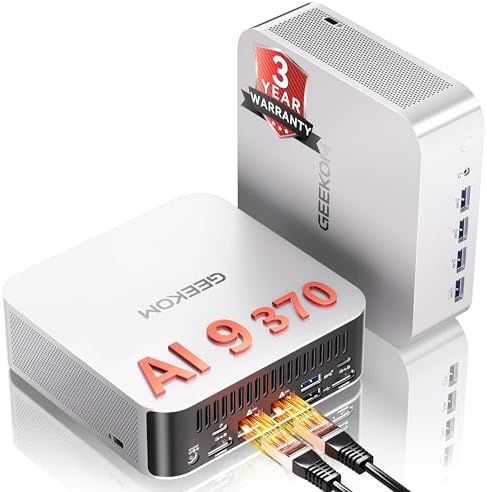
- 𝗗𝗲𝘀𝗸𝘁𝗼𝗽-𝗖𝗹𝗮𝘀𝘀 𝗔𝗜 𝗣𝗼𝘄𝗲𝗿 𝗳𝗼𝗿 𝗡𝗲𝘅𝘁-𝗚𝗲𝗻 𝗪𝗼𝗿𝗸𝗳𝗹𝗼𝘄𝘀 – Powered by AMD Ryzen AI 9 HX 370 with up to 80 TOPS AI performance and a…
- 𝗔𝗔𝗔 𝗚𝗮𝗺𝗶𝗻𝗴 & 𝗣𝗿𝗼 𝗖𝗿𝗲𝗮𝘁𝗶𝘃𝗲 𝗣𝗼𝘄𝗲𝗿 – Featuring a 12-core, 24-thread Zen 5 processor and Radeon 890M Graphics with 16 RDNA 3…
- 𝗔𝗱𝘃𝗮𝗻𝗰𝗲𝗱 𝗗𝗮𝘁𝗮 𝗦𝗰𝗶𝗲𝗻𝗰𝗲, 𝗗𝗲𝘃𝗲𝗹𝗼𝗽𝗺𝗲𝗻𝘁 & 𝗟𝗮𝗯-𝗧𝗲𝘀𝘁𝗲𝗱 𝗥𝗲𝗹𝗶𝗮𝗯𝗶𝗹𝗶𝘁𝘆 – Built for software development, virtualization, data analy…
For AI developers: NVIDIA DGX Spark
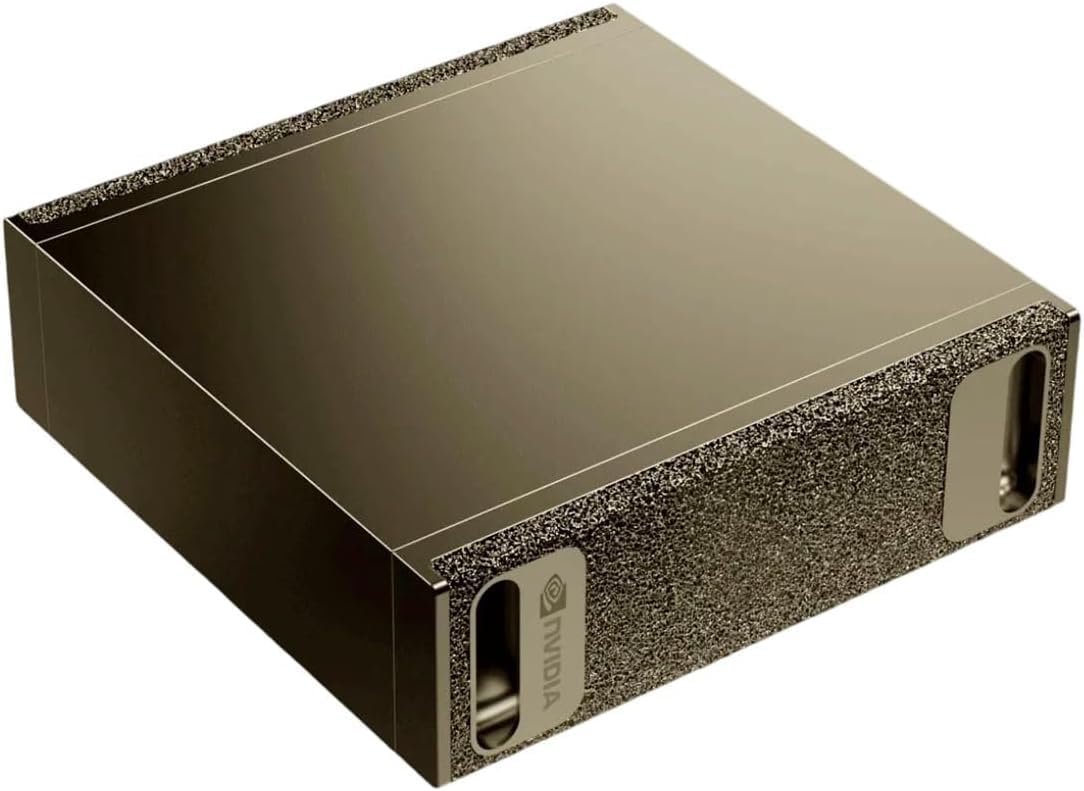
One machine earns a spot here precisely because it is not a Copilot+ PC — and buyers keep confusing the two. NVIDIA’s DGX Spark (around $5,000) is sold as a “Personal AI Desktop Supercomputer,” and that is exactly what it is: it runs NVIDIA DGX OS, which is Linux (Ubuntu), not Windows, so it will not run a single Copilot+ feature. It is a specialist tool for AI developers who prototype, fine-tune and run large language models — up to 200 billion parameters — locally on NVIDIA’s GB10 Grace Blackwell chip and CUDA stack. If you want a computer for everyday work, this is emphatically not it. But if you are a developer who wants a real local-AI supercomputer on your desk, it is Amazon’s Choice in the category with strong reviews, and this is the one to look at.
The Six Compared
| Machine | Silicon / NPU | RAM / Storage | Screen |
|---|---|---|---|
| Surface Laptop (2024) Best overall | Snapdragon X Plus Copilot+ certified | 16GB / 512GB | 13.8″ touch |
| Acer Aspire 14 AI Best value | Core Ultra 5 226V 40 TOPS | 16GB / 512GB | 14″ WUXGA |
| Surface Pro (2026) Best 2-in-1 | Snapdragon X2 Plus 45 TOPS | 16GB / 512GB | 13″ touch |
| HP OmniStudio 27 Best desktop | Ryzen AI 7 445 50 TOPS | 16GB / 512GB | 27″ FHD |
| GEEKOM A9 Max Best mini PC | Ryzen AI 9 HX 370 50 TOPS | 32GB / 1TB | Mini (BYO monitor) |
Specifications are manufacturer-stated. Live pricing appears in the product cards above and in the price table below, both drawn from the product database rather than typed into this page.
Laptop or Desktop for AI Work?
For once this is an easy question, because the hardware decides it for you.
If you want a Copilot+ machine, you are buying mobile silicon whether or not it sits in a laptop. The all-in-one in this guide runs the same class of chip as the laptops. So the decision is not about AI capability at all — it comes down to screen size, whether you need to carry it, and how you feel about a machine you cannot easily upgrade.
Where a desktop still wins outright is raw processing for work that does not touch the NPU: video rendering, large compiles, heavy spreadsheets, gaming. A tower with a strong CPU and a discrete graphics card will beat every machine in this guide at those jobs while failing the Copilot+ test completely. If that is your workload, the NPU is a rounding error in your buying decision and our desktop versus laptop breakdown is the more useful page.
If you spend your day in meetings, documents and a browser, and you want live captions, on-device translation, better background blur and Windows Studio Effects without shipping audio and video to a server, the NPU is genuinely doing something for you — and a laptop is where it belongs. Our best business laptops guide covers the wider field including non-Copilot+ machines that may suit you better.
What About MacBooks?
This question comes up constantly and the answer is simpler than it looks: Copilot+ is a Windows certification, so no Mac is or can be a Copilot+ PC, regardless of how capable its hardware is.
Apple Silicon has carried a dedicated neural engine for years, and Apple runs its own on-device AI features across macOS. So a MacBook is not “a laptop without an NPU” — it is a laptop with a different NPU running a different feature set that Microsoft’s certification has no bearing on.
What that means practically is that the comparison is not about neural hardware at all. It is the same operating system decision people have always made: the applications you need, the ecosystem you are already in, and what your workplace supports. If you are weighing a Mac against the machines above, our MacBook Air buying guide covers that side properly, and our processor comparison takes the silicon question head-on.
The one thing not to do is treat a TOPS figure as a cross-platform score. The number is measured differently by different vendors, it is quoted inconsistently, and comparing an Apple figure to an Intel or Qualcomm figure tells you very little about how either machine performs at anything you would actually do.
What About AI Mini PCs?
Mini PCs are the other route to a Copilot+ desktop, and we looked at them seriously before leaving them out.
The hardware case is strong. Because the qualifying silicon is mobile, it drops naturally into a small chassis, and several mini PCs ship with Ryzen AI processors carrying 50-TOPS NPUs alongside generous memory and storage — often more of both than the laptops in this guide, at similar money.
The problem is trust, not hardware. The mini PC category on Amazon is dominated by brands with very short track records, and when we applied the same four bars used above, almost nothing survived. Machines we examined included one well-reviewed unit sitting at 3.3 stars — below our floor — and another with a respectable average built on a total of three customer reviews. The one option from a major manufacturer, an HP workstation-class mini running a Ryzen AI Max chip, had no customer reviews at all and listed at roughly $2,300, which is close to twice what our compact-desktop pick costs.
That is exactly why most mini PCs did not make our list — but one did, and it earned its place as our compact-desktop pick above: the GEEKOM A9 Max clears the review bar with several hundred ratings where the rest have a handful. If you want to explore the wider category, our mini PC guide covers it, including non-Copilot+ machines with longer track records.
Who Should Actually Buy One
We will end where the specification started, because this is the part most AI PC coverage skips.
Buy one if you are replacing a machine anyway. If your laptop is four or five years old and you are shopping regardless, there is no good reason to buy a new machine without an NPU in 2026. It costs little or nothing extra at most price points, and it is the difference between a laptop that can run the next few years of on-device Windows features and one that cannot.
Buy one if the specific features matter to your work. Live captions with translation, on-device transcription, and studio effects on every call are real, they run locally, and they do not need an internet connection or a subscription. If you are on video calls all day or working across languages, that is worth money.
Do not buy one to future-proof against something vague. The NPU accelerates a defined and currently fairly short list of tasks. It does not make Windows faster, it does not make games faster, and it does not make your existing software smarter. If your current machine is fine, this is not the year it becomes obsolete.
Do not buy one if your budget forces a compromise elsewhere. A well-specified conventional laptop at $600 will serve most people better than a Copilot+ machine at $600 with half the storage. The certification is a feature, not a substitute for the fundamentals.
How to Check a Listing Yourself in Ten Seconds
You do not need us for this. Before you buy anything advertised as an AI PC, run these four checks on the product page:
- Find the exact processor name. If it does not contain “Ryzen AI”, “Core Ultra 200V/300V”, or “Snapdragon X”, it is not a Copilot+ machine. “Copilot AI” or “Copilot key” in the title means nothing on its own.
- Check the memory. Under 16GB disqualifies it regardless of the chip.
- Check the Brand field in the product details, not the title. If it is a company name you do not recognize, you are looking at a reseller listing.
- Check the review count, not just the star rating. Five stars on two reviews tells you nothing.
Those four checks would have removed seven of the ten best-selling results for “Copilot+ PC” on Amazon on the day we wrote this.
Frequently Asked Questions
What is the minimum specification for a Copilot+ PC?
Microsoft requires a processor or SoC with an NPU capable of 40 or more TOPS, at least 16GB of DDR5 or LPDDR5 memory, and at least 256GB of SSD or UFS storage. Qualifying processor families are AMD Ryzen AI 300 and 400 series, Intel Core Ultra 200V and 300V series, and the Snapdragon X series.
Is an “AI PC” the same thing as a “Copilot+ PC”?
No. “AI PC” is a marketing phrase with no agreed definition and no minimum hardware behind it. “Copilot+ PC” is a Microsoft certification with published requirements. Many laptops sold as AI PCs do not meet the Copilot+ specification, and some contain no NPU at all.
Can I upgrade my existing laptop to a Copilot+ PC?
No. The NPU is built into the processor package, so it cannot be added later. Adding memory or storage to a machine with a non-qualifying chip will not make it eligible either.
Does a higher TOPS number mean a faster laptop?
Not in general use. TOPS measures NPU throughput on AI tasks only. It has no bearing on how quickly the machine opens applications, renders video or plays games, all of which depend on the CPU, GPU and storage. Above the 40-TOPS threshold, the certified Windows AI features behave the same way.
Why do some listings advertise 80 TOPS?
That figure usually combines the CPU, GPU and NPU. The NPU alone on those machines is typically 50 TOPS. Microsoft’s certification counts only the NPU, so check whether a quoted figure is labeled as an NPU number before comparing it against another machine.
Are Snapdragon-based Copilot+ laptops compatible with my software?
Mainstream applications, including Microsoft 365, major browsers and most productivity software, run well on Windows on Arm. Some specialized professional tools, older utilities and certain games still have compatibility gaps. If you depend on a niche application, check its Arm support before buying.
Are there Copilot+ desktop towers?
Effectively no. Every qualifying processor family is mobile silicon, and desktop processors carry much smaller NPUs. Copilot+ desktops in practice means all-in-ones and mini PCs built around laptop chips.
Is 8GB of RAM enough for an AI PC?
No — and a machine with 8GB is not a Copilot+ PC regardless of its processor, because 16GB is part of the specification. Several all-in-ones sold with Ryzen AI chips and 8GB of memory fall outside the certification for this reason.
Related buying guides
- What Is an NPU? AI PCs Explained
- Best Business Laptops 2026
- Best MacBook Air M5 for Business 2026
- Best Mini PCs 2026
- Best All-in-One Desktops 2026
- Intel vs AMD vs Apple M5: Which Processor for Which Task?
Smart Tech Buying participates in the Amazon Services LLC Associates Program. As an Amazon Associate we earn from qualifying purchases.
Why You Can Trust Smart Tech Buying
Every recommendation is based on extensive product research, manufacturer specifications, customer feedback, long-term reliability, value, and suitability for real-world use. When we have personal experience with a product, we include those insights. We regularly review our guides to keep recommendations current as new products are released.